

Introduction
The Imagga API is a set of image understanding and analysis technologies available as a web service that allows you to automate the process of analyzing, organizing and searching through large collections of unstructured images.
The services are hosted at our end and are available on a software-as-a-service (SaaS) basis which makes them very flexible, scalable (applicable to any size of image collection), and affordable. All you have to do to begin using them is to Sign Up and you can immediately start sending requests to our REST API.
Let's get started.
Getting Started
It's as simple as 1, 2, 3 to get started building with Imagga API.
1. Sign Up
First thing you should do in order to begin using Imagga API is go to our website, choose a subscription plan that fits your needs or go with the free one and sign up.
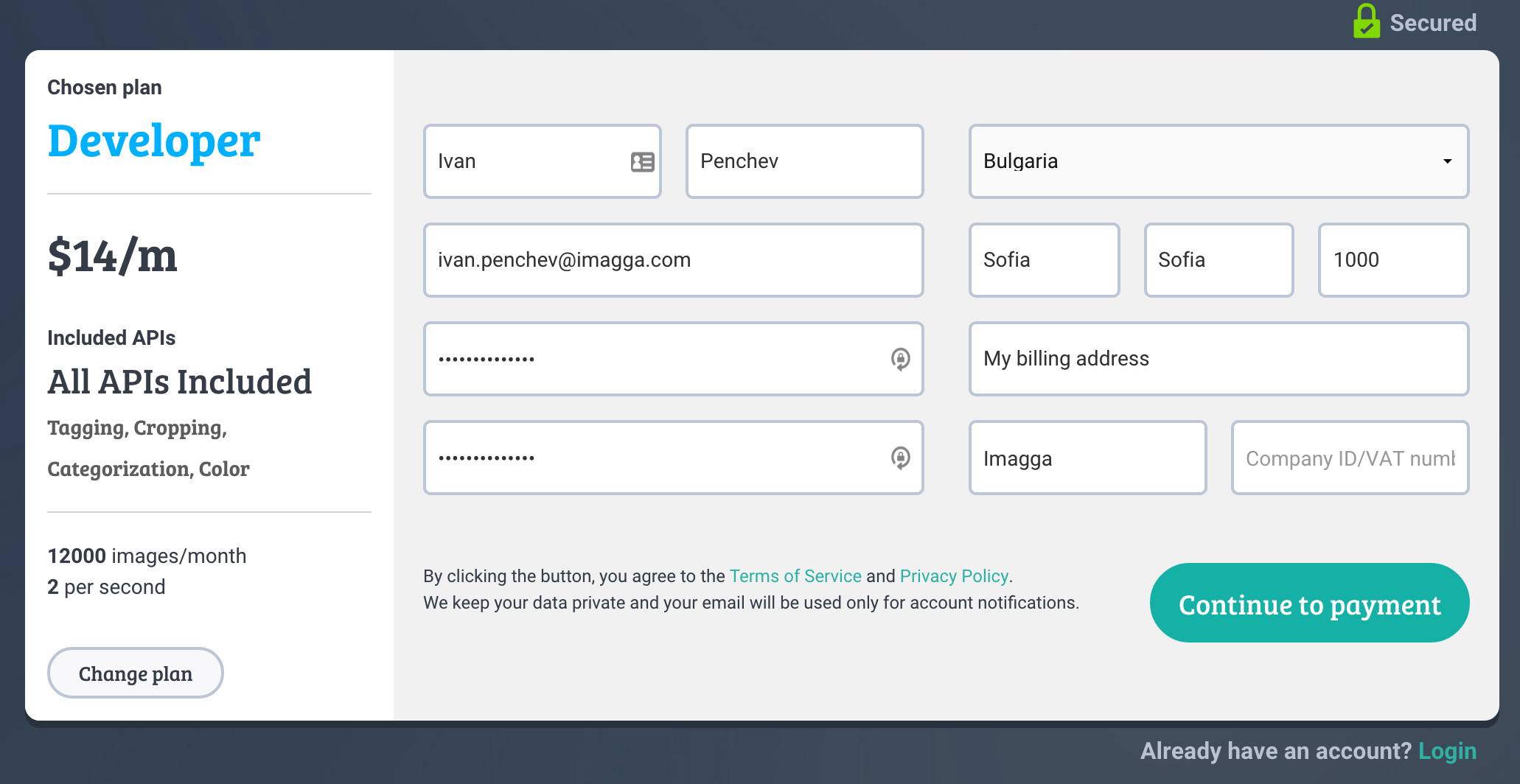
Upon a successful sign up, you will be presented with your profile dashboard page where the api credentials could be found:
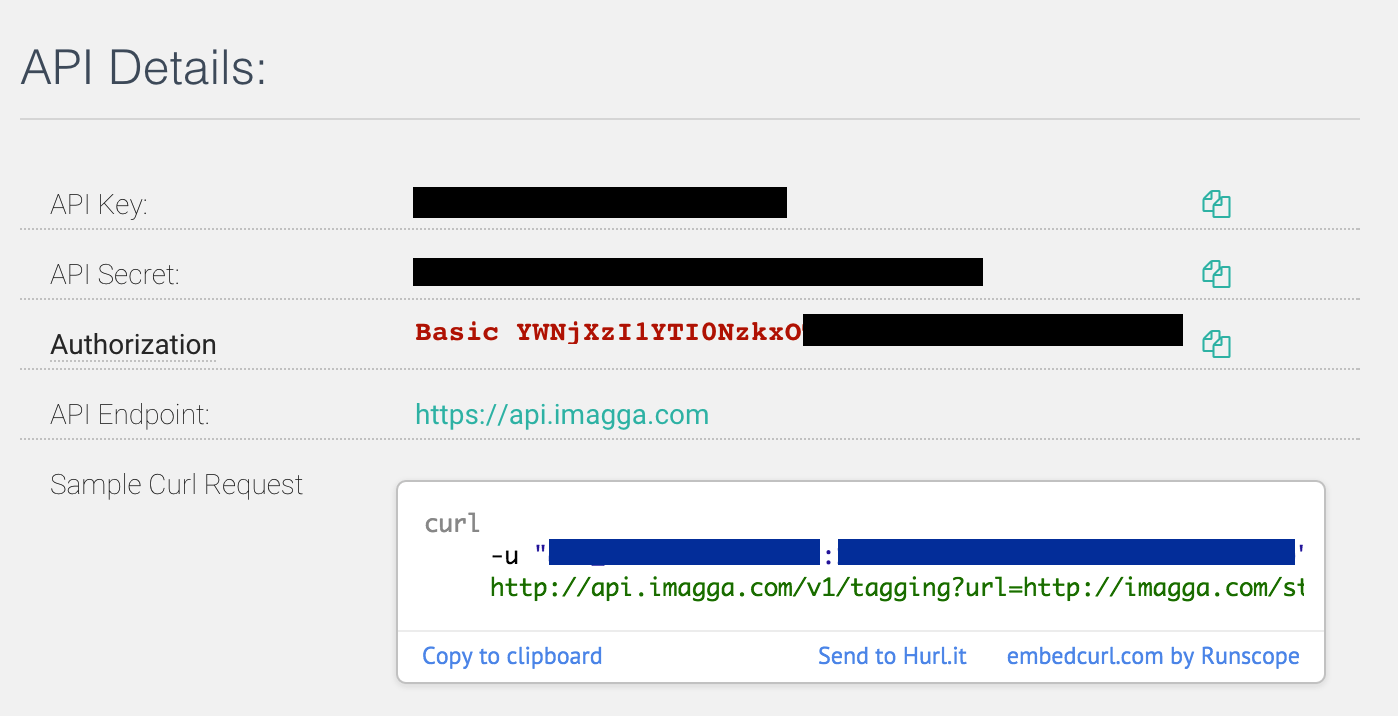
In the same section you can see the complete value of the basic authorization header already prepared for you so you can just copy and and paste it without doing the base64 encoding yourself. A code snippet to get you started is also available, again ready to be tried.
2. Send a request
With just a simpleGETrequest to the auto-tagging endpoint (/tags) you receive numerous keywords describing the given photo. Here's what our request should look like:
curl --user "<replace-with-your-api-key>:<replace-with-your-api-secret>" https://api.imagga.com/v2/tags?image_url=https://docs.imagga.com/static/images/docs/sample/japan-605234_1280.jpgimport requests
api_key = '<replace-with-your-api-key>'
api_secret = '<replace-with-your-api-secret>'
image_url = 'https://docs.imagga.com/static/images/docs/sample/japan-605234_1280.jpg'
response = requests.get(
'https://api.imagga.com/v2/tags?image_url=%s' % image_url,
auth=(api_key, api_secret))
print(response.json())
<?php
$image_url = 'https://docs.imagga.com/static/images/docs/sample/japan-605234_1280.jpg';
$api_credentials = array(
'key' => '<replace-with-your-api-key>',
'secret' => '<replace-with-your-api-secret>'
);
$ch = curl_init();
curl_setopt($ch, CURLOPT_URL, 'https://api.imagga.com/v2/tags?image_url='.$image_url);
curl_setopt($ch, CURLOPT_RETURNTRANSFER, TRUE);
curl_setopt($ch, CURLOPT_HEADER, FALSE);
curl_setopt($ch, CURLOPT_USERPWD, $api_credentials['key'].':'.$api_credentials['secret']);
$response = curl_exec($ch);
curl_close($ch);
$json_response = json_decode($response);
var_dump($json_response);/* Please note that this example uses
the HttpURLConnection class */
String credentialsToEncode = "<replace-with-your-api-key>" + ":" + "<replace-with-your-api-secret>";
String basicAuth = Base64.getEncoder().encodeToString(credentialsToEncode.getBytes(StandardCharsets.UTF_8));
String endpoint_url = "https://api.imagga.com/v2/tags";
String image_url = "http://playground.imagga.com/static/img/example_photos/japan-605234_1280.jpg";
String url = endpoint_url + "?image_url=" + image_url;
URL urlObject = new URL(url);
HttpURLConnection connection = (HttpURLConnection) urlObject.openConnection();
connection.setRequestProperty("Authorization", "Basic " + basicAuth);
int responseCode = connection.getResponseCode();
System.out.println("\nSending 'GET' request to URL : " + url);
System.out.println("Response Code : " + responseCode);
BufferedReader connectionInput = new BufferedReader(new InputStreamReader(connection.getInputStream()));
String jsonResponse = connectionInput.readLine();
connectionInput.close();
System.out.println(jsonResponse);
/* After receiving the JSON response you'll need to parse it in order to get the values you need.
You can do this by using a JSON library/package of your choice.
You can find a list of such tools at json.org */require 'rubygems' if RUBY_VERSION < '1.9'
require 'rest-client'
require 'base64'
image_url = 'https://docs.imagga.com/static/images/docs/sample/japan-605234_1280.jpg'
api_key = '<replace-with-your-api-key>'
api_secret = '<replace-with-your-api-secret>'
auth = 'Basic ' + Base64.strict_encode64( "#{api_key}:#{api_secret}" ).chomp
response = RestClient.get "https://api.imagga.com/v2/tags?image_url=#{image_url}", { :Authorization => auth }
puts responseconst got = require('got'); // if you don't have "got" - install it with "npm install got"
const apiKey = '<replace-with-your-api-key>';
const apiSecret = '<replace-with-your-api-secret>';
const imageUrl = 'https://docs.imagga.com/static/images/docs/sample/japan-605234_1280.jpg';
const url = 'https://api.imagga.com/v2/tags?image_url=' + encodeURIComponent(imageUrl);
(async () => {
try {
const response = await got(url, {username: apiKey, password: apiSecret});
console.log(response.body);
} catch (error) {
console.log(error.response.body);
}
})();// These code snippets use an open-source library. http://unirest.io/objective-c
NSDictionary *headers = @{@"Accept": @"application/json"};
UNIUrlConnection *asyncConnection = [[UNIRest get:^(UNISimpleRequest *request) {
[request setUrl:@"https://api.imagga.com/v2/tags?image_url=http%3A%2F%2Fdocs.imagga.com%2Fstatic%2Fimages%2Fdocs%2Fsample%2Fjapan-605234_1280.jpg"];
[request setHeaders:headers];
[request setUsername:@"<replace-with-your-api-key>"];
[request setPassword:@"<replace-with-your-api-secret>"];
}] asJsonAsync:^(UNIHTTPJsonResponse *response, NSError *error) {
NSInteger code = response.code;
NSDictionary *responseHeaders = response.headers;
UNIJsonNode *body = response.body;
NSData *rawBody = response.rawBody;
}];package main
import (
"fmt"
"io/ioutil"
"net/http"
)
func main() {
client := &http.Client{}
api_key := "<replace-with-your-api-key>"
api_secret := "<replace-with-your-api-secret>"
image_url := "https://docs.imagga.com/static/images/docs/sample/japan-605234_1280.jpg"
req, _ := http.NewRequest("GET", "https://api.imagga.com/v2/tags?image_url="+image_url, nil)
req.SetBasicAuth(api_key, api_secret)
resp, err := client.Do(req)
if err != nil {
fmt.Println("Error when sending request to the server")
return
}
defer resp.Body.Close()
resp_body, _ := ioutil.ReadAll(resp.Body)
fmt.Println(resp.Status)
fmt.Println(string(resp_body))
}// This examples is using RestSharp as a REST client - http://restsharp.org
using System;
using RestSharp;
namespace ImaggaAPISample
{
public class ImaggaSampleClass
{
public static void Main(string[] args)
{
string apiKey = "<replace-with-your-api-key>";
string apiSecret = "<replace-with-your-api-secret>";
string imageUrl = "https://docs.imagga.com/static/images/docs/sample/japan-605234_1280.jpg";
string basicAuthValue = System.Convert.ToBase64String(System.Text.Encoding.UTF8.GetBytes(String.Format("{0}:{1}", apiKey, apiSecret)));
var client = new RestClient("https://api.imagga.com/v2/tags");
client.Timeout = -1;
var request = new RestRequest(Method.GET);
request.AddParameter("image_url", imageUrl);
request.AddHeader("Authorization", String.Format("Basic {0}", basicAuthValue));
IRestResponse response = client.Execute(request);
Console.WriteLine(response.Content);
Console.ReadLine();
}
}
}And if the request was successful we will find a list of tags with confidence levels in the response. The confidences are represented by a percentage number from 0 to 100 where 100 means that the API is absolutely sure the tags must be relevant anf confidence < 30 means that there is a higher chance that the tag might not be relevant. Read best practices on filtering the tags by their confidence levels.
{
  "result": {
    "tags": [
      {
        "confidence": 61.4116096496582,
        "tag": {
          "en": "mountain"
        }
      },
      {
        "confidence": 54.3507270812988,
        "tag": {
          "en": "landscape"
        }
      },
      {
        "confidence": 50.969783782959,
        "tag": {
          "en": "mountains"
        }
      },
      {
        "confidence": 46.1385192871094,
        "tag": {
          "en": "wall"
        }
      },
      {
        "confidence": 40.6059913635254,
        "tag": {
          "en": "clouds"
        }
      },
      {
        "confidence": 37.2282066345215,
        "tag": {
          "en": "sky"
        }
      },
      {
        "confidence": 36.2647514343262,
        "tag": {
          "en": "park"
        }
      },
      {
        "confidence": 35.3734092712402,
        "tag": {
          "en": "national"
        }
      },
      {
        "confidence": 35.1284828186035,
        "tag": {
          "en": "range"
        }
      },
      {
        "confidence": 34.7774543762207,
        "tag": {
          "en": "snow"
        }
      },
      {
        "confidence": 32.9128646850586,
        "tag": {
          "en": "tree"
        }
      },
      {
        "confidence": 29.5557823181152,
        "tag": {
          "en": "rock"
        }
      },
      {
        "confidence": 28.4864749908447,
        "tag": {
          "en": "trees"
        }
      },
      {
        "confidence": 28.1904907226562,
        "tag": {
          "en": "travel"
        }
      },
      {
        "confidence": 28.1532077789307,
        "tag": {
          "en": "valley"
        }
      },
      {
        "confidence": 27.2323837280273,
        "tag": {
          "en": "scenic"
        }
      },
      {
        "confidence": 25.4718055725098,
        "tag": {
          "en": "forest"
        }
      },
      {
        "confidence": 24.6589889526367,
        "tag": {
          "en": "outdoors"
        }
      },
      {
        "confidence": 23.2137584686279,
        "tag": {
          "en": "peak"
        }
      },
      {
        "confidence": 23.1196212768555,
        "tag": {
          "en": "tourism"
        }
      },
      {
        "confidence": 22.9586181640625,
        "tag": {
          "en": "outdoor"
        }
      },
      {
        "confidence": 22.5058460235596,
        "tag": {
          "en": "canyon"
        }
      },
      {
        "confidence": 21.1684589385986,
        "tag": {
          "en": "stone"
        }
      },
      {
        "confidence": 20.7627124786377,
        "tag": {
          "en": "scenery"
        }
      },
      {
        "confidence": 19.8215427398682,
        "tag": {
          "en": "cloud"
        }
      },
      {
        "confidence": 19.6833038330078,
        "tag": {
          "en": "river"
        }
      },
      {
        "confidence": 19.4671821594238,
        "tag": {
          "en": "desert"
        }
      },
      {
        "confidence": 18.9360198974609,
        "tag": {
          "en": "environment"
        }
      },
      {
        "confidence": 16.9691829681396,
        "tag": {
          "en": "rocks"
        }
      },
      {
        "confidence": 16.6996059417725,
        "tag": {
          "en": "lake"
        }
      },
      {
        "confidence": 16.6136302947998,
        "tag": {
          "en": "cliff"
        }
      },
      {
        "confidence": 16.5426540374756,
        "tag": {
          "en": "geology"
        }
      },
      {
        "confidence": 15.9809865951538,
        "tag": {
          "en": "wilderness"
        }
      },
      {
        "confidence": 15.4057178497314,
        "tag": {
          "en": "hiking"
        }
      },
      {
        "confidence": 14.7685861587524,
        "tag": {
          "en": "erosion"
        }
      },
      {
        "confidence": 14.6678800582886,
        "tag": {
          "en": "glacier"
        }
      },
      {
        "confidence": 14.482006072998,
        "tag": {
          "en": "winter"
        }
      },
      {
        "confidence": 14.3086681365967,
        "tag": {
          "en": "panorama"
        }
      },
      {
        "confidence": 14.1589803695679,
        "tag": {
          "en": "summer"
        }
      },
      {
        "confidence": 14.0245943069458,
        "tag": {
          "en": "water"
        }
      },
      {
        "confidence": 13.453519821167,
        "tag": {
          "en": "grass"
        }
      },
      {
        "confidence": 13.1261720657349,
        "tag": {
          "en": "hill"
        }
      },
      {
        "confidence": 13.011589050293,
        "tag": {
          "en": "high"
        }
      },
      {
        "confidence": 12.622181892395,
        "tag": {
          "en": "grand"
        }
      },
      {
        "confidence": 12.6174287796021,
        "tag": {
          "en": "hills"
        }
      },
      {
        "confidence": 12.5902862548828,
        "tag": {
          "en": "rocky"
        }
      },
      {
        "confidence": 12.0642681121826,
        "tag": {
          "en": "sunny"
        }
      },
      {
        "confidence": 11.7458524703979,
        "tag": {
          "en": "landmark"
        }
      },
      {
        "confidence": 11.4653568267822,
        "tag": {
          "en": "vacation"
        }
      },
      {
        "confidence": 11.321738243103,
        "tag": {
          "en": "alp"
        }
      },
      {
        "confidence": 10.7740707397461,
        "tag": {
          "en": "southwest"
        }
      },
      {
        "confidence": 10.5922183990479,
        "tag": {
          "en": "sand"
        }
      },
      {
        "confidence": 10.3427696228027,
        "tag": {
          "en": "cold"
        }
      },
      {
        "confidence": 9.98015022277832,
        "tag": {
          "en": "orange"
        }
      },
      {
        "confidence": 9.7638635635376,
        "tag": {
          "en": "sandstone"
        }
      },
      {
        "confidence": 9.75960826873779,
        "tag": {
          "en": "formation"
        }
      },
      {
        "confidence": 9.669753074646,
        "tag": {
          "en": "ice"
        }
      },
      {
        "confidence": 9.37593650817871,
        "tag": {
          "en": "natural"
        }
      },
      {
        "confidence": 9.03097343444824,
        "tag": {
          "en": "roof"
        }
      },
      {
        "confidence": 8.87552165985107,
        "tag": {
          "en": "peaks"
        }
      },
      {
        "confidence": 8.81966876983643,
        "tag": {
          "en": "alpine"
        }
      },
      {
        "confidence": 8.80224514007568,
        "tag": {
          "en": "mount"
        }
      },
      {
        "confidence": 8.73800754547119,
        "tag": {
          "en": "vista"
        }
      },
      {
        "confidence": 8.6391773223877,
        "tag": {
          "en": "day"
        }
      },
      {
        "confidence": 8.31719589233398,
        "tag": {
          "en": "top"
        }
      },
      {
        "confidence": 8.24748420715332,
        "tag": {
          "en": "peaceful"
        }
      },
      {
        "confidence": 8.17128562927246,
        "tag": {
          "en": "sun"
        }
      },
      {
        "confidence": 8.11302661895752,
        "tag": {
          "en": "horizon"
        }
      },
      {
        "confidence": 7.91500616073608,
        "tag": {
          "en": "land"
        }
      },
      {
        "confidence": 7.91032791137695,
        "tag": {
          "en": "country"
        }
      },
      {
        "confidence": 7.87008666992188,
        "tag": {
          "en": "geological"
        }
      },
      {
        "confidence": 7.86280584335327,
        "tag": {
          "en": "national park"
        }
      },
      {
        "confidence": 7.85683012008667,
        "tag": {
          "en": "spring"
        }
      },
      {
        "confidence": 7.84731531143188,
        "tag": {
          "en": "wild"
        }
      },
      {
        "confidence": 7.79706764221191,
        "tag": {
          "en": "scene"
        }
      },
      {
        "confidence": 7.7928295135498,
        "tag": {
          "en": "color"
        }
      },
      {
        "confidence": 7.72600078582764,
        "tag": {
          "en": "west"
        }
      },
      {
        "confidence": 7.72066307067871,
        "tag": {
          "en": "majestic"
        }
      },
      {
        "confidence": 7.59368371963501,
        "tag": {
          "en": "adventure"
        }
      },
      {
        "confidence": 7.58410120010376,
        "tag": {
          "en": "stones"
        }
      },
      {
        "confidence": 7.51064872741699,
        "tag": {
          "en": "cloudy"
        }
      },
      {
        "confidence": 7.48021507263184,
        "tag": {
          "en": "tourist"
        }
      },
      {
        "confidence": 7.34951877593994,
        "tag": {
          "en": "dome"
        }
      },
      {
        "confidence": 7.33834314346313,
        "tag": {
          "en": "ecology"
        }
      },
      {
        "confidence": 7.24884223937988,
        "tag": {
          "en": "tranquil"
        }
      },
      {
        "confidence": 7.12695741653442,
        "tag": {
          "en": "sunlight"
        }
      }
    ]
  },
  "status": {
    "text": "",
    "type": "success"
  }
}
After we have signed up and have our credentials, let's try making our first request to the /tags endpoint now.
When we check the specification of the endpoint, we find that it accepts GET requests and we can either directly submit a URL for analyzing
or upload an image file to the API's /uploads endpoint, and use the upload identifier to submit the image for tagging with the tagging's image_upload_id parameter.
In this example we will use just a URL of an image. Let's try with the following one:
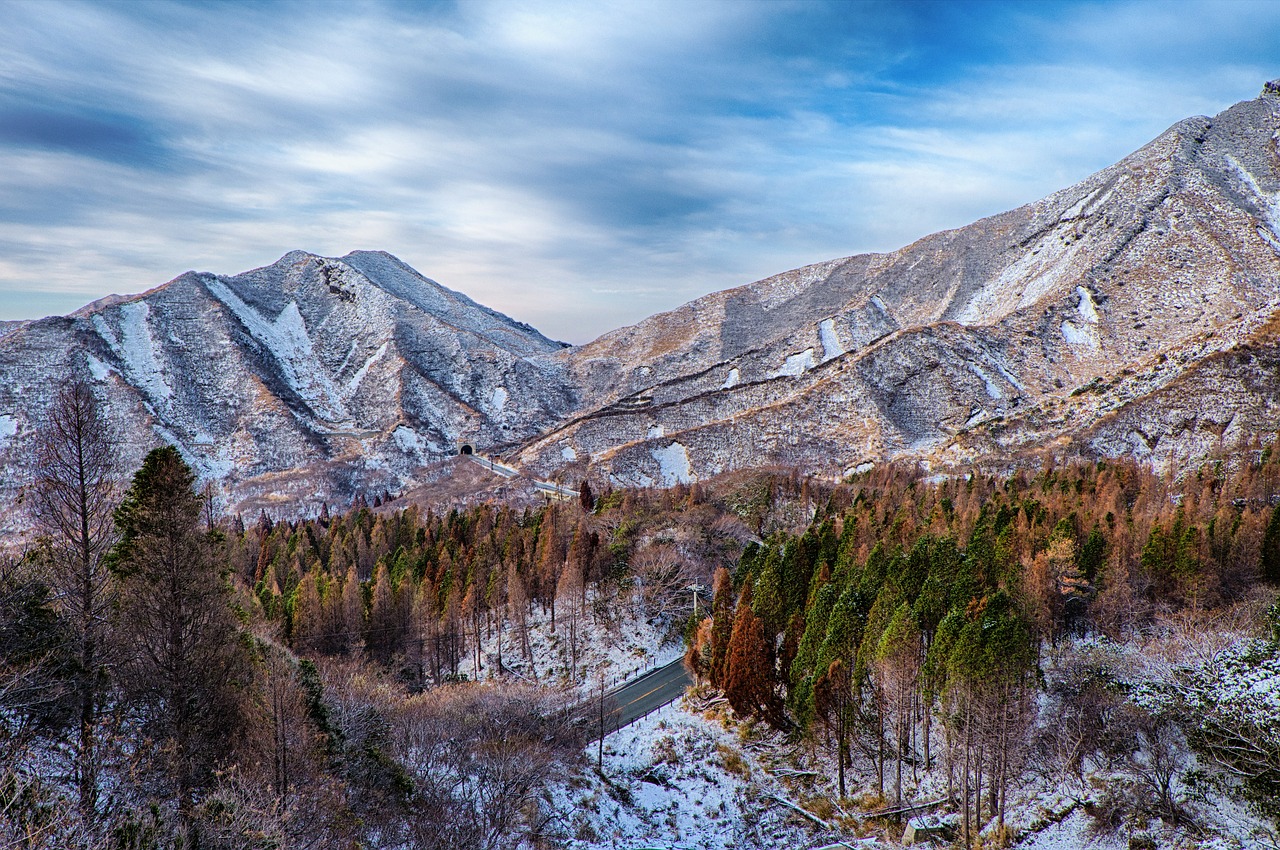
In the code section we can see how to make the request and what a successful response would look like.
3. Have fun!
Explore the other amazing features of Imagga API and have fun building great things with image recognition.
Authentication
Here’s is how to set up the basic authentication:
# With shell, you can just pass the correct header with each request
curl api_endpoint_here" -H "Authorization: Basic YWNjX2R1bW15OmR1bW15X3NlY3JldF9jb2RlXzEyMzQ1Njc4OQ=="

# Or you can use the user parameter and just specify your api key and secret
curl "api_endpoint_here" --user "<replace-with-your-api-key>:<replace-with-your-api-secret>"
import requests
api_key = '<replace-with-your-api-key>'
api_secret = '<replace-with-your-api-secret>'
response = requests.get(
'https://api.imagga.com/v2',
auth=(api_key, api_secret))
print(response.json())<?php
$api_credentials = array(
'key' => '<replace-with-your-api-key>',
'secret' => '<replace-with-your-api-secret>'
);
$ch = curl_init();
curl_setopt($ch, CURLOPT_URL, 'https://api.imagga.com/v2');
curl_setopt($ch, CURLOPT_RETURNTRANSFER, TRUE);
curl_setopt($ch, CURLOPT_HEADER, FALSE);
curl_setopt($ch, CURLOPT_USERPWD, $api_credentials['key'].':'.$api_credentials['secret']);
// Some result handling goes here .../* Please note that this example uses
the HttpURLConnection class */
//Add your credentials and Base64 encode them
String credentialsToEncode = "<replace-with-your-api-key>" + ":" + "<replace-with-your-api-secret>";
String basicAuth = Base64.getEncoder().encodeToString(credentialsToEncode.getBytes(StandardCharsets.UTF_8));
//When constructing the request set up your Basic authorization like this
URL urlObject = new URL("https://api.imagga.com/v2");
HttpURLConnection connection = (HttpURLConnection) urlObject.openConnection();
connection.setRequestProperty("Authorization", "Basic " + basicAuth);
// Do some result handling here...
/* After receiving the JSON response you'll need to parse it in order to get the values you need.
You can do this by using a JSON library/package of your choice.
You can find a list of such tools at json.org */require 'rubygems' if RUBY_VERSION < '1.9'
require 'rest-client'
require 'base64'
api_key = '<replace-with-your-api-key>'
api_secret = '<replace-with-your-api-secret>'
auth = 'Basic ' + Base64.strict_encode64( "#{api_key}:#{api_secret}" ).chomp
response = RestClient.get 'https://api.imagga.com/v2', { :Authorization => auth }
puts responseconst got = require('got'); // if you don't have "got" - install it with "npm install got"
const apiKey = '<replace-with-your-api-key>';
const apiSecret = '<replace-with-your-api-secret>';
(async () => {
try {
const response = await got('https://api.imagga.com/v2', {username: apiKey, password: apiSecret});
console.log(response.body);
} catch (error) {
console.log(error.response.body);
}
})();// These code snippets use an open-source library. http://unirest.io/objective-c
NSDictionary *headers = @{@"Accept": @"application/json"};
UNIUrlConnection *asyncConnection = [[UNIRest get:^(UNISimpleRequest *request) {
[request setUrl:@"https://api.imagga.com/v2"];
[request setHeaders:headers];
[request setUsername:@"<replace-with-your-api-key>"];
[request setPassword:@"<replace-with-your-api-secret>"];
}] asJsonAsync:^(UNIHTTPJsonResponse *response, NSError *error) {
NSInteger code = response.code;
NSDictionary *responseHeaders = response.headers;
UNIJsonNode *body = response.body;
NSData *rawBody = response.rawBody;
}];package main
import (
"fmt"
"io/ioutil"
"net/http"
)
func main() {
client := &http.Client{}
api_key := "<replace-with-your-api-key>"
api_secret := "<replace-with-your-api-secret>"
req, _ := http.NewRequest("GET", "https://api.imagga.com/v2", nil)
req.SetBasicAuth(api_key, api_secret)
resp, err := client.Do(req)
if err != nil {
fmt.Println("Error when sending request to the server")
return
}
defer resp.Body.Close()
resp_body, _ := ioutil.ReadAll(resp.Body)
fmt.Println(resp.Status)
fmt.Println(string(resp_body))
}// This examples is using RestSharp as a REST client - http://restsharp.org
using System;
using RestSharp;
namespace ImaggaAPISample
{
public class ImaggaSampleClass
{
public static void Main(string[] args)
{
string apiKey = "<replace-with-your-api-key>";
string apiSecret = "<replace-with-your-api-secret>";
string basicAuthValue = System.Convert.ToBase64String(System.Text.Encoding.UTF8.GetBytes(String.Format("{0}:{1}", apiKey, apiSecret)));
var client = new RestClient("https://api.imagga.com/v2/");
client.Timeout = -1;
var request = new RestRequest(Method.GET);
request.AddHeader("Authorization", String.Format("Basic {0}", basicAuthValue));
IRestResponse response = client.Execute(request);
Console.WriteLine(response.Content);
Console.ReadLine();
}
}
}Make sure to replace the
api keyandsecretwith your API credentials which can be found in your dashboard.
Currently the only supported method for authentication is Basic. In order to be able to use our APIs you should first Sign Up to receive your very own api key and secret pair. You shouldn’t disclose them to anyone. The api key will serve as your username in the Basic authentication process and the api secret will be your password.
The Basic authentication requires you to provide an “Authorization” header with each request beginning with the word "Basic" followed by an interval and your api key and secret in the form api_key:api_secret base64 encoded.
Versioning
The versioning of the API is specified as part of the URI. For instance, in order to use v2 of the API the request URI should begin with /v2 followed by a specific endpoint.
https://api.imagga.com/v2
API Endpoints
/tags(/<tagger_id>)
GET Request:
curl --user "<replace-with-your-api-key>:<replace-with-your-api-secret>" "https://api.imagga.com/v2/tags?image_url=https://imagga.com/static/images/tagging/wind-farm-538576_640.jpg"import requests
api_key = '<replace-with-your-api-key>'
api_secret = '<replace-with-your-api-secret>'
image_url = 'https://imagga.com/static/images/tagging/wind-farm-538576_640.jpg'
response = requests.get(
'https://api.imagga.com/v2/tags?image_url=%s' % image_url,
auth=(api_key, api_secret))
print(response.json())
<?php
$image_url = 'https://imagga.com/static/images/tagging/wind-farm-538576_640.jpg';
$api_credentials = array(
'key' => '<replace-with-your-api-key>',
'secret' => '<replace-with-your-api-secret>'
);
$ch = curl_init();
curl_setopt($ch, CURLOPT_URL, 'https://api.imagga.com/v2/tags?image_url='.urlencode($image_url));
curl_setopt($ch, CURLOPT_RETURNTRANSFER, TRUE);
curl_setopt($ch, CURLOPT_HEADER, FALSE);
curl_setopt($ch, CURLOPT_USERPWD, $api_credentials['key'].':'.$api_credentials['secret']);
$response = curl_exec($ch);
curl_close($ch);
$json_response = json_decode($response);
var_dump($json_response);/* Please note that this example uses
the HttpURLConnection class */
String credentialsToEncode = "<replace-with-your-api-key>" + ":" + "<replace-with-your-api-secret>";
String basicAuth = Base64.getEncoder().encodeToString(credentialsToEncode.getBytes(StandardCharsets.UTF_8));
String endpoint_url = "https://api.imagga.com/v2/tags";
String image_url = "https://imagga.com/static/images/tagging/wind-farm-538576_640.jpg";
String url = endpoint_url + "?image_url=" + image_url;
URL urlObject = new URL(url);
HttpURLConnection connection = (HttpURLConnection) urlObject.openConnection();
connection.setRequestProperty("Authorization", "Basic " + basicAuth);
int responseCode = connection.getResponseCode();
System.out.println("\nSending 'GET' request to URL : " + url);
System.out.println("Response Code : " + responseCode);
BufferedReader connectionInput = new BufferedReader(new InputStreamReader(connection.getInputStream()));
String jsonResponse = connectionInput.readLine();
connectionInput.close();
System.out.println(jsonResponse);
/* After receiving the JSON response you'll need to parse it in order to get the values you need.
You can do this by using a JSON library/package of your choice.
You can find a list of such tools at json.org */require 'rubygems' if RUBY_VERSION < '1.9'
require 'rest-client'
require 'base64'
image_url = 'https://imagga.com/static/images/tagging/wind-farm-538576_640.jpg'
api_key = '<replace-with-your-api-key>'
api_secret = '<replace-with-your-api-secret>'
auth = 'Basic ' + Base64.strict_encode64( "#{api_key}:#{api_secret}" ).chomp
response = RestClient.get "https://api.imagga.com/v2/tags?image_url=#{image_url}", { :Authorization => auth }
puts responseconst got = require('got'); // if you don't have "got" - install it with "npm install got"
const apiKey = '<replace-with-your-api-key>';
const apiSecret = '<replace-with-your-api-secret>';
const imageUrl = 'https://imagga.com/static/images/tagging/wind-farm-538576_640.jpg';
const url = 'https://api.imagga.com/v2/tags?image_url=' + encodeURIComponent(imageUrl);
(async () => {
try {
const response = await got(url, {username: apiKey, password: apiSecret});
console.log(response.body);
} catch (error) {
console.log(error.response.body);
}
})();// These code snippets use an open-source library. http://unirest.io/objective-c
NSDictionary *headers = @{@"Accept": @"application/json"};
UNIUrlConnection *asyncConnection = [[UNIRest get:^(UNISimpleRequest *request) {
[request setUrl:@"https://api.imagga.com/v2/tags?image_url=http%3A%2F%2Fimagga.com%2Fstatic%2Fimages%2Ftagging%2Fwind-farm-538576_640.jpg"];
[request setHeaders:headers];
[request setUsername:@"<replace-with-your-api-key>"];
[request setPassword:@"<replace-with-your-api-secret>"];
}] asJsonAsync:^(UNIHTTPJsonResponse *response, NSError *error) {
NSInteger code = response.code;
NSDictionary *responseHeaders = response.headers;
UNIJsonNode *body = response.body;
NSData *rawBody = response.rawBody;
}];package main
import (
"fmt"
"io/ioutil"
"net/http"
)
func main() {
client := &http.Client{}
api_key := "<replace-with-your-api-key>"
api_secret := "<replace-with-your-api-secret>"
image_url := "https://imagga.com/static/images/tagging/wind-farm-538576_640.jpg"
req, _ := http.NewRequest("GET", "https://api.imagga.com/v2/tags?image_url="+image_url, nil)
req.SetBasicAuth(api_key, api_secret)
resp, err := client.Do(req)
if err != nil {
fmt.Println("Error when sending request to the server")
return
}
defer resp.Body.Close()
resp_body, _ := ioutil.ReadAll(resp.Body)
fmt.Println(resp.Status)
fmt.Println(string(resp_body))
}// This examples is using RestSharp as a REST client - http://restsharp.org
using System;
using RestSharp;
namespace ImaggaAPISample
{
public class ImaggaSampleClass
{
public static void Main(string[] args)
{
string apiKey = "<replace-with-your-api-key>";
string apiSecret = "<replace-with-your-api-secret>";
string imageUrl = "https://imagga.com/static/images/tagging/wind-farm-538576_640.jpg";
string basicAuthValue = System.Convert.ToBase64String(System.Text.Encoding.UTF8.GetBytes(String.Format("{0}:{1}", apiKey, apiSecret)));
var client = new RestClient("https://api.imagga.com/v2/tags");
client.Timeout = -1;
var request = new RestRequest(Method.GET);
request.AddParameter("image_url", imageUrl);
request.AddHeader("Authorization", String.Format("Basic {0}", basicAuthValue));
IRestResponse response = client.Execute(request);
Console.WriteLine(response.Content);
Console.ReadLine();
}
}
}POST Request:curl --user "<replace-with-your-api-key>:<replace-with-your-api-secret>" -F "image=@/path/to/image.jpg" "https://api.imagga.com/v2/tags"
POST Request:import requests

api_key = '<replace-with-your-api-key>'
api_secret = '<replace-with-your-api-secret>'
image_path = '/path/to/your/image.jpg'

response = requests.post(
    'https://api.imagga.com/v2/tags',
    auth=(api_key, api_secret),
    files={'image': open(image_path, 'rb')})
print(response.json())
POST Request:<?php $file_path = '/path/to/my/image.jpg'; $api_credentials = array( 'key' => '<replace-with-your-api-key>', 'secret' => '<replace-with-your-api-secret>' ); $ch = curl_init(); curl_setopt($ch, CURLOPT_URL, "https://api.imagga.com/v2/tags"); curl_setopt($ch, CURLOPT_CUSTOMREQUEST, 'POST'); curl_setopt($ch, CURLOPT_RETURNTRANSFER, 1); curl_setopt($ch, CURLOPT_CONNECTTIMEOUT, 5); curl_setopt($ch, CURLOPT_TIMEOUT, 60); curl_setopt($ch, CURLOPT_USERPWD, $api_credentials['key'].':'.$api_credentials['secret']); curl_setopt($ch, CURLOPT_HEADER, FALSE); curl_setopt($ch, CURLOPT_POST, 1); $fields = [ 'image' => new \CurlFile($file_path, 'image/jpeg', 'image.jpg') ]; curl_setopt($ch, CURLOPT_POSTFIELDS, $fields); $response = curl_exec($ch); curl_close($ch); $json_response = json_decode($response); var_dump($json_response);
POST Request:import java.io.File;
import java.io.FileInputStream;
import java.io.BufferedReader;
import java.io.IOException;
import java.io.InputStreamReader;
import java.io.InputStream;
import java.io.DataOutputStream;
import java.io.BufferedInputStream;
import java.net.HttpURLConnection;
import java.net.URL;
import java.util.Base64;
import java.nio.charset.StandardCharsets;

public class ImageUpload {
  public static void main(String[] args) throws IOException {
    String credentialsToEncode = "<replace-with-your-api-key>" + ":" + "<replace-with-your-api-secret>";
    String basicAuth = Base64.getEncoder().encodeToString(credentialsToEncode.getBytes(StandardCharsets.UTF_8));

    // Change the file path here
    String filepath = "path_to_image";
    File fileToUpload = new File(filepath);

    String endpoint = "/tags";

    String crlf = "\r\n";
    String twoHyphens = "--";
    String boundary =  "Image Upload";

    URL urlObject = new URL("https://api.imagga.com/v2" + endpoint);
    HttpURLConnection connection = (HttpURLConnection) urlObject.openConnection();
    connection.setRequestProperty("Authorization", "Basic " + basicAuth);
    connection.setUseCaches(false);
    connection.setDoOutput(true);

    connection.setRequestMethod("POST");
    connection.setRequestProperty("Connection", "Keep-Alive");
    connection.setRequestProperty("Cache-Control", "no-cache");
    connection.setRequestProperty(
        "Content-Type", "multipart/form-data;boundary=" + boundary);

    DataOutputStream request = new DataOutputStream(connection.getOutputStream());

    request.writeBytes(twoHyphens + boundary + crlf);
    request.writeBytes("Content-Disposition: form-data; name=\"image\";filename=\"" + fileToUpload.getName() + "\"" + crlf);
    request.writeBytes(crlf);


    InputStream inputStream = new FileInputStream(fileToUpload);
    int bytesRead;
    byte[] dataBuffer = new byte[1024];
    while ((bytesRead = inputStream.read(dataBuffer)) != -1) {
      request.write(dataBuffer, 0, bytesRead);
    }

    request.writeBytes(crlf);
    request.writeBytes(twoHyphens + boundary + twoHyphens + crlf);
    request.flush();
    request.close();

    InputStream responseStream = new BufferedInputStream(connection.getInputStream());

    BufferedReader responseStreamReader = new BufferedReader(new InputStreamReader(responseStream));

    String line = "";
    StringBuilder stringBuilder = new StringBuilder();

    while ((line = responseStreamReader.readLine()) != null) {
        stringBuilder.append(line).append("\n");
    }
    responseStreamReader.close();

    String response = stringBuilder.toString();
    System.out.println(response);

    responseStream.close();
    connection.disconnect();
  }
}
POST Request:require 'rubygems' if RUBY_VERSION < '1.9' require 'rest-client' require 'base64' image_path = '/path/to/image.jpg' api_key = '<replace-with-your-api-key>' api_secret = '<replace-with-your-api-secret>' auth = 'Basic ' + Base64.strict_encode64( "#{api_key}:#{api_secret}" ).chomp response = RestClient.post "https://api.imagga.com/v2/tags", { :image => File.new(image_path, 'rb') }, { :Authorization => auth } puts response
POST Request:const got = require('got'); // if you don't have "got" - install it with "npm install got"
const fs = require('fs');
const FormData = require('form-data');

const apiKey = '<replace-with-your-api-key>';
const apiSecret = '<replace-with-your-api-secret>';

const filePath = '/path/to/image.jpg';
const formData = new FormData();
formData.append('image', fs.createReadStream(filePath));

(async () => {
    try {
        const response = await got.post('https://api.imagga.com/v2/tags', {body: formData, username: apiKey, password: apiSecret});
        console.log(response.body);
    } catch (error) {
        console.log(error.response.body);
    }
})();
POST Request:// This examples is using RestSharp as a REST client - http://restsharp.org
using System;
using RestSharp;

namespace ImaggaAPISample
{
    public class ImaggaSampleClass
    {
        public static void Main(string[] args)
        {
            string apiKey = "<replace-with-your-api-key>";
            string apiSecret = "<replace-with-your-api-secret>";
            string image = "path_to_image";

            string basicAuthValue = System.Convert.ToBase64String(System.Text.Encoding.UTF8.GetBytes(String.Format("{0}:{1}", apiKey, apiSecret)));

            var client = new RestClient("https://api.imagga.com/v2/tags");
            client.Timeout = -1;

            var request = new RestRequest(Method.POST);
            request.AddHeader("Authorization", String.Format("Basic {0}", basicAuthValue));
            request.AddFile("image", image);

            IRestResponse response = client.Execute(request);
            Console.WriteLine(response.Content);
            Console.ReadLine();
        }
    }
}
Example Response:
{
  "result": {
    "tags": [
      {
        "confidence": 61.4116096496582,
        "tag": {
          "en": "mountain"
        }
      },
      {
        "confidence": 54.3507270812988,
        "tag": {
          "en": "landscape"
        }
      },
      {
        "confidence": 50.969783782959,
        "tag": {
          "en": "mountains"
        }
      },
      {
        "confidence": 46.1385192871094,
        "tag": {
          "en": "wall"
        }
      },
      {
        "confidence": 40.6059913635254,
        "tag": {
          "en": "clouds"
        }
      },
      {
        "confidence": 37.2282066345215,
        "tag": {
          "en": "sky"
        }
      },
      {
        "confidence": 36.2647514343262,
        "tag": {
          "en": "park"
        }
      },
      {
        "confidence": 35.3734092712402,
        "tag": {
          "en": "national"
        }
      },
      {
        "confidence": 35.1284828186035,
        "tag": {
          "en": "range"
        }
      },
      {
        "confidence": 34.7774543762207,
        "tag": {
          "en": "snow"
        }
      },
      {
        "confidence": 32.9128646850586,
        "tag": {
          "en": "tree"
        }
      },
      {
        "confidence": 29.5557823181152,
        "tag": {
          "en": "rock"
        }
      },
      {
        "confidence": 28.4864749908447,
        "tag": {
          "en": "trees"
        }
      },
      {
        "confidence": 28.1904907226562,
        "tag": {
          "en": "travel"
        }
      },
      {
        "confidence": 28.1532077789307,
        "tag": {
          "en": "valley"
        }
      },
      {
        "confidence": 27.2323837280273,
        "tag": {
          "en": "scenic"
        }
      },
      {
        "confidence": 25.4718055725098,
        "tag": {
          "en": "forest"
        }
      },
      {
        "confidence": 24.6589889526367,
        "tag": {
          "en": "outdoors"
        }
      },
      {
        "confidence": 23.2137584686279,
        "tag": {
          "en": "peak"
        }
      },
      {
        "confidence": 23.1196212768555,
        "tag": {
          "en": "tourism"
        }
      },
      {
        "confidence": 22.9586181640625,
        "tag": {
          "en": "outdoor"
        }
      },
      {
        "confidence": 22.5058460235596,
        "tag": {
          "en": "canyon"
        }
      },
      {
        "confidence": 21.1684589385986,
        "tag": {
          "en": "stone"
        }
      },
      {
        "confidence": 20.7627124786377,
        "tag": {
          "en": "scenery"
        }
      },
      {
        "confidence": 19.8215427398682,
        "tag": {
          "en": "cloud"
        }
      },
      {
        "confidence": 19.6833038330078,
        "tag": {
          "en": "river"
        }
      },
      {
        "confidence": 19.4671821594238,
        "tag": {
          "en": "desert"
        }
      },
      {
        "confidence": 18.9360198974609,
        "tag": {
          "en": "environment"
        }
      },
      {
        "confidence": 16.9691829681396,
        "tag": {
          "en": "rocks"
        }
      },
      {
        "confidence": 16.6996059417725,
        "tag": {
          "en": "lake"
        }
      },
      {
        "confidence": 16.6136302947998,
        "tag": {
          "en": "cliff"
        }
      },
      {
        "confidence": 16.5426540374756,
        "tag": {
          "en": "geology"
        }
      },
      {
        "confidence": 15.9809865951538,
        "tag": {
          "en": "wilderness"
        }
      },
      {
        "confidence": 15.4057178497314,
        "tag": {
          "en": "hiking"
        }
      },
      {
        "confidence": 14.7685861587524,
        "tag": {
          "en": "erosion"
        }
      },
      {
        "confidence": 14.6678800582886,
        "tag": {
          "en": "glacier"
        }
      },
      {
        "confidence": 14.482006072998,
        "tag": {
          "en": "winter"
        }
      },
      {
        "confidence": 14.3086681365967,
        "tag": {
          "en": "panorama"
        }
      },
      {
        "confidence": 14.1589803695679,
        "tag": {
          "en": "summer"
        }
      },
      {
        "confidence": 14.0245943069458,
        "tag": {
          "en": "water"
        }
      },
      {
        "confidence": 13.453519821167,
        "tag": {
          "en": "grass"
        }
      },
      {
        "confidence": 13.1261720657349,
        "tag": {
          "en": "hill"
        }
      },
      {
        "confidence": 13.011589050293,
        "tag": {
          "en": "high"
        }
      },
      {
        "confidence": 12.622181892395,
        "tag": {
          "en": "grand"
        }
      },
      {
        "confidence": 12.6174287796021,
        "tag": {
          "en": "hills"
        }
      },
      {
        "confidence": 12.5902862548828,
        "tag": {
          "en": "rocky"
        }
      },
      {
        "confidence": 12.0642681121826,
        "tag": {
          "en": "sunny"
        }
      },
      {
        "confidence": 11.7458524703979,
        "tag": {
          "en": "landmark"
        }
      },
      {
        "confidence": 11.4653568267822,
        "tag": {
          "en": "vacation"
        }
      },
      {
        "confidence": 11.321738243103,
        "tag": {
          "en": "alp"
        }
      },
      {
        "confidence": 10.7740707397461,
        "tag": {
          "en": "southwest"
        }
      },
      {
        "confidence": 10.5922183990479,
        "tag": {
          "en": "sand"
        }
      },
      {
        "confidence": 10.3427696228027,
        "tag": {
          "en": "cold"
        }
      },
      {
        "confidence": 9.98015022277832,
        "tag": {
          "en": "orange"
        }
      },
      {
        "confidence": 9.7638635635376,
        "tag": {
          "en": "sandstone"
        }
      },
      {
        "confidence": 9.75960826873779,
        "tag": {
          "en": "formation"
        }
      },
      {
        "confidence": 9.669753074646,
        "tag": {
          "en": "ice"
        }
      },
      {
        "confidence": 9.37593650817871,
        "tag": {
          "en": "natural"
        }
      },
      {
        "confidence": 9.03097343444824,
        "tag": {
          "en": "roof"
        }
      },
      {
        "confidence": 8.87552165985107,
        "tag": {
          "en": "peaks"
        }
      },
      {
        "confidence": 8.81966876983643,
        "tag": {
          "en": "alpine"
        }
      },
      {
        "confidence": 8.80224514007568,
        "tag": {
          "en": "mount"
        }
      },
      {
        "confidence": 8.73800754547119,
        "tag": {
          "en": "vista"
        }
      },
      {
        "confidence": 8.6391773223877,
        "tag": {
          "en": "day"
        }
      },
      {
        "confidence": 8.31719589233398,
        "tag": {
          "en": "top"
        }
      },
      {
        "confidence": 8.24748420715332,
        "tag": {
          "en": "peaceful"
        }
      },
      {
        "confidence": 8.17128562927246,
        "tag": {
          "en": "sun"
        }
      },
      {
        "confidence": 8.11302661895752,
        "tag": {
          "en": "horizon"
        }
      },
      {
        "confidence": 7.91500616073608,
        "tag": {
          "en": "land"
        }
      },
      {
        "confidence": 7.91032791137695,
        "tag": {
          "en": "country"
        }
      },
      {
        "confidence": 7.87008666992188,
        "tag": {
          "en": "geological"
        }
      },
      {
        "confidence": 7.86280584335327,
        "tag": {
          "en": "national park"
        }
      },
      {
        "confidence": 7.85683012008667,
        "tag": {
          "en": "spring"
        }
      },
      {
        "confidence": 7.84731531143188,
        "tag": {
          "en": "wild"
        }
      },
      {
        "confidence": 7.79706764221191,
        "tag": {
          "en": "scene"
        }
      },
      {
        "confidence": 7.7928295135498,
        "tag": {
          "en": "color"
        }
      },
      {
        "confidence": 7.72600078582764,
        "tag": {
          "en": "west"
        }
      },
      {
        "confidence": 7.72066307067871,
        "tag": {
          "en": "majestic"
        }
      },
      {
        "confidence": 7.59368371963501,
        "tag": {
          "en": "adventure"
        }
      },
      {
        "confidence": 7.58410120010376,
        "tag": {
          "en": "stones"
        }
      },
      {
        "confidence": 7.51064872741699,
        "tag": {
          "en": "cloudy"
        }
      },
      {
        "confidence": 7.48021507263184,
        "tag": {
          "en": "tourist"
        }
      },
      {
        "confidence": 7.34951877593994,
        "tag": {
          "en": "dome"
        }
      },
      {
        "confidence": 7.33834314346313,
        "tag": {
          "en": "ecology"
        }
      },
      {
        "confidence": 7.24884223937988,
        "tag": {
          "en": "tranquil"
        }
      },
      {
        "confidence": 7.12695741653442,
        "tag": {
          "en": "sunlight"
        }
      }
    ]
  },
  "status": {
    "text": "",
    "type": "success"
  }
}
Our Auto-Tagging Solution harnesses the power of state-of-the-art technologies for image understanding in order to provide you with the most advanced and powerful automatic tagging through an easy to use REST interface.
By sending an image URL to the /tags endpoint you can get a list of many automatically suggested textual tags. Confidence percentage will be assigned to each of them so you can filter only the most relevant ones for your specific case.
GET https://api.imagga.com/v2/tags(/<tagger_id>)
Query Parameters
| Parameter | Description |
|---|---|
| image_url | Image URL to perform auto-tagging on. |
| image_upload_id | You can also directly send image files for auto-tagging by uploading them to our /uploads endpoint and then providing the received content identifiers via this parameter. |
| language (default: en) | If you’d like to get a translation of the tags in other languages, you should use the language parameter. Specify the languages you want to receive your results in, separated by comma. If there is only 1 language, don’t use an empty comma. See all available languages here. |
| verbose (default: 0) | Whether to return some additional information about each of the tags (such as WordNet synset id for some of them) or not. |
| limit (default: -1 - meaning all tags) | Limits the number of tags in the result to the number you set. Integer value is expected. |
| threshold (default: 0.0) | Thresholds the confidence of tags in the result to the number you set. Double value is expected. By default all tags with confidence above 7 are being returned and you cannot go lower than that. |
| decrease_parents (default: 1) | Whether or not to decrease the confidence levels of parent tags of the main recognized object. |
| tagger_id | If a tagger_id is present, the tagging will be done with a custom tagger. |
POST https://api.imagga.com/v2/tags(/<tagger_id>)
Query Parameters
| Parameter | Description |
|---|---|
| image | Image file contents to perform auto-tagging on. |
| image_base64 | Image file contents encoded in base64 format to perform auto-tagging on. |
| language (default: en) | If you’d like to get a translation of the tags in other languages, you should use the language parameter. Specify the languages you want to receive your results in, separated by comma. If there is only 1 language, don’t use an empty comma. See all available languages here. |
| verbose (default: 0) | Whether to return some additional information about each of the tags (such as WordNet synset id for some of them) or not. |
| limit (default: -1 - meaning all tags) | Limits the number of tags in the result to the number you set. Integer value is expected. |
| threshold (default: 0.0) | Thresholds the confidence of tags in the result to the number you set. Double value is expected. By default all tags with confidence above 7 are being returned and you cannot go lower than that. |
| decrease_parents (default: 1) | Whether or not to decrease the confidence levels of parent tags of the main recognized object. |
| tagger_id | If a tagger_id is present, the tagging will be done with a custom tagger. |
Response Description
The response is a JSON object which has 2 main keys. The first one is the `result` key under which (as you may have expected) you will find the results for a successful request. The result is a JSON object on it’s own with the following data:
tags- an array of all the tags the API has suggested for this image; each of the items in the `tags` array has the following keys:confidence- a number representing a percentage from 0 to 100 where 100 means that the API is absolutely sure this tag must be relevant and confidence < 30 means that there is a higher chance that the tag might not be such;tag- the tag itself which could be an object, concept, color, etc. describing something from the photo scene;
The other main key is the `status` item of the JSON response. Here expect an object, having the following 2 keys:
type- success / error depending on whether the request was processed successfully;text- human-readable reason why the processing was unsuccessful;
/categorizers
GET Request:
curl --user "<replace-with-your-api-key>:<replace-with-your-api-secret>" "https://api.imagga.com/v2/categorizers"import requests
api_key = '<replace-with-your-api-key>'
api_secret = '<replace-with-your-api-secret>'
response = requests.get(
'https://api.imagga.com/v2/categorizers',
auth=(api_key, api_secret))
print(response.json())
<?php
$api_credentials = array(
'key' => '<replace-with-your-api-key>',
'secret' => '<replace-with-your-api-secret>'
);
$ch = curl_init();
curl_setopt($ch, CURLOPT_URL, 'https://api.imagga.com/v2/categorizers');
curl_setopt($ch, CURLOPT_RETURNTRANSFER, TRUE);
curl_setopt($ch, CURLOPT_HEADER, FALSE);
curl_setopt($ch, CURLOPT_USERPWD, $api_credentials['key'].':'.$api_credentials['secret']);
$response = curl_exec($ch);
curl_close($ch);
$json_response = json_decode($response);
var_dump($json_response);/* Please note that this example uses
the HttpURLConnection class */
String credentialsToEncode = "<replace-with-your-api-key>" + ":" + "<replace-with-your-api-secret>";
String basicAuth = Base64.getEncoder().encodeToString(credentialsToEncode.getBytes(StandardCharsets.UTF_8));
String url = "https://api.imagga.com/v2/categorizers";
URL urlObject = new URL(url);
HttpURLConnection connection = (HttpURLConnection) urlObject.openConnection();
connection.setRequestProperty("Authorization", "Basic " + basicAuth);
int responseCode = connection.getResponseCode();
System.out.println("\nSending 'GET' request to URL : " + url);
System.out.println("Response Code : " + responseCode);
BufferedReader connectionInput = new BufferedReader(new InputStreamReader(connection.getInputStream()));
String jsonResponse = connectionInput.readLine();
connectionInput.close();
System.out.println(jsonResponse);
/* After receiving the JSON response you'll need to parse it in order to get the values you need.
You can do this by using a JSON library/package of your choice.
You can find a list of such tools at json.org */require 'rubygems' if RUBY_VERSION < '1.9'
require 'rest-client'
require 'base64'
api_key = '<replace-with-your-api-key>'
api_secret = '<replace-with-your-api-secret>'
auth = 'Basic ' + Base64.strict_encode64( "#{api_key}:#{api_secret}" ).chomp
response = RestClient.get 'https://api.imagga.com/v2/categorizers', { :Authorization => auth }
puts responseconst got = require('got'); // if you don't have "got" - install it with "npm install got"
const apiKey = '<replace-with-your-api-key>';
const apiSecret = '<replace-with-your-api-secret>';
(async () => {
try {
const response = await got('https://api.imagga.com/v2/categorizers', {username: apiKey, password: apiSecret});
console.log(response.body);
} catch (error) {
console.log(error.response.body);
}
})();// These code snippets use an open-source library. http://unirest.io/objective-c
NSDictionary *headers = @{@"Accept": @"application/json"};
UNIUrlConnection *asyncConnection = [[UNIRest get:^(UNISimpleRequest *request) {
[request setUrl:@"https://api.imagga.com/v2/categorizers"];
[request setHeaders:headers];
[request setUsername:@"<replace-with-your-api-key>"];
[request setPassword:@"<replace-with-your-api-secret>"];
}] asJsonAsync:^(UNIHTTPJsonResponse *response, NSError *error) {
NSInteger code = response.code;
NSDictionary *responseHeaders = response.headers;
UNIJsonNode *body = response.body;
NSData *rawBody = response.rawBody;
}];package main
import (
"fmt"
"io/ioutil"
"net/http"
)
func main() {
client := &http.Client{}
api_key := "<replace-with-your-api-key>"
api_secret := "<replace-with-your-api-secret>"
req, _ := http.NewRequest("GET", "https://api.imagga.com/v2/categorizers", nil)
req.SetBasicAuth(api_key, api_secret)
resp, err := client.Do(req)
if err != nil {
fmt.Println("Error when sending request to the server")
return
}
defer resp.Body.Close()
resp_body, _ := ioutil.ReadAll(resp.Body)
fmt.Println(resp.Status)
fmt.Println(string(resp_body))
}// This examples is using RestSharp as a REST client - http://restsharp.org
using System;
using RestSharp;
namespace ImaggaAPISample
{
public class ImaggaSampleClass
{
public static void Main(string[] args)
{
string apiKey = "<replace-with-your-api-key>";
string apiSecret = "<replace-with-your-api-secret>";
string basicAuthValue = System.Convert.ToBase64String(System.Text.Encoding.UTF8.GetBytes(String.Format("{0}:{1}", apiKey, apiSecret)));
var client = new RestClient("https://api.imagga.com/v2/categorizers");
client.Timeout = -1;
var request = new RestRequest(Method.GET);
request.AddHeader("Authorization", String.Format("Basic {0}", basicAuthValue));
IRestResponse response = client.Execute(request);
Console.WriteLine(response.Content);
Console.ReadLine();
}
}
}Example Response:
{
  "result": {
    "categorizers": [
      {
        "id": "nsfw_beta",
        "labels": [
          "nsfw",
          "safe",
          "underwear"
        ],
        "title": "NSFW Categorizer (beta v2)"
      },
      {
        "id": "personal_photos",
        "labels": [
          "interior objects",
          "nature landscape",
          "beaches seaside",
          "events parties",
          "food drinks",
          "paintings art",
          "pets animals",
          "text visuals",
          "sunrises sunsets",
          "cars vehicles",
          "macro flowers",
          "streetview architecture",
          "people portraits"
        ],
        "title": "Personal Photos Categorizer"
      }
    ]
  },
  "status": {
    "text": "",
    "type": "success"
  }
}
GET https://api.imagga.com/v2/categorizers
Get a list of all available categorizers for you.
A categorizer is used to recognize various objects and concepts. There are several predefined ones available but if none of them fit your needs we can build a custom one for you.
Response Description
The response is a JSON object which has 2 main keys. The first one is the `result` key under which (as you may have expected) you will find the results for a successful request. The result is a JSON object on it’s own with a key `categorizers` the following data:
labels- an array of all the categories that this categorizer recognizes;id- the categorizer id that you should use to access it through the`/categories/<categorizer_id>`endpoint;title- a human-readable name of the categorizer (might be empty);
The other main key is the `status` item of the JSON response. Here expect an object, having the following 2 keys:
type- success / error depending on whether the request was processed successfully;text- human-readable reason why the processing was unsuccessful;
/categories/<categorizer_id>
GET Request:
curl --user "<replace-with-your-api-key>:<replace-with-your-api-secret>" "https://api.imagga.com/v2/categories/personal_photos?image_url=https://imagga.com/static/images/categorization/skyline-14619_640.jpg"import requests
api_key = '<replace-with-your-api-key>'
api_secret = '<replace-with-your-api-secret>'
image_url = 'https://imagga.com/static/images/categorization/skyline-14619_640.jpg'
categorizer_id = 'personal_photos'
response = requests.get(
'https://api.imagga.com/v2/categories/%s?image_url=%s' % (categorizer_id, image_url),
auth=(api_key, api_secret))
print(response.json())
<?php
$image_url = 'https://imagga.com/static/images/categorization/skyline-14619_640.jpg';
$categorizer = 'personal_photos';
$api_credentials = array(
'key' => '<replace-with-your-api-key>',
'secret' => '<replace-with-your-api-secret>'
);
$ch = curl_init();
curl_setopt($ch, CURLOPT_URL, 'https://api.imagga.com/v2/categories/'.$categorizer.'?image_url='.urlencode($image_url));
curl_setopt($ch, CURLOPT_RETURNTRANSFER, TRUE);
curl_setopt($ch, CURLOPT_HEADER, FALSE);
curl_setopt($ch, CURLOPT_USERPWD, $api_credentials['key'].':'.$api_credentials['secret']);
$response = curl_exec($ch);
curl_close($ch);
$json_response = json_decode($response);
var_dump($json_response);/* Please note that this example uses
the HttpURLConnection class */
String credentialsToEncode = "<replace-with-your-api-key>" + ":" + "<replace-with-your-api-secret>";
String basicAuth = Base64.getEncoder().encodeToString(credentialsToEncode.getBytes(StandardCharsets.UTF_8));
String endpoint_url = "https://api.imagga.com/v2/categories";
String categorizerId = "personal_photos";
String image_url = "https://imagga.com/static/images/categorization/skyline-14619_640.jpg";
String url = endpoint_url + "/" + categorizerId + "?image_url=" + image_url;
URL urlObject = new URL(url);
HttpURLConnection connection = (HttpURLConnection) urlObject.openConnection();
connection.setRequestProperty("Authorization", "Basic " + basicAuth);
int responseCode = connection.getResponseCode();
System.out.println("\nSending 'GET' request to URL : " + url);
System.out.println("Response Code : " + responseCode);
BufferedReader connectionInput = new BufferedReader(new InputStreamReader(connection.getInputStream()));
String jsonResponse = connectionInput.readLine();
connectionInput.close();
System.out.println(jsonResponse);
/* After receiving the JSON response you'll need to parse it in order to get the values you need.
You can do this by using a JSON library/package of your choice.
You can find a list of such tools at json.org */require 'rubygems' if RUBY_VERSION < '1.9'
require 'rest-client'
require 'base64'
image_url = 'https://imagga.com/static/images/categorization/skyline-14619_640.jpg'
categorizer = 'personal_photos'
api_key = '<replace-with-your-api-key>'
api_secret = '<replace-with-your-api-secret>'
auth = 'Basic ' + Base64.strict_encode64( "#{api_key}:#{api_secret}" ).chomp
response = RestClient.get "https://api.imagga.com/v2/categories/#{categorizer}?image_url=#{image_url}", { :Authorization => auth }
puts responseconst got = require('got'); // if you don't have "got" - install it with "npm install got"
const apiKey = '<replace-with-your-api-key>';
const apiSecret = '<replace-with-your-api-secret>';
const imageUrl = 'https://imagga.com/static/images/categorization/skyline-14619_640.jpg';
const url = 'https://api.imagga.com/v2/categories/personal_photos?image_url=' + encodeURIComponent(imageUrl);
(async () => {
try {
const response = await got(url, {username: apiKey, password: apiSecret});
console.log(response.body);
} catch (error) {
console.log(error.response.body);
}
})();// These code snippets use an open-source library. http://unirest.io/objective-c
NSDictionary *headers = @{@"Accept": @"application/json"};
UNIUrlConnection *asyncConnection = [[UNIRest get:^(UNISimpleRequest *request) {
[request setUrl:@"https://api.imagga.com/v2/categories/personal_photos?image_url=https%3A%2F%2Fimagga.com%2Fstatic%2Fimages%2Fcategorization%2Fskyline-14619_640.jpg"];
[request setHeaders:headers];
[request setUsername:@"<replace-with-your-api-key>"];
[request setPassword:@"<replace-with-your-api-secret>"];
}] asJsonAsync:^(UNIHTTPJsonResponse *response, NSError *error) {
NSInteger code = response.code;
NSDictionary *responseHeaders = response.headers;
UNIJsonNode *body = response.body;
NSData *rawBody = response.rawBody;
}];package main
import (
"fmt"
"io/ioutil"
"net/http"
)
func main() {
client := &http.Client{}
api_key := "<replace-with-your-api-key>"
api_secret := "<replace-with-your-api-secret>"
image_url := "https://imagga.com/static/images/categorization/skyline-14619_640.jpg"
req, _ := http.NewRequest("GET", "https://api.imagga.com/v2/categories/personal_photos?image_url="+image_url, nil)
req.SetBasicAuth(api_key, api_secret)
resp, err := client.Do(req)
if err != nil {
fmt.Println("Error when sending request to the server")
return
}
defer resp.Body.Close()
resp_body, _ := ioutil.ReadAll(resp.Body)
fmt.Println(resp.Status)
fmt.Println(string(resp_body))
}// This examples is using RestSharp as a REST client - http://restsharp.org
using System;
using RestSharp;
namespace ImaggaAPISample
{
public class ImaggaSampleClass
{
public static void Main(string[] args)
{
string apiKey = "<replace-with-your-api-key>";
string apiSecret = "<replace-with-your-api-secret>";
string imageUrl = "https://imagga.com/static/images/categorization/skyline-14619_640.jpg";
string categorizerId = "personal_photos";
string basicAuthValue = System.Convert.ToBase64String(System.Text.Encoding.UTF8.GetBytes(String.Format("{0}:{1}", apiKey, apiSecret)));
var client = new RestClient(String.Format("https://api.imagga.com/v2/categories/{0}", categorizerId));
client.Timeout = -1;
var request = new RestRequest(Method.GET);
request.AddParameter("image_url", imageUrl);
request.AddHeader("Authorization", String.Format("Basic {0}", basicAuthValue));
IRestResponse response = client.Execute(request);
Console.WriteLine(response.Content);
Console.ReadLine();
}
}
}POST Request:curl --user "<replace-with-your-api-key>:<replace-with-your-api-secret>" -F "image=@/path/to/image.jpg" "https://api.imagga.com/v2/categories/personal_photos"
POST Request:import requests

api_key = '<replace-with-your-api-key>'
api_secret = '<replace-with-your-api-secret>'
image_path = '/path/to/your/image.jpg'

response = requests.post(
    'https://api.imagga.com/v2/categories/personal_photos',
    auth=(api_key, api_secret),
    files={'image': open(image_path, 'rb')})
print(response.json())
POST Request:<?php $file_path = '/path/to/my/image.jpg'; $api_credentials = array( 'key' => '<replace-with-your-api-key>', 'secret' => '<replace-with-your-api-secret>' ); $ch = curl_init(); curl_setopt($ch, CURLOPT_URL, "https://api.imagga.com/v2/categories/personal_photos"); curl_setopt($ch, CURLOPT_CUSTOMREQUEST, 'POST'); curl_setopt($ch, CURLOPT_RETURNTRANSFER, 1); curl_setopt($ch, CURLOPT_CONNECTTIMEOUT, 5); curl_setopt($ch, CURLOPT_TIMEOUT, 60); curl_setopt($ch, CURLOPT_USERPWD, $api_credentials['key'].':'.$api_credentials['secret']); curl_setopt($ch, CURLOPT_HEADER, FALSE); curl_setopt($ch, CURLOPT_POST, 1); $fields = [ 'image' => new \CurlFile($file_path, 'image/jpeg', 'image.jpg') ]; curl_setopt($ch, CURLOPT_POSTFIELDS, $fields); $response = curl_exec($ch); curl_close($ch); $json_response = json_decode($response); var_dump($json_response);
POST Request:import java.io.File;
import java.io.FileInputStream;
import java.io.BufferedReader;
import java.io.IOException;
import java.io.InputStreamReader;
import java.io.InputStream;
import java.io.DataOutputStream;
import java.io.BufferedInputStream;
import java.net.HttpURLConnection;
import java.net.URL;
import java.util.Base64;
import java.nio.charset.StandardCharsets;

public class ImageUpload {
  public static void main(String[] args) throws IOException {
    String credentialsToEncode = "<replace-with-your-api-key>" + ":" + "<replace-with-your-api-secret>";
    String basicAuth = Base64.getEncoder().encodeToString(credentialsToEncode.getBytes(StandardCharsets.UTF_8));

    // Change the file path here
    String filepath = "path_to_image";
    File fileToUpload = new File(filepath);

    String endpoint = "/categories/personal_photos";

    String crlf = "\r\n";
    String twoHyphens = "--";
    String boundary =  "Image Upload";

    URL urlObject = new URL("https://api.imagga.com/v2" + endpoint);
    HttpURLConnection connection = (HttpURLConnection) urlObject.openConnection();
    connection.setRequestProperty("Authorization", "Basic " + basicAuth);
    connection.setUseCaches(false);
    connection.setDoOutput(true);

    connection.setRequestMethod("POST");
    connection.setRequestProperty("Connection", "Keep-Alive");
    connection.setRequestProperty("Cache-Control", "no-cache");
    connection.setRequestProperty(
        "Content-Type", "multipart/form-data;boundary=" + boundary);

    DataOutputStream request = new DataOutputStream(connection.getOutputStream());

    request.writeBytes(twoHyphens + boundary + crlf);
    request.writeBytes("Content-Disposition: form-data; name=\"image\";filename=\"" + fileToUpload.getName() + "\"" + crlf);
    request.writeBytes(crlf);


    InputStream inputStream = new FileInputStream(fileToUpload);
    int bytesRead;
    byte[] dataBuffer = new byte[1024];
    while ((bytesRead = inputStream.read(dataBuffer)) != -1) {
      request.write(dataBuffer, 0, bytesRead);
    }

    request.writeBytes(crlf);
    request.writeBytes(twoHyphens + boundary + twoHyphens + crlf);
    request.flush();
    request.close();

    InputStream responseStream = new BufferedInputStream(connection.getInputStream());

    BufferedReader responseStreamReader = new BufferedReader(new InputStreamReader(responseStream));

    String line = "";
    StringBuilder stringBuilder = new StringBuilder();

    while ((line = responseStreamReader.readLine()) != null) {
        stringBuilder.append(line).append("\n");
    }
    responseStreamReader.close();

    String response = stringBuilder.toString();
    System.out.println(response);

    responseStream.close();
    connection.disconnect();
  }
}
POST Request:require 'rubygems' if RUBY_VERSION < '1.9' require 'rest-client' require 'base64' image_path = '/path/to/image.jpg' api_key = '<replace-with-your-api-key>' api_secret = '<replace-with-your-api-secret>' auth = 'Basic ' + Base64.strict_encode64( "#{api_key}:#{api_secret}" ).chomp response = RestClient.post "https://api.imagga.com/v2/categories/personal_photos", { :image => File.new(image_path, 'rb') }, { :Authorization => auth } puts response
POST Request:const got = require('got'); // if you don't have "got" - install it with "npm install got"
const fs = require('fs');
const FormData = require('form-data');

const apiKey = '<replace-with-your-api-key>';
const apiSecret = '<replace-with-your-api-secret>';

const filePath = '/path/to/image.jpg';
const formData = new FormData();
formData.append('image', fs.createReadStream(filePath));

(async () => {
    try {
        const response = await got.post('https://api.imagga.com/v2/categories/personal_photos', {body: formData, username: apiKey, password: apiSecret});
        console.log(response.body);
    } catch (error) {
        console.log(error.response.body);
    }
})();
POST Request:// This examples is using RestSharp as a REST client - http://restsharp.org
using System;
using RestSharp;

namespace ImaggaAPISample
{
    public class ImaggaSampleClass
    {
        public static void Main(string[] args)
        {
            string apiKey = "<replace-with-your-api-key>";
            string apiSecret = "<replace-with-your-api-secret>";
            string image = "path_to_image";
            string categorizerId = "personal_photos";

            string basicAuthValue = System.Convert.ToBase64String(System.Text.Encoding.UTF8.GetBytes(String.Format("{0}:{1}", apiKey, apiSecret)));

            var client = new RestClient(String.Format("https://api.imagga.com/v2/categories/{0}", categorizerId));
            client.Timeout = -1;

            var request = new RestRequest(Method.POST);
            request.AddHeader("Authorization", String.Format("Basic {0}", basicAuthValue));
            request.AddFile("image", image);

            IRestResponse response = client.Execute(request);
            Console.WriteLine(response.Content);
            Console.ReadLine();
        }
    }
}
Example Response:
{
  "result": {
    "categories": [
      {
        "confidence": 99.9469680786133,
        "name": {
          "en": "streetview architecture"
        }
      }
    ]
  },
  "status": {
    "text": "",
    "type": "success"
  }
}
As soon as you have decided which is the best categorizer for your images or have trained your own, you are ready to get your hands dirty with some photo classification. You can get a list of the available ones using the /categorizers endpoint or you can find them in the next section of this documentation.
Sending an image for classification is really easy. It can be achieved with a simple GET request to this endpoint. If the classification is successful, as a result, you will get back 200 (OK) response and a list of categories, each with a confidence percentage specifying how confident the system is about the particular result.
GET https://api.imagga.com/v2/categories/<categorizer_id>
Query Parameters
| Parameter | Description |
|---|---|
| image_url | URL of an image to submit for categorization. |
| image_upload_id | You can also directly send image files for categorization by uploading them to our /uploads endpoint and then providing the received content identifiers via this parameter. |
| language (default: en) | If you’d like to get a translation of the tags in other languages, you should use the language parameter. Specify the languages you want to receive your results in, separated by comma. If there is only 1 language, don’t use an empty comma. See all available languages here. |
| save_index (optional) | The index name in which you wish to save this image for searching later on. |
| save_id (optional) | The id with which you wish to associate your image when putting it in a search index. This will be the identificator which will be returned to you when searching for similar images. (If you send an image with an already existing id, it will be overriden as if an update operation took place. Consider this when choosing your ids.) - In order for the image to be present in the search index later on, you need to train it with the /similar-images/categories/<categorizer_id>/<index_id>(/<entry_id>) endpoint |
POST https://api.imagga.com/v2/categories/<categorizer_id>
Query Parameters
| Parameter | Description |
|---|---|
| image | Image file contents to perform categorization on. |
| image_base64 | Image file contents encoded in base64 format to perform categorization on. |
| language (default: en) | If you’d like to get a translation of the tags in other languages, you should use the language parameter. Specify the languages you want to receive your results in, separated by comma. If there is only 1 language, don’t use an empty comma. See all available languages here. |
| save_index (optional) | The index name in which you wish to save this image for searching later on. |
| save_id (optional) | The id with which you wish to associate your image when putting it in a search index. This will be the identificator which will be returned to you when searching for similar images. (If you send an image with an already existing id, it will be overriden as if an update operation took place. Consider this when choosing your ids.) - In order for the image to be present in the search index later on, you need to train it with the /similar-images/categories/<categorizer_id>/<index_id>(/<entry_id>) endpoint |
Response Description
The response is a JSON object which has 2 main keys. The first one is the `result` key under which (as you may have expected) you will find the results for a successful request. The result is a JSON object with the following data:
categories- an array with categories that the API has suggested for this image; each of the items in the`categories`array has the following keys:confidence- a number representing a percentage from 0 to 100 where 100 means that the API is absolutely sure this category is relevant and confidence < 30 means that there is a higher chance that the proposed category might not be such;name- the category’s identifier (might be human-readable or not, it depends on the categorizer) ;
The other main key is the `status` item of the JSON response. Here expect an object, having the following 2 keys:
type- success / error depending on whether the request was processed successfully;text- human-readable reason why the processing was unsuccessful;
/croppings
GET Request:
curl --user "<replace-with-your-api-key>:<replace-with-your-api-secret>" "https://api.imagga.com/v2/croppings?image_url=https://imagga.com/static/images/tagging/wind-farm-538576_640.jpg&resolution=500x300,100x100"import requests
api_key = '<replace-with-your-api-key>'
api_secret = '<replace-with-your-api-secret>'
image_url = 'https://imagga.com/static/images/tagging/wind-farm-538576_640.jpg'
response = requests.get(
'https://api.imagga.com/v2/croppings?image_url=%s&resolution=100x100,500x300' % image_url,
auth=(api_key, api_secret))
print(response.json())
<?php
$image_url = 'https://imagga.com/static/images/tagging/wind-farm-538576_640.jpg';
$sizes = array(
'100x100',
'500x300'
);
$api_credentials = array(
'key' => '<replace-with-your-api-key>',
'secret' => '<replace-with-your-api-secret>'
);
$ch = curl_init();
curl_setopt($ch, CURLOPT_URL, 'https://api.imagga.com/v2/croppings?image_url=' . urlencode($image_url) . '&resolution=' . implode(',', $sizes));
curl_setopt($ch, CURLOPT_RETURNTRANSFER, TRUE);
curl_setopt($ch, CURLOPT_HEADER, FALSE);
curl_setopt($ch, CURLOPT_USERPWD, $api_credentials['key'].':'.$api_credentials['secret']);
$response = curl_exec($ch);
curl_close($ch);
$json_response = json_decode($response);
var_dump($json_response);/* Please note that this example uses
the HttpURLConnection class */
String credentialsToEncode = "<replace-with-your-api-key>" + ":" + "<replace-with-your-api-secret>";
String basicAuth = Base64.getEncoder().encodeToString(credentialsToEncode.getBytes(StandardCharsets.UTF_8));
String endpoint_url = "https://api.imagga.com/v2/croppings";
String image_url = "https://imagga.com/static/images/tagging/wind-farm-538576_640.jpg";
String resolution1 = "100x100";
String resolution2 = "500x300";
String url = endpoint_url + "?image_url=" + image_url + "&resolution=" + resolution1 + "," + resolution2;
URL urlObject = new URL(url);
HttpURLConnection connection = (HttpURLConnection) urlObject.openConnection();
connection.setRequestProperty("Authorization", "Basic " + basicAuth);
int responseCode = connection.getResponseCode();
System.out.println("\nSending 'GET' request to URL : " + url);
System.out.println("Response Code : " + responseCode);
BufferedReader connectionInput = new BufferedReader(new InputStreamReader(connection.getInputStream()));
String jsonResponse = connectionInput.readLine();
connectionInput.close();
System.out.println(jsonResponse);
/* After receiving the JSON response you'll need to parse it in order to get the values you need.
You can do this by using a JSON library/package of your choice.
You can find a list of such tools at json.org */require 'rubygems' if RUBY_VERSION < '1.9'
require 'rest-client'
require 'base64'
image_url = 'https://imagga.com/static/images/tagging/wind-farm-538576_640.jpg'
api_key = '<replace-with-your-api-key>'
api_secret = '<replace-with-your-api-secret>'
auth = 'Basic ' + Base64.strict_encode64( "#{api_key}:#{api_secret}" ).chomp
response = RestClient.get "https://api.imagga.com/v2/croppings?image_url=#{image_url}", { :Authorization => auth }
puts responseconst got = require('got'); // if you don't have "got" - install it with "npm install got"
const apiKey = '<replace-with-your-api-key>';
const apiSecret = '<replace-with-your-api-secret>';
const imageUrl = 'https://imagga.com/static/images/tagging/wind-farm-538576_640.jpg';
const url = 'https://api.imagga.com/v2/croppings?image_url=' + encodeURIComponent(imageUrl);
(async () => {
try {
const response = await got(url, {username: apiKey, password: apiSecret});
console.log(response.body);
} catch (error) {
console.log(error.response.body);
}
})();// These code snippets use an open-source library. http://unirest.io/objective-c
NSDictionary *headers = @{@"Accept": @"application/json"};
UNIUrlConnection *asyncConnection = [[UNIRest get:^(UNISimpleRequest *request) {
[request setUrl:@"https://api.imagga.com/v2/croppings?image_url=http%3A%2F%2Fimagga.com%2Fstatic%2Fimages%2Ftagging%2Fwind-farm-538576_640.jpg&resolution=100x100,500x300"];
[request setHeaders:headers];
[request setUsername:@"<replace-with-your-api-key>"];
[request setPassword:@"<replace-with-your-api-secret>"];
}] asJsonAsync:^(UNIHTTPJsonResponse *response, NSError *error) {
NSInteger code = response.code;
NSDictionary *responseHeaders = response.headers;
UNIJsonNode *body = response.body;
NSData *rawBody = response.rawBody;
}];package main
import (
"fmt"
"io/ioutil"
"net/http"
)
func main() {
client := &http.Client{}
api_key := "<replace-with-your-api-key>"
api_secret := "<replace-with-your-api-secret>"
image_url := "https://imagga.com/static/images/tagging/wind-farm-538576_640.jpg"
req, _ := http.NewRequest("GET", "https://api.imagga.com/v2/croppings?image_url="+image_url+"&resolution=100x100,500x300", nil)
req.SetBasicAuth(api_key, api_secret)
resp, err := client.Do(req)
if err != nil {
fmt.Println("Error when sending request to the server")
return
}
defer resp.Body.Close()
resp_body, _ := ioutil.ReadAll(resp.Body)
fmt.Println(resp.Status)
fmt.Println(string(resp_body))
}// This examples is using RestSharp as a REST client - http://restsharp.org
using System;
using RestSharp;
namespace ImaggaAPISample
{
public class ImaggaSampleClass
{
public static void Main(string[] args)
{
string apiKey = "<replace-with-your-api-key>";
string apiSecret = "<replace-with-your-api-secret>";
string imageUrl = "https://imagga.com/static/images/tagging/wind-farm-538576_640.jpg";
string basicAuthValue = System.Convert.ToBase64String(System.Text.Encoding.UTF8.GetBytes(String.Format("{0}:{1}", apiKey, apiSecret)));
var client = new RestClient("https://api.imagga.com/v2/croppings");
client.Timeout = -1;
var request = new RestRequest(Method.GET);
request.AddParameter("image_url", imageUrl);
request.AddParameter("resolution", "500x300");
request.AddHeader("Authorization", String.Format("Basic {0}", basicAuthValue));
IRestResponse response = client.Execute(request);
Console.WriteLine(response.Content);
Console.ReadLine();
}
}
}POST Request:curl --user "<replace-with-your-api-key>:<replace-with-your-api-secret>" -F "image=@/path/to/image.jpg" -F "resolution=100x100,500x300" "https://api.imagga.com/v2/croppings"
POST Request:import requests

api_key = '<replace-with-your-api-key>'
api_secret = '<replace-with-your-api-secret>'
image_path = '/path/to/your/image.jpg'

response = requests.post(
    'https://api.imagga.com/v2/croppings',
    auth=(api_key, api_secret),
    params={'resolution': '100x100,500x300'},
    files={'image': open(image_path, 'rb')})
print(response.json())
POST Request:<?php $file_path = '/path/to/my/image.jpg'; $api_credentials = array( 'key' => '<replace-with-your-api-key>', 'secret' => '<replace-with-your-api-secret>' ); $ch = curl_init(); curl_setopt($ch, CURLOPT_URL, "https://api.imagga.com/v2/croppings"); curl_setopt($ch, CURLOPT_CUSTOMREQUEST, 'POST'); curl_setopt($ch, CURLOPT_RETURNTRANSFER, 1); curl_setopt($ch, CURLOPT_CONNECTTIMEOUT, 5); curl_setopt($ch, CURLOPT_TIMEOUT, 60); curl_setopt($ch, CURLOPT_USERPWD, $api_credentials['key'].':'.$api_credentials['secret']); curl_setopt($ch, CURLOPT_HEADER, FALSE); curl_setopt($ch, CURLOPT_POST, 1); $fields = [ 'image' => new \CurlFile($file_path, 'image/jpeg', 'image.jpg'), 'resolution' => '100x100,500x300' ]; curl_setopt($ch, CURLOPT_POSTFIELDS, $fields); $response = curl_exec($ch); curl_close($ch); $json_response = json_decode($response); var_dump($json_response);
POST Request:import java.io.File;
import java.io.FileInputStream;
import java.io.BufferedReader;
import java.io.IOException;
import java.io.InputStreamReader;
import java.io.InputStream;
import java.io.DataOutputStream;
import java.io.BufferedInputStream;
import java.net.HttpURLConnection;
import java.net.URL;
import java.util.Base64;
import java.nio.charset.StandardCharsets;

public class ImageUpload {
  public static void main(String[] args) throws IOException {
    String credentialsToEncode = "<replace-with-your-api-key>" + ":" + "<replace-with-your-api-secret>";
    String basicAuth = Base64.getEncoder().encodeToString(credentialsToEncode.getBytes(StandardCharsets.UTF_8));

    // Change the file path here
    String filepath = "path_to_image";
    File fileToUpload = new File(filepath);

    String endpoint = "/croppings";

    String crlf = "\r\n";
    String twoHyphens = "--";
    String boundary =  "Image Upload";

    URL urlObject = new URL("https://api.imagga.com/v2" + endpoint);
    HttpURLConnection connection = (HttpURLConnection) urlObject.openConnection();
    connection.setRequestProperty("Authorization", "Basic " + basicAuth);
    connection.setUseCaches(false);
    connection.setDoOutput(true);

    connection.setRequestMethod("POST");
    connection.setRequestProperty("Connection", "Keep-Alive");
    connection.setRequestProperty("Cache-Control", "no-cache");
    connection.setRequestProperty(
        "Content-Type", "multipart/form-data;boundary=" + boundary);

    DataOutputStream request = new DataOutputStream(connection.getOutputStream());

    request.writeBytes(twoHyphens + boundary + crlf);
    request.writeBytes("Content-Disposition: form-data; name=\"image\";filename=\"" + fileToUpload.getName() + "\"" + crlf);
    request.writeBytes(crlf);


    InputStream inputStream = new FileInputStream(fileToUpload);
    int bytesRead;
    byte[] dataBuffer = new byte[1024];
    while ((bytesRead = inputStream.read(dataBuffer)) != -1) {
      request.write(dataBuffer, 0, bytesRead);
    }

    request.writeBytes(crlf);
    request.writeBytes(twoHyphens + boundary + twoHyphens + crlf);
    request.flush();
    request.close();

    InputStream responseStream = new BufferedInputStream(connection.getInputStream());

    BufferedReader responseStreamReader = new BufferedReader(new InputStreamReader(responseStream));

    String line = "";
    StringBuilder stringBuilder = new StringBuilder();

    while ((line = responseStreamReader.readLine()) != null) {
        stringBuilder.append(line).append("\n");
    }
    responseStreamReader.close();

    String response = stringBuilder.toString();
    System.out.println(response);

    responseStream.close();
    connection.disconnect();
  }
}
POST Request:require 'rubygems' if RUBY_VERSION < '1.9' require 'rest-client' require 'base64' image_path = '/path/to/image.jpg' api_key = '<replace-with-your-api-key>' api_secret = '<replace-with-your-api-secret>' resolution = '100x100,500x300' auth = 'Basic ' + Base64.strict_encode64( "#{api_key}:#{api_secret}" ).chomp response = RestClient.post "https://api.imagga.com/v2/croppings", { :image => File.new(image_path, 'rb'), :resolution => resolution }, { :Authorization => auth } puts response
POST Request:const got = require('got'); // if you don't have "got" - install it with "npm install got"
const fs = require('fs');
const FormData = require('form-data');

const apiKey = '<replace-with-your-api-key>';
const apiSecret = '<replace-with-your-api-secret>';

const filePath = '/path/to/image.jpg';
const formData = new FormData();
formData.append('image', fs.createReadStream(filePath));
formData.append('resolution', '100x100,500x300');

(async () => {
    try {
        const response = await got.post('https://api.imagga.com/v2/croppings', {body: formData, username: apiKey, password: apiSecret});
        console.log(response.body);
    } catch (error) {
        console.log(error.response.body);
    }
})();
POST Request:// This examples is using RestSharp as a REST client - http://restsharp.org
using System;
using RestSharp;

namespace ImaggaAPISample
{
    public class ImaggaSampleClass
    {
        public static void Main(string[] args)
        {
            string apiKey = "<replace-with-your-api-key>";
            string apiSecret = "<replace-with-your-api-secret>";
            string image = "path_to_image";

            string basicAuthValue = System.Convert.ToBase64String(System.Text.Encoding.UTF8.GetBytes(String.Format("{0}:{1}", apiKey, apiSecret)));

            var client = new RestClient("https://api.imagga.com/v2/croppings");
            client.Timeout = -1;

            var request = new RestRequest(Method.POST);
            request.AddHeader("Authorization", String.Format("Basic {0}", basicAuthValue));
            request.AddFile("image", image);
            request.AddParameter("resolution", "300x300");

            IRestResponse response = client.Execute(request);
            Console.WriteLine(response.Content);
            Console.ReadLine();
        }
    }
}
Example Response:
{
  "result": {
    "croppings": [
      {
        "target_height": 100,
        "target_width": 100,
        "x1": 59,
        "x2": 507,
        "y1": 0,
        "y2": 448
      },
      {
        "target_height": 300,
        "target_width": 500,
        "x1": 0,
        "x2": 639,
        "y1": 0,
        "y2": 384
      }
    ]
  },
  "status": {
    "text": "",
    "type": "success"
  }
}
The technology behind this endpoint analyzes the pixel content of each given image in order to find the most “visually important” areas in the image. Having this information and eventually some constraints, it can suggest the best cropping automatically.
You can perform smart-cropping analysis and return the coordinates for cropping.
GET https://api.imagga.com/v2/croppings
Query Parameters
| Parameter | Description |
|---|---|
| image_url | Image URL to perform smart-cropping on. |
| image_upload_id | You can also directly send image files for smart-cropping by uploading them to our /uploads endpoint and then providing the received content identifiers via this parameter. |
| resolution | Resolution pair in the form (width)x(height) where ‘x’ is just the small letter x. You can provide several resolutions just by providing several resolution pairs separated with a comma. If you omit this parameter, the API will still suggest the best cropping coordinates so everything that matters in the photo scene is preserved. |
| no_scaling (default: 0) | Whether the cropping coordinates should exactly match the requested resolutions or just preserve their aspect ratios and let you resize the cropped image later. If set to 1, the coordinates that the API is going to return would exactly match the requested resolution so there won't be a need to perform any scaling of the image after cropping it. Otherwise, after cropping the images with the suggested coordinates, you should resize them to the desired resolution. |
| rect_percentage | The minimum percentage of the most "visually important" area of the image which you wish to preserve (default -1.0 means that the technology will decide around 95-99% depending on image). |
| image_result (default: 0) | If set to 1 you will receive raster image. Keep in mind that when using this parameter you can't use multiple resolutions. *We don't support images with transparency. If you want to cropp PNG image with alpha channel don't use this parameter and cropp the image on your side with the received coordinates. |
POST https://api.imagga.com/v2/croppings
Query Parameters
| Parameter | Description |
|---|---|
| image | Image file contents to perform smart-cropping on. |
| image_base64 | Image file contents encoded in base64 format to perform smart-cropping on. |
| resolution | Resolution pair in the form (width)x(height) where ‘x’ is just the small letter x. You can provide several resolutions just by providing several resolution pairs separated with a comma. If you omit this parameter, the API will still suggest the best cropping coordinates so everything that matters in the photo scene is preserved. |
| no_scaling (default: 0) | Whether the cropping coordinates should exactly match the requested resolutions or just preserve their aspect ratios and let you resize the cropped image later. If set to 1, the coordinates that the API is going to return would exactly match the requested resolution so there won't be a need to perform any scaling of the image after cropping it. Otherwise, after cropping the images with the suggested coordinates, you should resize them to the desired resolution. |
| rect_percentage | The minimum percentage of the most "visually important" area of the image which you wish to preserve (default -1.0 means that the technology will decide around 95-99% depending on image). |
| image_result (default: 0) | If set to 1 you will receive raster image. Keep in mind that when using this parameter you can't use multiple resolutions. *We don't support images with transparency. If you want to cropp PNG image with alpha channel don't use this parameter and cropp the image on your side with the received coordinates. |
Response Description
The response is a JSON object which has 2 main keys. The first one is the `result` key under which (as you may have expected) you will find the results for a successful request. The result is a JSON object on it’s own with the following data:
croppings- an array of all the croppings the API has suggested for this image; each of the items in the `croppings` array has the following keys:target_width- the requested image width (measured in pixels);target_height- the requested image height (measured in pixels);x1, y1- separate keys; numbers that represent the start point coordinates of the cropped image (top left);x2, y2- separate keys; numbers that represent the end point coordinates of the cropped image (bottom right);
The other main key is the `status` item of the JSON response. Here expect an object, having the following 2 keys:
type- success / error depending on whether the request was processed successfully;text- human-readable reason why the processing was unsuccessful;
/colors
GET Request:
curl --user "<replace-with-your-api-key>:<replace-with-your-api-secret>" "https://api.imagga.com/v2/colors?image_url=https://imagga.com/static/images/tagging/wind-farm-538576_640.jpg"import requests
api_key = '<replace-with-your-api-key>'
api_secret = '<replace-with-your-api-secret>'
image_url = 'https://imagga.com/static/images/tagging/wind-farm-538576_640.jpg'
response = requests.get(
'https://api.imagga.com/v2/colors?image_url=%s' % image_url,
auth=(api_key, api_secret))
print(response.json())
<?php
$image_url = 'https://imagga.com/static/images/tagging/wind-farm-538576_640.jpg';
$api_credentials = array(
'key' => '<replace-with-your-api-key>',
'secret' => '<replace-with-your-api-secret>'
);
$ch = curl_init();
curl_setopt($ch, CURLOPT_URL, 'https://api.imagga.com/v2/colors?image_url='.urlencode($image_url));
curl_setopt($ch, CURLOPT_RETURNTRANSFER, TRUE);
curl_setopt($ch, CURLOPT_HEADER, FALSE);
curl_setopt($ch, CURLOPT_USERPWD, $api_credentials['key'].':'.$api_credentials['secret']);
$response = curl_exec($ch);
curl_close($ch);
$json_response = json_decode($response);
var_dump($json_response);/* Please note that this example uses
the HttpURLConnection class */
String credentialsToEncode = "<replace-with-your-api-key>" + ":" + "<replace-with-your-api-secret>";
String basicAuth = Base64.getEncoder().encodeToString(credentialsToEncode.getBytes(StandardCharsets.UTF_8));
String endpoint_url = "https://api.imagga.com/v2/colors";
String image_url = "https://imagga.com/static/images/tagging/wind-farm-538576_640.jpg";
String url = endpoint_url + "?image_url=" + image_url;
URL urlObject = new URL(url);
HttpURLConnection connection = (HttpURLConnection) urlObject.openConnection();
connection.setRequestProperty("Authorization", "Basic " + basicAuth);
int responseCode = connection.getResponseCode();
System.out.println("\nSending 'GET' request to URL : " + url);
System.out.println("Response Code : " + responseCode);
BufferedReader connectionInput = new BufferedReader(new InputStreamReader(connection.getInputStream()));
String jsonResponse = connectionInput.readLine();
connectionInput.close();
System.out.println(jsonResponse);
/* After receiving the JSON response you'll need to parse it in order to get the values you need.
You can do this by using a JSON library/package of your choice.
You can find a list of such tools at json.org */require 'rubygems' if RUBY_VERSION < '1.9'
require 'rest-client'
require 'base64'
image_url = 'https://imagga.com/static/images/tagging/wind-farm-538576_640.jpg'
api_key = '<replace-with-your-api-key>'
api_secret = '<replace-with-your-api-secret>'
auth = 'Basic ' + Base64.strict_encode64( "#{api_key}:#{api_secret}" ).chomp
response = RestClient.get "https://api.imagga.com/v2/colors?image_url=#{image_url}", { :Authorization => auth }
puts responseconst got = require('got'); // if you don't have "got" - install it with "npm install got"
const apiKey = '<replace-with-your-api-key>';
const apiSecret = '<replace-with-your-api-secret>';
const imageUrl = 'https://imagga.com/static/images/tagging/wind-farm-538576_640.jpg';
const url = 'https://api.imagga.com/v2/colors?image_url=' + encodeURIComponent(imageUrl);
(async () => {
try {
const response = await got(url, {username: apiKey, password: apiSecret});
console.log(response.body);
} catch (error) {
console.log(error.response.body);
}
})();// These code snippets use an open-source library. http://unirest.io/objective-c
NSDictionary *headers = @{@"Accept": @"application/json"};
UNIUrlConnection *asyncConnection = [[UNIRest get:^(UNISimpleRequest *request) {
[request setUrl:@"https://api.imagga.com/v2/colors?image_url=http%3A%2F%2Fimagga.com%2Fstatic%2Fimages%2Ftagging%2Fwind-farm-538576_640.jpg"];
[request setHeaders:headers];
[request setUsername:@"<replace-with-your-api-key>"];
[request setPassword:@"<replace-with-your-api-secret>"];
}] asJsonAsync:^(UNIHTTPJsonResponse *response, NSError *error) {
NSInteger code = response.code;
NSDictionary *responseHeaders = response.headers;
UNIJsonNode *body = response.body;
NSData *rawBody = response.rawBody;
}];package main
import (
"fmt"
"io/ioutil"
"net/http"
)
func main() {
client := &http.Client{}
api_key := "<replace-with-your-api-key>"
api_secret := "<replace-with-your-api-secret>"
image_url := "https://imagga.com/static/images/tagging/wind-farm-538576_640.jpg"
req, _ := http.NewRequest("GET", "https://api.imagga.com/v2/colors?image_url="+image_url, nil)
req.SetBasicAuth(api_key, api_secret)
resp, err := client.Do(req)
if err != nil {
fmt.Println("Error when sending request to the server")
return
}
defer resp.Body.Close()
resp_body, _ := ioutil.ReadAll(resp.Body)
fmt.Println(resp.Status)
fmt.Println(string(resp_body))
}// This examples is using RestSharp as a REST client - http://restsharp.org
using System;
using RestSharp;
namespace ImaggaAPISample
{
public class ImaggaSampleClass
{
public static void Main(string[] args)
{
string apiKey = "<replace-with-your-api-key>";
string apiSecret = "<replace-with-your-api-secret>";
string imageUrl = "https://imagga.com/static/images/tagging/wind-farm-538576_640.jpg";
string basicAuthValue = System.Convert.ToBase64String(System.Text.Encoding.UTF8.GetBytes(String.Format("{0}:{1}", apiKey, apiSecret)));
var client = new RestClient("https://api.imagga.com/v2/colors");
client.Timeout = -1;
var request = new RestRequest(Method.GET);
request.AddParameter("image_url", imageUrl);
request.AddHeader("Authorization", String.Format("Basic {0}", basicAuthValue));
IRestResponse response = client.Execute(request);
Console.WriteLine(response.Content);
Console.ReadLine();
}
}
}POST Request:curl --user "<replace-with-your-api-key>:<replace-with-your-api-secret>" -F "image=@/path/to/image.jpg" "https://api.imagga.com/v2/colors"
POST Request:import requests

api_key = '<replace-with-your-api-key>'
api_secret = '<replace-with-your-api-secret>'
image_path = '/path/to/your/image.jpg'

response = requests.post(
    'https://api.imagga.com/v2/colors',
    auth=(api_key, api_secret),
    files={'image': open(image_path, 'rb')})
print(response.json())
POST Request:<?php $file_path = '/path/to/my/image.jpg'; $api_credentials = array( 'key' => '<replace-with-your-api-key>', 'secret' => '<replace-with-your-api-secret>' ); $ch = curl_init(); curl_setopt($ch, CURLOPT_URL, "https://api.imagga.com/v2/colors"); curl_setopt($ch, CURLOPT_CUSTOMREQUEST, 'POST'); curl_setopt($ch, CURLOPT_RETURNTRANSFER, 1); curl_setopt($ch, CURLOPT_CONNECTTIMEOUT, 5); curl_setopt($ch, CURLOPT_TIMEOUT, 60); curl_setopt($ch, CURLOPT_USERPWD, $api_credentials['key'].':'.$api_credentials['secret']); curl_setopt($ch, CURLOPT_HEADER, FALSE); curl_setopt($ch, CURLOPT_POST, 1); $fields = [ 'image' => new \CurlFile($file_path, 'image/jpeg', 'image.jpg') ]; curl_setopt($ch, CURLOPT_POSTFIELDS, $fields); $response = curl_exec($ch); curl_close($ch); $json_response = json_decode($response); var_dump($json_response);
POST Request:import java.io.File;
import java.io.FileInputStream;
import java.io.BufferedReader;
import java.io.IOException;
import java.io.InputStreamReader;
import java.io.InputStream;
import java.io.DataOutputStream;
import java.io.BufferedInputStream;
import java.net.HttpURLConnection;
import java.net.URL;
import java.util.Base64;
import java.nio.charset.StandardCharsets;

public class ImageUpload {
  public static void main(String[] args) throws IOException {
    String credentialsToEncode = "<replace-with-your-api-key>" + ":" + "<replace-with-your-api-secret>";
    String basicAuth = Base64.getEncoder().encodeToString(credentialsToEncode.getBytes(StandardCharsets.UTF_8));

    // Change the file path here
    String filepath = "path_to_image";
    File fileToUpload = new File(filepath);

    String endpoint = "/colors";

    String crlf = "\r\n";
    String twoHyphens = "--";
    String boundary =  "Image Upload";

    URL urlObject = new URL("https://api.imagga.com/v2" + endpoint);
    HttpURLConnection connection = (HttpURLConnection) urlObject.openConnection();
    connection.setRequestProperty("Authorization", "Basic " + basicAuth);
    connection.setUseCaches(false);
    connection.setDoOutput(true);

    connection.setRequestMethod("POST");
    connection.setRequestProperty("Connection", "Keep-Alive");
    connection.setRequestProperty("Cache-Control", "no-cache");
    connection.setRequestProperty(
        "Content-Type", "multipart/form-data;boundary=" + boundary);

    DataOutputStream request = new DataOutputStream(connection.getOutputStream());

    request.writeBytes(twoHyphens + boundary + crlf);
    request.writeBytes("Content-Disposition: form-data; name=\"image\";filename=\"" + fileToUpload.getName() + "\"" + crlf);
    request.writeBytes(crlf);


    InputStream inputStream = new FileInputStream(fileToUpload);
    int bytesRead;
    byte[] dataBuffer = new byte[1024];
    while ((bytesRead = inputStream.read(dataBuffer)) != -1) {
      request.write(dataBuffer, 0, bytesRead);
    }

    request.writeBytes(crlf);
    request.writeBytes(twoHyphens + boundary + twoHyphens + crlf);
    request.flush();
    request.close();

    InputStream responseStream = new BufferedInputStream(connection.getInputStream());

    BufferedReader responseStreamReader = new BufferedReader(new InputStreamReader(responseStream));

    String line = "";
    StringBuilder stringBuilder = new StringBuilder();

    while ((line = responseStreamReader.readLine()) != null) {
        stringBuilder.append(line).append("\n");
    }
    responseStreamReader.close();

    String response = stringBuilder.toString();
    System.out.println(response);

    responseStream.close();
    connection.disconnect();
  }
}
POST Request:require 'rubygems' if RUBY_VERSION < '1.9' require 'rest-client' require 'base64' image_path = '/path/to/image.jpg' api_key = '<replace-with-your-api-key>' api_secret = '<replace-with-your-api-secret>' auth = 'Basic ' + Base64.strict_encode64( "#{api_key}:#{api_secret}" ).chomp response = RestClient.post "https://api.imagga.com/v2/colors", { :image => File.new(image_path, 'rb') }, { :Authorization => auth } puts response
POST Request:const got = require('got'); // if you don't have "got" - install it with "npm install got"
const fs = require('fs');
const FormData = require('form-data');

const apiKey = '<replace-with-your-api-key>';
const apiSecret = '<replace-with-your-api-secret>';

const filePath = '/path/to/image.jpg';
const formData = new FormData();
formData.append('image', fs.createReadStream(filePath));

(async () => {
    try {
        const response = await got.post('https://api.imagga.com/v2/colors', {body: formData, username: apiKey, password: apiSecret});
        console.log(response.body);
    } catch (error) {
        console.log(error.response.body);
    }
})();
POST Request:// This examples is using RestSharp as a REST client - http://restsharp.org
using System;
using RestSharp;

namespace ImaggaAPISample
{
    public class ImaggaSampleClass
    {
        public static void Main(string[] args)
        {
            string apiKey = "<replace-with-your-api-key>";
            string apiSecret = "<replace-with-your-api-secret>";
            string image = "path_to_image";

            string basicAuthValue = System.Convert.ToBase64String(System.Text.Encoding.UTF8.GetBytes(String.Format("{0}:{1}", apiKey, apiSecret)));

            var client = new RestClient("https://api.imagga.com/v2/colors");
            client.Timeout = -1;

            var request = new RestRequest(Method.POST);
            request.AddHeader("Authorization", String.Format("Basic {0}", basicAuthValue));
            request.AddFile("image", image);

            IRestResponse response = client.Execute(request);
            Console.WriteLine(response.Content);
            Console.ReadLine();
        }
    }
}
Example Response:
{
  "result": {
    "colors": {
      "background_colors": [
        {
          "b": 47,
          "closest_palette_color": "light bronze",
          "closest_palette_color_html_code": "#8c5e37",
          "closest_palette_color_parent": "skin",
          "closest_palette_distance": 1.70506228322597,
          "g": 92,
          "html_code": "#8c5c2f",
          "percent": 48.0033950805664,
          "r": 140
        },
        {
          "b": 146,
          "closest_palette_color": "cerulean",
          "closest_palette_color_html_code": "#0074a8",
          "closest_palette_color_parent": "blue",
          "closest_palette_distance": 5.53350780052479,
          "g": 116,
          "html_code": "#467492",
          "percent": 39.0454025268555,
          "r": 70
        },
        {
          "b": 30,
          "closest_palette_color": "dark bronze",
          "closest_palette_color_html_code": "#542e0c",
          "closest_palette_color_parent": "skin",
          "closest_palette_distance": 5.47689735887696,
          "g": 48,
          "html_code": "#4f301e",
          "percent": 12.9512014389038,
          "r": 79
        }
      ],
      "color_percent_threshold": 1.75,
      "color_variance": 36,
      "foreground_colors": [
        {
          "b": 147,
          "closest_palette_color": "larkspur",
          "closest_palette_color_html_code": "#6e7e99",
          "closest_palette_color_parent": "blue",
          "closest_palette_distance": 8.60114706674971,
          "g": 125,
          "html_code": "#577d93",
          "percent": 52.3429222106934,
          "r": 87
        },
        {
          "b": 145,
          "closest_palette_color": "pewter",
          "closest_palette_color_html_code": "#84898c",
          "closest_palette_color_parent": "grey",
          "closest_palette_distance": 1.75501013175431,
          "g": 142,
          "html_code": "#898e91",
          "percent": 30.0293598175049,
          "r": 137
        },
        {
          "b": 42,
          "closest_palette_color": "brownie",
          "closest_palette_color_html_code": "#584039",
          "closest_palette_color_parent": "brown",
          "closest_palette_distance": 4.99189248709017,
          "g": 58,
          "html_code": "#593a2a",
          "percent": 17.6277160644531,
          "r": 89
        }
      ],
      "image_colors": [
        {
          "b": 146,
          "closest_palette_color": "cerulean",
          "closest_palette_color_html_code": "#0074a8",
          "closest_palette_color_parent": "blue",
          "closest_palette_distance": 7.85085588656478,
          "g": 121,
          "html_code": "#547992",
          "percent": 48.3686981201172,
          "r": 84
        },
        {
          "b": 46,
          "closest_palette_color": "light bronze",
          "closest_palette_color_html_code": "#8c5e37",
          "closest_palette_color_parent": "skin",
          "closest_palette_distance": 3.05634270891355,
          "g": 86,
          "html_code": "#83562e",
          "percent": 47.9353446960449,
          "r": 131
        },
        {
          "b": 46,
          "closest_palette_color": "navy blue",
          "closest_palette_color_html_code": "#2b2e43",
          "closest_palette_color_parent": "navy blue",
          "closest_palette_distance": 6.62790662069936,
          "g": 27,
          "html_code": "#1f1b2e",
          "percent": 3.60131478309631,
          "r": 31
        }
      ],
      "object_percentage": 20.790994644165
    }
  },
  "status": {
    "text": "",
    "type": "success"
  }
}
Analyse and extract the predominant colors from images.
GET https://api.imagga.com/v2/colors
Query Parameters
| Parameter | Description |
|---|---|
| image_url | Image URL to perform color-extraction on. |
| image_upload_id | You can also directly send image files for color-extraction by uploading them to our /uploads endpoint and then providing the received content identifiers via this parameter. |
| extract_overall_colors (default: 1) | Specify whether the overall image colors should be extracted. The possible values are 1 for 'yes’, and 0 for 'no’. |
| extract_object_colors (default: 1) | Specify if the service should try to extract object and non-object (a.k.a. foreground and background) colors separately. The possible values are 1 for 'yes’, and 0 for 'no’. |
| overall_count (default: 5) | Specify the number of overall image colors the service should try to extract. |
| separated_count (default: 3) | Specify the number of separated colors (foreground and background) the service should try to extract. |
| deterministic (default: 0) | Whether or not to use a deterministic algorithm to extract the colors of the image. |
| save_index (optional) | The index name in which you wish to save this image for searching later on. This parameter require you to also use deterministic algorithm. |
| save_id (optional) | The id with which you wish to associate your image when putting it in a search index. This will be the identificator which will be returned to you when searching for similar images. (If you send an image with an already existing id, it will be overriden as if an update operation took place. Consider this when choosing your ids.) - In order for the image to be present in the search index later on, you need to train it with the /similar-images/colors/<index_id>(/<entry_id>) endpoint |
| features_type (overall or object) | extract color information from foreground object(value: object) or overall image(value: overall) to use for comparison with other photos when using a search index. |
POST https://api.imagga.com/v2/colors
Query Parameters
| Parameter | Description |
|---|---|
| image | Image file contents to perform color-extraction on. |
| image_base64 | Image file contents encoded in base64 format to perform color-extraction on. |
| extract_overall_colors (default: 1) | Specify whether the overall image colors should be extracted. The possible values are 1 for 'yes’, and 0 for 'no’. |
| extract_object_colors (default: 1) | Specify if the service should try to extract object and non-object (a.k.a. foreground and background) colors separately. The possible values are 1 for 'yes’, and 0 for 'no’. |
| overall_count (default: 5) | Specify the number of overall image colors the service should try to extract. |
| separated_count (default: 3) | Specify the number of separated colors (foreground and background) the service should try to extract. |
| deterministic (default: 0) | Whether or not to use a deterministic algorithm to extract the colors of the image. |
| save_index (optional) | The index name in which you wish to save this image for searching later on. This parameter require you to also use deterministic algorithm. |
| save_id (optional) | The id with which you wish to associate your image when putting it in a search index. This will be the identificator which will be returned to you when searching for similar images. (If you send an image with an already existing id, it will be overriden as if an update operation took place. Consider this when choosing your ids.) - In order for the image to be present in the search index later on, you need to train it with the /similar-images/colors/<index_id>(/<entry_id>) endpoint |
| features_type (overall or object) | extract color information from foreground object(value: object) or overall image(value: overall) to use for comparison with other photos when using a search index. |
Response Description
The response is a JSON object which has 2 main keys. The first one is the `result` key under which (as you may have expected) you will find the results for a successful request. The result is a JSON object on it’s own with the following data:
colors- a JSON object, containing the information about the color analysis of the photo with the following data:background_colors- an array with up to 3 color results, each represented by a JSON object with the following data:r, g, b- separate keys; numbers between 0 and 255 that represent the red, green and blue components of the color (in the RGB color space, for convenience);closest_palette_color- the color from the palette that is closest to this color;closest_palette_distance- a number, representing how close this color is to the one under the`closest_palette_color`key;closest_palette_color_html_code- the`closest_palette_color`item’s hex code (with leading #);html_code- the hex code of this color (with leading #) ;closest_palette_color_parent- the parent of the`closest_palette_color`item in the palette (the “base” color of this color's palette);percentage- a floating point number that shows what part of the image is in this color (as a percent from 0 to 100);
color_variance- a number that shows how varied the colors in the image are;object_percentage- a floating point number that shows what part of the image is taken by the main object (as a percent from 0 to 100)image_colors- an array containing up to 5 color results - JSON objects with the same data as the`background_colors`array’s objects (with the only difference that the`percentage`key here is named`percent`);color_percent_treshold- а floating point number; colors with`percentage`value lower than this number won’t be included in the response;foreground_colors- an array containing up to 3 color results - JSON objects with the same data as the`background_colors`array’s objects ;
The other main key is the `status` item of the JSON response. Here expect an object, having the following 2 keys:
type- success / error depending on whether the request was processed successfully;text- human-readable reason why the processing was unsuccessful;
/faces/detections
GET Request:
curl --user "<replace-with-your-api-key>:<replace-with-your-api-secret>" "https://api.imagga.com/v2/faces/detections?image_url=https://imagga.com/static/images/categorization/child-476506_640.jpg"import requests
api_key = '<replace-with-your-api-key>'
api_secret = '<replace-with-your-api-secret>'
image_url = 'https://imagga.com/static/images/categorization/child-476506_640.jpg'
response = requests.get(
'https://api.imagga.com/v2/faces/detections?image_url=%s' % (image_url),
auth=(api_key, api_secret))
print(response.json())
<?php
$image_url = 'https://imagga.com/static/images/categorization/child-476506_640.jpg';
$api_credentials = array(
'key' => '<replace-with-your-api-key>',
'secret' => '<replace-with-your-api-secret>'
);
$ch = curl_init();
curl_setopt($ch, CURLOPT_URL, 'https://api.imagga.com/v2/faces/detections?image_url='.urlencode($image_url));
curl_setopt($ch, CURLOPT_RETURNTRANSFER, TRUE);
curl_setopt($ch, CURLOPT_HEADER, FALSE);
curl_setopt($ch, CURLOPT_USERPWD, $api_credentials['key'].':'.$api_credentials['secret']);
$response = curl_exec($ch);
curl_close($ch);
$json_response = json_decode($response);
var_dump($json_response);/* Please note that this example uses
the HttpURLConnection class */
String credentialsToEncode = "<replace-with-your-api-key>" + ":" + "<replace-with-your-api-secret>";
String basicAuth = Base64.getEncoder().encodeToString(credentialsToEncode.getBytes(StandardCharsets.UTF_8));
String endpoint_url = "https://api.imagga.com/v2/faces/detections";
String image_url = "https://imagga.com/static/images/categorization/child-476506_640.jpg";
String url = endpoint_url + "?image_url=" + image_url;
URL urlObject = new URL(url);
HttpURLConnection connection = (HttpURLConnection) urlObject.openConnection();
connection.setRequestProperty("Authorization", "Basic " + basicAuth);
int responseCode = connection.getResponseCode();
System.out.println("\nSending 'GET' request to URL : " + url);
System.out.println("Response Code : " + responseCode);
BufferedReader connectionInput = new BufferedReader(new InputStreamReader(connection.getInputStream()));
String jsonResponse = connectionInput.readLine();
connectionInput.close();
System.out.println(jsonResponse);
/* After receiving the JSON response you'll need to parse it in order to get the values you need.
You can do this by using a JSON library/package of your choice.
You can find a list of such tools at json.org */require 'rubygems' if RUBY_VERSION < '1.9'
require 'rest-client'
require 'base64'
image_url = 'https://imagga.com/static/images/categorization/child-476506_640.jpg'
api_key = '<replace-with-your-api-key>'
api_secret = '<replace-with-your-api-secret>'
auth = 'Basic ' + Base64.strict_encode64( "#{api_key}:#{api_secret}" ).chomp
response = RestClient.get "https://api.imagga.com/v2/faces/detections?image_url=#{image_url}", { :Authorization => auth }
puts responseconst got = require('got'); // if you don't have "got" - install it with "npm install got"
const apiKey = '<replace-with-your-api-key>';
const apiSecret = '<replace-with-your-api-secret>';
const imageUrl = 'https://imagga.com/static/images/categorization/child-476506_640.jpg';
const url = 'https://api.imagga.com/v2/faces/detections?image_url=' + encodeURIComponent(imageUrl);
(async () => {
try {
const response = await got(url, {username: apiKey, password: apiSecret});
console.log(response.body);
} catch (error) {
console.log(error.response.body);
}
})();// These code snippets use an open-source library. http://unirest.io/objective-c
NSDictionary *headers = @{@"Accept": @"application/json"};
UNIUrlConnection *asyncConnection = [[UNIRest get:^(UNISimpleRequest *request) {
[request setUrl:@"https://api.imagga.com/v2/faces/detections?image_url=https%3A%2F%2Fimagga.com%2Fstatic%2Fimages%2Fcategorization%2Fskyline-14619_640.jpg"];
[request setHeaders:headers];
[request setUsername:@"<replace-with-your-api-key>"];
[request setPassword:@"<replace-with-your-api-secret>"];
}] asJsonAsync:^(UNIHTTPJsonResponse *response, NSError *error) {
NSInteger code = response.code;
NSDictionary *responseHeaders = response.headers;
UNIJsonNode *body = response.body;
NSData *rawBody = response.rawBody;
}];package main
import (
"fmt"
"io/ioutil"
"net/http"
)
func main() {
client := &http.Client{}
api_key := "<replace-with-your-api-key>"
api_secret := "<replace-with-your-api-secret>"
image_url := "https://imagga.com/static/images/categorization/child-476506_640.jpg"
req, _ := http.NewRequest("GET", "https://api.imagga.com/v2/faces/detections?image_url="+image_url, nil)
req.SetBasicAuth(api_key, api_secret)
resp, err := client.Do(req)
if err != nil {
fmt.Println("Error when sending request to the server")
return
}
defer resp.Body.Close()
resp_body, _ := ioutil.ReadAll(resp.Body)
fmt.Println(resp.Status)
fmt.Println(string(resp_body))
}// This examples is using RestSharp as a REST client - http://restsharp.org
using System;
using RestSharp;
namespace ImaggaAPISample
{
public class ImaggaSampleClass
{
public static void Main(string[] args)
{
string apiKey = "<replace-with-your-api-key>";
string apiSecret = "<replace-with-your-api-secret>";
string imageUrl = "https://imagga.com/static/images/categorization/child-476506_640.jpg";
string basicAuthValue = System.Convert.ToBase64String(System.Text.Encoding.UTF8.GetBytes(String.Format("{0}:{1}", apiKey, apiSecret)));
var client = new RestClient("https://api.imagga.com/v2/faces/detections");
client.Timeout = -1;
var request = new RestRequest(Method.GET);
request.AddParameter("image_url", imageUrl);
request.AddHeader("Authorization", String.Format("Basic {0}", basicAuthValue));
IRestResponse response = client.Execute(request);
Console.WriteLine(response.Content);
Console.ReadLine();
}
}
}POST Request:curl --user "<replace-with-your-api-key>:<replace-with-your-api-secret>" -F "image=@/path/to/image.jpg" "https://api.imagga.com/v2/faces/detections"
POST Request:import requests

api_key = '<replace-with-your-api-key>'
api_secret = '<replace-with-your-api-secret>'
image_path = '/path/to/your/image.jpg'

response = requests.post(
    'https://api.imagga.com/v2/faces/detections',
    auth=(api_key, api_secret),
    files={'image': open(image_path, 'rb')})
print(response.json())
POST Request:<?php $file_path = '/path/to/my/image.jpg'; $api_credentials = array( 'key' => '<replace-with-your-api-key>', 'secret' => '<replace-with-your-api-secret>' ); $ch = curl_init(); curl_setopt($ch, CURLOPT_URL, "https://api.imagga.com/v2/faces/detections"); curl_setopt($ch, CURLOPT_CUSTOMREQUEST, 'POST'); curl_setopt($ch, CURLOPT_RETURNTRANSFER, 1); curl_setopt($ch, CURLOPT_CONNECTTIMEOUT, 5); curl_setopt($ch, CURLOPT_TIMEOUT, 60); curl_setopt($ch, CURLOPT_USERPWD, $api_credentials['key'].':'.$api_credentials['secret']); curl_setopt($ch, CURLOPT_HEADER, FALSE); curl_setopt($ch, CURLOPT_POST, 1); $fields = [ 'image' => new \CurlFile($file_path, 'image/jpeg', 'image.jpg') ]; curl_setopt($ch, CURLOPT_POSTFIELDS, $fields); $response = curl_exec($ch); curl_close($ch); $json_response = json_decode($response); var_dump($json_response);
POST Request:import java.io.File;
import java.io.FileInputStream;
import java.io.BufferedReader;
import java.io.IOException;
import java.io.InputStreamReader;
import java.io.InputStream;
import java.io.DataOutputStream;
import java.io.BufferedInputStream;
import java.net.HttpURLConnection;
import java.net.URL;
import java.util.Base64;
import java.nio.charset.StandardCharsets;

public class ImageUpload {
  public static void main(String[] args) throws IOException {
    String credentialsToEncode = "<replace-with-your-api-key>" + ":" + "<replace-with-your-api-secret>";
    String basicAuth = Base64.getEncoder().encodeToString(credentialsToEncode.getBytes(StandardCharsets.UTF_8));

    // Change the file path here
    String filepath = "path_to_image";
    File fileToUpload = new File(filepath);

    String endpoint = "/faces/detections";

    String crlf = "\r\n";
    String twoHyphens = "--";
    String boundary =  "Image Upload";

    URL urlObject = new URL("https://api.imagga.com/v2" + endpoint);
    HttpURLConnection connection = (HttpURLConnection) urlObject.openConnection();
    connection.setRequestProperty("Authorization", "Basic " + basicAuth);
    connection.setUseCaches(false);
    connection.setDoOutput(true);

    connection.setRequestMethod("POST");
    connection.setRequestProperty("Connection", "Keep-Alive");
    connection.setRequestProperty("Cache-Control", "no-cache");
    connection.setRequestProperty(
        "Content-Type", "multipart/form-data;boundary=" + boundary);

    DataOutputStream request = new DataOutputStream(connection.getOutputStream());

    request.writeBytes(twoHyphens + boundary + crlf);
    request.writeBytes("Content-Disposition: form-data; name=\"image\";filename=\"" + fileToUpload.getName() + "\"" + crlf);
    request.writeBytes(crlf);


    InputStream inputStream = new FileInputStream(fileToUpload);
    int bytesRead;
    byte[] dataBuffer = new byte[1024];
    while ((bytesRead = inputStream.read(dataBuffer)) != -1) {
      request.write(dataBuffer, 0, bytesRead);
    }

    request.writeBytes(crlf);
    request.writeBytes(twoHyphens + boundary + twoHyphens + crlf);
    request.flush();
    request.close();

    InputStream responseStream = new BufferedInputStream(connection.getInputStream());

    BufferedReader responseStreamReader = new BufferedReader(new InputStreamReader(responseStream));

    String line = "";
    StringBuilder stringBuilder = new StringBuilder();

    while ((line = responseStreamReader.readLine()) != null) {
        stringBuilder.append(line).append("\n");
    }
    responseStreamReader.close();

    String response = stringBuilder.toString();
    System.out.println(response);

    responseStream.close();
    connection.disconnect();
  }
}
POST Request:require 'rubygems' if RUBY_VERSION < '1.9' require 'rest-client' require 'base64' image_path = '/path/to/image.jpg' api_key = '<replace-with-your-api-key>' api_secret = '<replace-with-your-api-secret>' auth = 'Basic ' + Base64.strict_encode64( "#{api_key}:#{api_secret}" ).chomp response = RestClient.post "https://api.imagga.com/v2/faces/detections", { :image => File.new(image_path, 'rb') }, { :Authorization => auth } puts response
POST Request:const got = require('got'); // if you don't have "got" - install it with "npm install got"
const fs = require('fs');
const FormData = require('form-data');

const apiKey = '<replace-with-your-api-key>';
const apiSecret = '<replace-with-your-api-secret>';

const filePath = '/path/to/image.jpg';
const formData = new FormData();
formData.append('image', fs.createReadStream(filePath));

(async () => {
    try {
        const response = await got.post('https://api.imagga.com/v2/faces/detections', {body: formData, username: apiKey, password: apiSecret});
        console.log(response.body);
    } catch (error) {
        console.log(error.response.body);
    }
})();
POST Request:// This examples is using RestSharp as a REST client - http://restsharp.org
using System;
using RestSharp;

namespace ImaggaAPISample
{
    public class ImaggaSampleClass
    {
        public static void Main(string[] args)
        {
            string apiKey = "<replace-with-your-api-key>";
            string apiSecret = "<replace-with-your-api-secret>";
            string image = "path_to_image";

            string basicAuthValue = System.Convert.ToBase64String(System.Text.Encoding.UTF8.GetBytes(String.Format("{0}:{1}", apiKey, apiSecret)));

            var client = new RestClient("https://api.imagga.com/v2/faces/detections");
            client.Timeout = -1;

            var request = new RestRequest(Method.POST);
            request.AddHeader("Authorization", String.Format("Basic {0}", basicAuthValue));
            request.AddFile("image", image);

            IRestResponse response = client.Execute(request);
            Console.WriteLine(response.Content);
            Console.ReadLine();
        }
    }
}
Example Response:
{
    "result": {
        "faces": [
            {
                "confidence": 99.99755859375,
                "coordinates": {
                    "height": 122,
                    "width": 122,
                    "xmax": 387,
                    "xmin": 265,
                    "ymax": 156,
                    "ymin": 34
                },
                "face_id": "60577279bdedbcfbd8b4186ad5a9bd94f89a9085985d0edd41ad38298058c44c"
            }
        ]
    },
    "status": {
        "text": "",
        "type": "success"
    }
}
The face detection endpoint will detect human faces in an image and may include other attributes
Sending an image for face detection is really easy. It can be achieved with a simple GET request to this endpoint. If the detection is successful, as a result, you will get back 200 (OK) response and a list of detected faces, each with a confidence percentage specifying how confident the system is about the particular result. Each detection will also include coordinates for the location of the face.
GET https://api.imagga.com/v2/faces/detections
Query Parameters
| Parameter | Description |
|---|---|
| image_url | URL of an image to submit for face detection. |
| image_upload_id | You can also send image files for face detection by uploading them to our /uploads endpoint and then providing the received upload identifiers via this parameter. |
| return_face_id (optional) | Set it to a value of 1 (return_face_id=1) if you want the system to generate a face_id for each face detected on the image. The face_id can be used with other endpoints for faces, such as /faces/groupings for automatic grouping of provided faces, /faces/recognition for recognition of faces based on an index that you can create, /faces/similarity for scoring how similar two faces are. Information for each of these endpoints can be found below. No face images are stored - the face_id only represents a mathematical encoding. Keep in mind that the face_id is saved in our system for 24 hours. |
POST https://api.imagga.com/v2/faces/detections
Query Parameters
| Parameter | Description |
|---|---|
| image | Image file contents to perform face detection on. |
| image_base64 | Image file contents encoded in base64 format to perform face detection on. |
| return_face_id (optional) | Set it to a value of 1 (return_face_id=1) if you want the system to generate a face_id for each face detected on the image. The face_id can be used with other endpoints for faces, such as /faces/groupings for automatic grouping of provided faces, /faces/recognition for recognition of faces based on an index that you can create, /faces/similarity for scoring how similar two faces are. Information for each of these endpoints can be found below. No face images are stored - the face_id only represents a mathematical encoding. Keep in mind that the face_id is saved in our system for 24 hours. |
Response Description
The response is a JSON object which has 2 main keys. The first one is the `result` key under which (as you may have expected) you will find the results for a successful request. The result is a JSON object with the following data:
faces- an array with all faces the API has detected in this image; each of the items in the`faces`array has the following keys:confidence- a number representing a percentage from 0 to 100 where 100 means that the API is absolutely sure this face is relevant;coordinates- the coordinates of the face in the image in the format (xmin, ymin, xmax, ymax) where (xmin, ymin) is the top-left point of the face and (xmax, ymax) is the bottom-right point of the face:width- the width of the detected face;height- the height of the detected face;xmin- the X-axis of top-left point;ymin- the Y-axis of top-left point;xmax- the X-axis of bottom-right point;ymax- the Y-axis of bottom-right point;
face_id- theface_idgenerated by the system if the parameterreturn_face_idis provided with a value of1, if no parameter is provided or the parameter is set to0theface_idwill be an empty string;
The other main key is the `status` item of the JSON response. Here expect an object, having the following 2 keys:
type- success / error depending on whether the request was processed successfully;text- human-readable reason why the processing was unsuccessful;
/faces/similarity
GET Request:
# These are example face IDs, they won't work. Generate your own using the /faces/detections endpoint.
curl --user "<replace-with-your-api-key>:<replace-with-your-api-secret>" "https://api.imagga.com/v2/faces/similarity?face_id=1ede163690e7a6b3a2033c694bfc1319ff9cb24f491a44fdfc7d45ff2c74e9bd&second_face_id=645649873bbbe1ae31dd2c8c8714000e41d4d76e5ac24b5acb95c6ce16f09fbe"
import requests
api_key = '<replace-with-your-api-key>'
api_secret = '<replace-with-your-api-secret>'
# These are example face IDs, they won't work.
# Generate your own using the /faces/detections endpoint.
face_id = '1ede163690e7a6b3a2033c694bfc1319ff9cb24f491a44fdfc7d45ff2c74e9bd'
second_face_id = '645649873bbbe1ae31dd2c8c8714000e41d4d76e5ac24b5acb95c6ce16f09fbe'
response = requests.get(
'https://api.imagga.com/v2/faces/similarity?face_id=%s&second_face_id=%s' % (face_id, second_face_id),
auth=(api_key, api_secret))
print(response.json())
<?php
// These are example face IDs, they won't work. Generate your own using the /faces/detections endpoint.
$face_id = '1ede163690e7a6b3a2033c694bfc1319ff9cb24f491a44fdfc7d45ff2c74e9bd';
$second_face_id = '645649873bbbe1ae31dd2c8c8714000e41d4d76e5ac24b5acb95c6ce16f09fbe';
$api_credentials = array(
'key' => '<replace-with-your-api-key>',
'secret' => '<replace-with-your-api-secret>'
);
$ch = curl_init();
curl_setopt($ch, CURLOPT_URL, 'https://api.imagga.com/v2/faces/similarity?face_id='.$face_id.'&second_face_id='.$second_face_id);
curl_setopt($ch, CURLOPT_RETURNTRANSFER, TRUE);
curl_setopt($ch, CURLOPT_HEADER, FALSE);
curl_setopt($ch, CURLOPT_USERPWD, $api_credentials['key'].':'.$api_credentials['secret']);
$response = curl_exec($ch);
curl_close($ch);
$json_response = json_decode($response);
var_dump($json_response);/* Please note that this example uses
the HttpURLConnection class */
String credentialsToEncode = "<replace-with-your-api-key>" + ":" + "<replace-with-your-api-secret>";
String basicAuth = Base64.getEncoder().encodeToString(credentialsToEncode.getBytes(StandardCharsets.UTF_8));
String endpoint_url = "https://api.imagga.com/v2/faces/similarity/";
// These are example face IDs, they won't work. Generate your own using the /faces/detections endpoint.
String face_id = "1ede163690e7a6b3a2033c694bfc1319ff9cb24f491a44fdfc7d45ff2c74e9bd";
String second_face_id = "645649873bbbe1ae31dd2c8c8714000e41d4d76e5ac24b5acb95c6ce16f09fbe";
String url = endpoint_url + "?face_id=" + face_id + "&second_face_id=" + second_face_id;
URL urlObject = new URL(url);
HttpURLConnection connection = (HttpURLConnection) urlObject.openConnection();
connection.setRequestProperty("Authorization", "Basic " + basicAuth);
int responseCode = connection.getResponseCode();
System.out.println("\nSending 'GET' request to URL : " + url);
System.out.println("Response Code : " + responseCode);
BufferedReader connectionInput = new BufferedReader(new InputStreamReader(connection.getInputStream()));
String jsonResponse = connectionInput.readLine();
connectionInput.close();
System.out.println(jsonResponse);
/* After receiving the JSON response you'll need to parse it in order to get the values you need.
You can do this by using a JSON library/package of your choice.
You can find a list of such tools at json.org */require 'rubygems' if RUBY_VERSION < '1.9'
require 'rest-client'
require 'base64'
# These are example face IDs, they won't work.
# Generate your own using the /faces/detections endpoint.
face_id = '1ede163690e7a6b3a2033c694bfc1319ff9cb24f491a44fdfc7d45ff2c74e9bd'
second_face_id = '645649873bbbe1ae31dd2c8c8714000e41d4d76e5ac24b5acb95c6ce16f09fbe'
api_key = '<replace-with-your-api-key>'
api_secret = '<replace-with-your-api-secret>'
auth = 'Basic ' + Base64.strict_encode64( "#{api_key}:#{api_secret}" ).chomp
response = RestClient.get "https://api.imagga.com/v2/faces/similarity?face_id=#{face_id}&second_face_id=#{second_face_id}", { :Authorization => auth }
puts response// These are example face IDs, they won't work. Generate your own using the /faces/detections endpoint.
const got = require('got'); // if you don't have "got" - install it with "npm install got"
const apiKey = '<replace-with-your-api-key>';
const apiSecret = '<replace-with-your-api-secret>';
const faceId = '1ede163690e7a6b3a2033c694bfc1319ff9cb24f491a44fdfc7d45ff2c74e9bd';
const secondFaceId = '645649873bbbe1ae31dd2c8c8714000e41d4d76e5ac24b5acb95c6ce16f09fbe';
const url = 'https://api.imagga.com/v2/faces/similarity?face_id=' + faceId + '&second_face_id=' + secondFaceId;
(async () => {
try {
const response = await got(url, {username: apiKey, password: apiSecret});
console.log(response.body);
} catch (error) {
console.log(error.response.body);
}
})();// These code snippets use an open-source library. http://unirest.io/objective-c
NSDictionary *headers = @{@"Accept": @"application/json"};
// These are example face IDs, they won't work. Generate your own using the /faces/detections endpoint.
UNIUrlConnection *asyncConnection = [[UNIRest get:^(UNISimpleRequest *request) {
[request setUrl:@"https://api.imagga.com/v2/faces/similarity?face_id=1ede163690e7a6b3a2033c694bfc1319ff9cb24f491a44fdfc7d45ff2c74e9bd&second_face_id=645649873bbbe1ae31dd2c8c8714000e41d4d76e5ac24b5acb95c6ce16f09fbe"];
[request setHeaders:headers];
[request setUsername:@"<replace-with-your-api-key>"];
[request setPassword:@"<replace-with-your-api-secret>"];
}] asJsonAsync:^(UNIHTTPJsonResponse *response, NSError *error) {
NSInteger code = response.code;
NSDictionary *responseHeaders = response.headers;
UNIJsonNode *body = response.body;
NSData *rawBody = response.rawBody;
}];package main
import (
"fmt"
"io/ioutil"
"net/http"
)
func main() {
client := &http.Client{}
api_key := "<replace-with-your-api-key>"
api_secret := "<replace-with-your-api-secret>"
// These are example face IDs, they won't work. Generate your own using the /faces/detections endpoint.
face_id := "1ede163690e7a6b3a2033c694bfc1319ff9cb24f491a44fdfc7d45ff2c74e9bd"
second_face_id := "645649873bbbe1ae31dd2c8c8714000e41d4d76e5ac24b5acb95c6ce16f09fbe"
req, _ := http.NewRequest("GET", "https://api.imagga.com/v2/faces/similarity?face_id="+face_id+"&second_face_id="+second_face_id, nil)
req.SetBasicAuth(api_key, api_secret)
resp, err := client.Do(req)
if err != nil {
fmt.Println("Error when sending request to the server")
return
}
defer resp.Body.Close()
resp_body, _ := ioutil.ReadAll(resp.Body)
fmt.Println(resp.Status)
fmt.Println(string(resp_body))
}// This examples is using RestSharp as a REST client - http://restsharp.org
using System;
using RestSharp;
namespace ImaggaAPISample
{
public class ImaggaSampleClass
{
public static void Main(string[] args)
{
string apiKey = "<replace-with-your-api-key>";
string apiSecret = "<replace-with-your-api-secret>";
// These are example face IDs, they won't work. Generate your own using the /faces/detections endpoint.
string faceId = "1ede163690e7a6b3a2033c694bfc1319ff9cb24f491a44fdfc7d45ff2c74e9bd";
string secondFaceId = "645649873bbbe1ae31dd2c8c8714000e41d4d76e5ac24b5acb95c6ce16f09fbe";
string basicAuthValue = System.Convert.ToBase64String(System.Text.Encoding.UTF8.GetBytes(String.Format("{0}:{1}", apiKey, apiSecret)));
var client = new RestClient("https://api.imagga.com/v2/faces/similarity");
client.Timeout = -1;
var request = new RestRequest(Method.GET);
request.AddParameter("face_id", faceId);
request.AddParameter("second_face_id", secondFaceId);
request.AddHeader("Authorization", String.Format("Basic {0}", basicAuthValue));
IRestResponse response = client.Execute(request);
Console.WriteLine(response.Content);
Console.ReadLine();
}
}
}Example Response:
{
    "result": {
        "score": 32.2849769592285
    },
    "status": {
        "text": "",
        "type": "success"
    }
}
Use this endpoint if you want to compare two faces and see how visually similar they are. The face similarity endpoint returns a score between 0 and 100 representing numerically the similarity of two faces. You can then use this score with a predefined threshold on your side for various tasks, one of which can be face verification where you can verify if two faces belong to the same person if they surpass a given threshold (for example - 80%). The exact value of the threshold is left for you to determine based on your face images and requirements.
Sending 2 faces to find their similarity is really easy. It can be achieved with a simple GET request to this endpoint. If the processing is successful, as a result, you will get back 200 (OK) response with a distance specifying how similar the first image is to the second one.
GET https://api.imagga.com/v2/faces/similarity
Query Parameters
| Parameter | Description |
|---|---|
| face_id | The face ID of the first face as generated by the /faces/detections endpoint. |
| second_face_id | The face ID of the second face as generated by the /faces/detections endpoint. |
Response Description
The response is a JSON object which has 2 main keys. The first one is the `result` key under which (as you may have expected) you will find the results for a successful request. The result is a JSON object that contains the following data:
score- a number between 0 and 100 representing the similarity score of the two faces;
The other main key is the `status` item of the JSON response. Here expect an object, having the following 2 keys:
type- success / error depending on whether the request was processed successfully;text- human-readable reason why the processing was unsuccessful;
/faces/groupings
POST Request:# Below you must provide your own JSON encoded face IDs data for the "-d" parameter, the following data is just an example and won't work:
curl -X POST --user "<replace-with-your-api-key>:<replace-with-your-api-secret>" \
  http://api.imagga.com/v2/faces/groupings \
  -H 'Content-Type: application/json' \
  -d '{"faces":["1ede163690e7a6b3a2033c694bfc1319ff9cb24f491a44fdfc7d45ff2c74e9bd","37f057fd2b808e4239e6b5376e29868157a134e4ffb15cb724a290618b768f9f","6e2619cce0a91266cf53986c986b52d5137bd00a1048f4876268457e82a99fdb","d6235a1773ba70aee788c5dd771f10b0865c1e31109443b306ceb76617683c35","645649873bbbe1ae31dd2c8c8714000e41d4d76e5ac24b5acb95c6ce16f09fbe"]}'
POST Request:import requests

api_key = '<replace-with-your-api-key>'
api_secret = '<replace-with-your-api-secret>'

# Below you must provide your own JSON face IDs data
# The following data is just an example and won't work:
face_ids_input = {
    'faces': [
        '1ede163690e7a6b3a2033c694bfc1319ff9cb24f491a44fdfc7d45ff2c74e9bd',
        '37f057fd2b808e4239e6b5376e29868157a134e4ffb15cb724a290618b768f9f',
        '6e2619cce0a91266cf53986c986b52d5137bd00a1048f4876268457e82a99fdb',
        'd6235a1773ba70aee788c5dd771f10b0865c1e31109443b306ceb76617683c35',
        '645649873bbbe1ae31dd2c8c8714000e41d4d76e5ac24b5acb95c6ce16f09fbe'
    ]
}

response = requests.post(
    'https://api.imagga.com/v2/faces/groupings',
    auth=(api_key, api_secret),
    json=face_ids_input)

print(response.json())
POST Request:<?php

$curl = curl_init();

// Below you must provide your own JSON encoded face IDs data, the following data is just an example and won't work:
curl_setopt_array($curl, array(
  CURLOPT_URL => "http://api.imagga.com/v2/faces/groupings",
  CURLOPT_RETURNTRANSFER => true,
  CURLOPT_ENCODING => "",
  CURLOPT_MAXREDIRS => 10,
  CURLOPT_TIMEOUT => 30,
  CURLOPT_HTTP_VERSION => CURL_HTTP_VERSION_1_1,
  CURLOPT_CUSTOMREQUEST => "POST",
  CURLOPT_USERPWD => $api_credentials['key'].':'.$api_credentials['secret'],
  CURLOPT_POSTFIELDS => "{\"faces\":[\"1ede163690e7a6b3a2033c694bfc1319ff9cb24f491a44fdfc7d45ff2c74e9bd\",\"37f057fd2b808e4239e6b5376e29868157a134e4ffb15cb724a290618b768f9f\",\"6e2619cce0a91266cf53986c986b52d5137bd00a1048f4876268457e82a99fdb\",\"d6235a1773ba70aee788c5dd771f10b0865c1e31109443b306ceb76617683c35\",\"645649873bbbe1ae31dd2c8c8714000e41d4d76e5ac24b5acb95c6ce16f09fbe\"]}",
  CURLOPT_HTTPHEADER => array(
    "Content-Type: application/json",
  ),
));

$response = curl_exec($curl);
$err = curl_error($curl);

curl_close($curl);

if ($err) {
  echo "cURL Error #:" . $err;
} else {
  echo $response;
}
POST Request:// This example is using the Java OK HTTP library
OkHttpClient client = new OkHttpClient();

String credentialsToEncode = "<replace-with-your-api-key>" + ":" + "<replace-with-your-api-secret>";
String basicAuth = Base64.getEncoder().encodeToString(credentialsToEncode.getBytes(StandardCharsets.UTF_8));

MediaType mediaType = MediaType.parse("application/json");
// Below you must provide your own JSON encoded face IDs data, the following data is just an example and won't work:
RequestBody body = RequestBody.create(mediaType, "{\"faces\":[\"1ede163690e7a6b3a2033c694bfc1319ff9cb24f491a44fdfc7d45ff2c74e9bd\",\"37f057fd2b808e4239e6b5376e29868157a134e4ffb15cb724a290618b768f9f\",\"6e2619cce0a91266cf53986c986b52d5137bd00a1048f4876268457e82a99fdb\",\"d6235a1773ba70aee788c5dd771f10b0865c1e31109443b306ceb76617683c35\",\"645649873bbbe1ae31dd2c8c8714000e41d4d76e5ac24b5acb95c6ce16f09fbe\"]}");

Request request = new Request.Builder()
  .url("http://api.imagga.com/v2/faces/groupings")
  .post(body)
  .addHeader("Content-Type", "application/json")
  .addHeader("Authorization", "Basic " + basicAuth)
  .build();

Response response = client.newCall(request).execute();
POST Request:require 'uri'
require 'net/http'

url = URI("http://api.imagga.com/v2/faces/groupings")
api_key = '<replace-with-your-api-key>'
api_secret = '<replace-with-your-api-secret>'

http = Net::HTTP.new(url.host, url.port)

request = Net::HTTP::Post.new(url)
request["Content-Type"] = 'application/json'
request["Authorization"] = 'Basic ' + Base64.strict_encode64( "#{api_key}:#{api_secret}" ).chomp

# Below you must provide your own JSON encoded face IDs data, the following data is just an example and won't work:
request.body = "{\"faces\":[\"1ede163690e7a6b3a2033c694bfc1319ff9cb24f491a44fdfc7d45ff2c74e9bd\",\"37f057fd2b808e4239e6b5376e29868157a134e4ffb15cb724a290618b768f9f\",\"6e2619cce0a91266cf53986c986b52d5137bd00a1048f4876268457e82a99fdb\",\"d6235a1773ba70aee788c5dd771f10b0865c1e31109443b306ceb76617683c35\",\"645649873bbbe1ae31dd2c8c8714000e41d4d76e5ac24b5acb95c6ce16f09fbe\"]}"

response = http.request(request)
puts response.read_body
POST Request:// Below you must provide your own JSON encoded face IDs data, the following data is just an example and won't work:
const got = require('got'); // if you don't have "got" - install it with "npm install got"

const apiKey = '<replace-with-your-api-key>';
const apiSecret = '<replace-with-your-api-secret>';

const faces = {
    faces:
    [
        'c068e97a5f957fbf0512ada98412a618de885c4c7a5172d216795020545f7818',
        'ab92564d817dc70d7ecc50459739495be76dedd5bbdbcc544718c3e32a0a53b2',
        '83d5d67fe7544595206961fa930d37dc13b2be27ba2215fb48382266dbbb54f5',
        '12b71b1020268e2f855054c08f7bd339975de79ac0d5dfad0c5cd05a2306d702',
        'ca904162a062d9b5fb7bf96cd9ecaa7593525cd54d8645d38b64556b34754beb'
    ]
};

(async () => {
    try {
        const response = await got.post('http://api.imagga.com/v2/faces/groupings', {
            username: apiKey,
            password: apiSecret,
            json: faces
        });
        console.log(response.body);
    } catch (error) {
        console.log(error.response.body);
    }
})();
POST Request:// These code snippets use an open-source library. http://unirest.io/objective-c
NSDictionary *headers = @{@"Accept": @"application/json"};

// Below you must provide your own JSON encoded face IDs data, the following data is just an example and won't work:
NSDictionary *parameters = @{ @"faces": @[ @"1ede163690e7a6b3a2033c694bfc1319ff9cb24f491a44fdfc7d45ff2c74e9bd", @"37f057fd2b808e4239e6b5376e29868157a134e4ffb15cb724a290618b768f9f", @"6e2619cce0a91266cf53986c986b52d5137bd00a1048f4876268457e82a99fdb", @"d6235a1773ba70aee788c5dd771f10b0865c1e31109443b306ceb76617683c35", @"645649873bbbe1ae31dd2c8c8714000e41d4d76e5ac24b5acb95c6ce16f09fbe" ] };
NSData *postData = [NSJSONSerialization dataWithJSONObject:parameters options:0 error:nil];

UNIUrlConnection *asyncConnection = [[UNIRest post:^(UNISimpleRequest *request) {
    [request setUrl:@"https://api.imagga.com/v2/faces/groupings"];
    [request setHeaders:headers];
    [request setUsername:@"<replace-with-your-api-key>"];
    [request setPassword:@"<replace-with-your-api-secret>"]
    [request setBody:postData];
}] asJsonAsync:^(UNIHTTPJsonResponse *response, NSError *error) {
    NSInteger code = response.code;
    NSDictionary *responseHeaders = response.headers;
    UNIJsonNode *body = response.body;
    NSData *rawBody = response.rawBody;
}];
POST Request:package main

import (
  "fmt"
  "strings"
  "net/http"
  "io/ioutil"
)

func main() {

  url := "http://api.imagga.com/v2/faces/groupings"
  api_key := "<replace-with-your-api-key>"
  api_secret := "<replace-with-your-api-secret>"

  // Below you must provide your own JSON encoded face IDs data, the following data is just an example and won't work:
  payload := strings.NewReader("{\"faces\":[\"1ede163690e7a6b3a2033c694bfc1319ff9cb24f491a44fdfc7d45ff2c74e9bd\",\"37f057fd2b808e4239e6b5376e29868157a134e4ffb15cb724a290618b768f9f\",\"6e2619cce0a91266cf53986c986b52d5137bd00a1048f4876268457e82a99fdb\",\"d6235a1773ba70aee788c5dd771f10b0865c1e31109443b306ceb76617683c35\",\"645649873bbbe1ae31dd2c8c8714000e41d4d76e5ac24b5acb95c6ce16f09fbe\"]}")

  req, _ := http.NewRequest("POST", url, payload)

  req.Header.Add("Content-Type", "application/json")
  req.SetBasicAuth(api_key, api_secret)

  res, _ := http.DefaultClient.Do(req)

  defer res.Body.Close()
  body, _ := ioutil.ReadAll(res.Body)

  fmt.Println(res)
  fmt.Println(string(body))

}
POST Request:// This examples is using RestSharp as a REST client - http://restsharp.org
var client = new RestClient("http://api.imagga.com/v2/faces/groupings");
var request = new RestRequest(Method.POST);

string apiKey = "<replace-with-your-api-key>";
string apiSecret = "<replace-with-your-api-secret>";

string basicAuthValue = System.Convert.ToBase64String(System.Text.Encoding.UTF8.GetBytes(String.Format("{0}:{1}", apiKey, apiSecret)));

request.AddHeader("Authorization", String.Format("Basic {0}", authValue));
request.AddHeader("Content-Type", "application/json");

// Below you must provide your own JSON encoded face IDs data, the following data is just an example and won't work:
request.AddParameter("undefined", "{\"faces\":[\"1ede163690e7a6b3a2033c694bfc1319ff9cb24f491a44fdfc7d45ff2c74e9bd\",\"37f057fd2b808e4239e6b5376e29868157a134e4ffb15cb724a290618b768f9f\",\"6e2619cce0a91266cf53986c986b52d5137bd00a1048f4876268457e82a99fdb\",\"d6235a1773ba70aee788c5dd771f10b0865c1e31109443b306ceb76617683c35\",\"645649873bbbe1ae31dd2c8c8714000e41d4d76e5ac24b5acb95c6ce16f09fbe\"]}", ParameterType.RequestBody);

IRestResponse response = client.Execute(request);
Example Response:
{
    "result": {
        "ticket_id": "0eebb68eac5d980b396c6477be3095dbe9b11d7263218a7a88301439741a395d043c179f33c8886db74a4729b3ec4602"
    },
    "status": {
        "text": "",
        "type": "success"
    }
}
This endpoint will automatically group an unstructured set of face images based on their visual features. The output result is one or more disjoint groups containing faces that the system has found to be visually similar. The /faces/groupings endpoint requires at least 5 faces to be provided as an input. The endpoint also works asynchronously, which means that you will receive a `ticket_id` as a request output which then you have to provide it to the /tickets endpoint in order to get the final result when it is ready.
POST https://api.imagga.com/v2/faces/groupings
Query Parameters
| Parameter | Description |
|---|---|
| callback_url (optional) | The URL which you supply here will be called with a GET request appended with ?ticket={ticked_id} when the analysis is complete, where `ticked_id` will be the ticket id which you receive from this request. |
Query Body
The query request body must contain a valid JSON object with a key `faces`, containing a list of face IDs generated by the /faces/detections endpoint. Example:
{

  "faces": [

    "1ede163690e7a6b3a2033c694bfc1319ff9cb24f491a44fdfc7d45ff2c74e9bd",

    "37f057fd2b808e4239e6b5376e29868157a134e4ffb15cb724a290618b768f9f",

    "6e2619cce0a91266cf53986c986b52d5137bd00a1048f4876268457e82a99fdb",

    "d6235a1773ba70aee788c5dd771f10b0865c1e31109443b306ceb76617683c35",

    "645649873bbbe1ae31dd2c8c8714000e41d4d76e5ac24b5acb95c6ce16f09fbe"

  ]

}
Response Description
The response is a JSON object with a `ticket_id` key which you can use with the /tickets endpoint to collect your result when it is ready.
The final result collected using the /tickets endpoint will have a key `groups`. If the groupings request has been successful the `groups` key will contain the provided face IDs separated in arrays based on their visual similarities. Here is an example final result as received by the /tickets endpoint:
{

  "result": {

    "is_final": true,

    "ticket_result": {

      "groups": [

        [

          "1ede163690e7a6b3a2033c694bfc1319ff9cb24f491a44fdfc7d45ff2c74e9bd",

          "37f057fd2b808e4239e6b5376e29868157a134e4ffb15cb724a290618b768f9f"

        ],

        [

          "6e2619cce0a91266cf53986c986b52d5137bd00a1048f4876268457e82a99fdb",

          "d6235a1773ba70aee788c5dd771f10b0865c1e31109443b306ceb76617683c35",

          "645649873bbbe1ae31dd2c8c8714000e41d4d76e5ac24b5acb95c6ce16f09fbe"

        ]

      ]


  },

  "status": {

    "text": "",

    "type": "success"

  }

}
/faces/recognition/<index_id>(/<person_id>)
GET Request:
// Enter your index ID below. Enter the face ID from the /faces/detection endpoint below.
curl --user "<replace-with-your-api-key>:<replace-with-your-api-secret>" "https://api.imagga.com/v2/faces/recognition/celebrity_test?face_id=2fb094f3d37638c7caa3e0e8790c5177e6ab15821ed5ff777916df7f69011ab1"
import requests
api_key = '<replace-with-your-api-key>'
api_secret = '<replace-with-your-api-secret>'
# Enter the face ID from the /faces/detection endpoint below
face_id = '2fb094f3d37638c7caa3e0e8790c5177e6ab15821ed5ff777916df7f69011ab1'
# Enter your index ID below
index_id = 'celebrity_test'
response = requests.get(
'https://api.imagga.com/v2/faces/recognition/%s?face_id=%s' % (index_id, face_id),
auth=(api_key, api_secret))
print(response.json())
<?php
// Enter the face ID from the /faces/detection endpoint below
$face_id = '2fb094f3d37638c7caa3e0e8790c5177e6ab15821ed5ff777916df7f69011ab1';
// Enter your index ID below
$index_id = 'celebrity_test';
$api_credentials = array(
'key' => '<replace-with-your-api-key>',
'secret' => '<replace-with-your-api-secret>'
);
$ch = curl_init();
curl_setopt($ch, CURLOPT_URL, 'https://api.imagga.com/v2/faces/recognition/'.$index_id.'?face_id='.$face_id);
curl_setopt($ch, CURLOPT_RETURNTRANSFER, TRUE);
curl_setopt($ch, CURLOPT_HEADER, FALSE);
curl_setopt($ch, CURLOPT_USERPWD, $api_credentials['key'].':'.$api_credentials['secret']);
$response = curl_exec($ch);
curl_close($ch);
$json_response = json_decode($response);
var_dump($json_response);/* Please note that this example uses
the HttpURLConnection class */
String credentialsToEncode = "<replace-with-your-api-key>" + ":" + "<replace-with-your-api-secret>";
String basicAuth = Base64.getEncoder().encodeToString(credentialsToEncode.getBytes(StandardCharsets.UTF_8));
String endpoint_url = "https://api.imagga.com/v2/faces/recognition";
// Enter your index ID below
String index_id = "celebrity_test";
// Enter the face ID from the /faces/detection endpoint below
String face_id = "2fb094f3d37638c7caa3e0e8790c5177e6ab15821ed5ff777916df7f69011ab1";
String url = endpoint_url + "/" + index_id + "?face_id=" + face_id;
URL urlObject = new URL(url);
HttpURLConnection connection = (HttpURLConnection) urlObject.openConnection();
connection.setRequestProperty("Authorization", "Basic " + basicAuth);
int responseCode = connection.getResponseCode();
System.out.println("\nSending 'GET' request to URL : " + url);
System.out.println("Response Code : " + responseCode);
BufferedReader connectionInput = new BufferedReader(new InputStreamReader(connection.getInputStream()));
String jsonResponse = connectionInput.readLine();
connectionInput.close();
System.out.println(jsonResponse);
/* After receiving the JSON response you'll need to parse it in order to get the values you need.
You can do this by using a JSON library/package of your choice.
You can find a list of such tools at json.org */require 'rubygems' if RUBY_VERSION < '1.9'
require 'rest-client'
require 'base64'
# Enter the face ID from the /faces/detection endpoint below
face_id = '2fb094f3d37638c7caa3e0e8790c5177e6ab15821ed5ff777916df7f69011ab1'
# Enter your index ID below
index_id = 'celebrity_test'
api_key = '<replace-with-your-api-key>'
api_secret = '<replace-with-your-api-secret>'
auth = 'Basic ' + Base64.strict_encode64( "#{api_key}:#{api_secret}" ).chomp
response = RestClient.get "https://api.imagga.com/v2/faces/recognition/#{index_id}?face_id=#{face_id}", { :Authorization => auth }
puts responseconst got = require('got'); // if you don't have "got" - install it with "npm install got"
const apiKey = '<replace-with-your-api-key>';
const apiSecret = '<replace-with-your-api-secret>';
// Enter the face ID from the /faces/detection endpoint below
const faceId = '2fb094f3d37638c7caa3e0e8790c5177e6ab15821ed5ff777916df7f69011ab1';
// Enter your index ID below
const indexId = 'celebrity_test';
const url = 'https://api.imagga.com/v2/faces/recognition/' + indexId + '?face_id=' + faceId;
(async () => {
try {
const response = await got(url, {username: apiKey, password: apiSecret});
console.log(response.body);
} catch (error) {
console.log(error.response.body);
}
})();// These code snippets use an open-source library. http://unirest.io/objective-c
NSDictionary *headers = @{@"Accept": @"application/json"};
// Enter your index ID below. Enter the face ID from the /faces/detection endpoint below.
UNIUrlConnection *asyncConnection = [[UNIRest get:^(UNISimpleRequest *request) {
[request setUrl:@"https://api.imagga.com/v2/faces/recognition/celebrity_test?face_id=2fb094f3d37638c7caa3e0e8790c5177e6ab15821ed5ff777916df7f69011ab1"];
[request setHeaders:headers];
[request setUsername:@"<replace-with-your-api-key>"];
[request setPassword:@"<replace-with-your-api-secret>"];
}] asJsonAsync:^(UNIHTTPJsonResponse *response, NSError *error) {
NSInteger code = response.code;
NSDictionary *responseHeaders = response.headers;
UNIJsonNode *body = response.body;
NSData *rawBody = response.rawBody;
}];package main
import (
"fmt"
"io/ioutil"
"net/http"
)
func main() {
client := &http.Client{}
api_key := "<replace-with-your-api-key>"
api_secret := "<replace-with-your-api-secret>"
// Enter the face ID from the /faces/detection endpoint below
face_id := "2fb094f3d37638c7caa3e0e8790c5177e6ab15821ed5ff777916df7f69011ab1"
// Enter your index ID below
index_id := "celebrity_test";
req, _ := http.NewRequest("GET", "https://api.imagga.com/v2/faces/recognition/"+index_id+"?face_id="+face_id, nil)
req.SetBasicAuth(api_key, api_secret)
resp, err := client.Do(req)
if err != nil {
fmt.Println("Error when sending request to the server")
return
}
defer resp.Body.Close()
resp_body, _ := ioutil.ReadAll(resp.Body)
fmt.Println(resp.Status)
fmt.Println(string(resp_body))
}// This examples is using RestSharp as a REST client - http://restsharp.org
using System;
using RestSharp;
namespace ImaggaAPISample
{
public class ImaggaSampleClass
{
public static void Main(string[] args)
{
string apiKey = "<replace-with-your-api-key>";
string apiSecret = "<replace-with-your-api-secret>";
// Enter the face ID from the /faces/detection endpoint
string faceId = "2fb094f3d37638c7caa3e0e8790c5177e6ab15821ed5ff777916df7f69011ab1";
// Enter your index ID below
string index_id = "celebrity_test";
string basicAuthValue = System.Convert.ToBase64String(System.Text.Encoding.UTF8.GetBytes(String.Format("{0}:{1}", apiKey, apiSecret)));
var client = new RestClient(String.Format("https://api.imagga.com/v2/faces/recognition/{0}", index_id));
client.Timeout = -1;
var request = new RestRequest(Method.GET);
request.AddParameter("face_id", faceId);
request.AddHeader("Authorization", String.Format("Basic {0}", basicAuthValue));
IRestResponse response = client.Execute(request);
Console.WriteLine(response.Content);
Console.ReadLine();
}
}
}Example Response:
{
    "result": {
        "count": 2,
        "people": [
            {
                "id": "angelina_jolie",
                "score": 91.7307586669922
            },
            {
                "id": "brad_pitt",
                "score": 0.0
            }
        ]
    },
    "status": {
        "text": "",
        "type": "success"
    }
}
If you already have a backlog of structured images of people and you wish to recognize any new incoming faces as one of the people in your data, you can use the facial recognition endpoints to define such structure and to query the new faces.
The facial recognition process consists of the following three steps:
- Create the index by feeding your existing backlog of faces;
- Run the train process which saves the modifications in the system and calculates a mathematical representation of the structured data;
- Run the index against a query face to get the most visually similar people from the index;
Create an index by feeding your existing backlog of faces
The feeding process is relatively easy. Once you run all your face images through the /faces/detections endpoint with the return_face_id=1 parameter set and get their corresponding face IDs, you can then send a JSON data with the face IDs grouped in the structure that you want. The feeding process is repeatable, meaning you can run as many feeding requests as you want. Keep in mind that in order to have more precise recognition results afterwards, you will need to feed many different samples for each person in your dataset.
PUT https://api.imagga.com/v2/faces/recognition/<index_id>
Query Parameters
| Parameter | Description |
|---|---|
| index_id | Name of the index that you wish to create. |
Query Body
The query request body must contain a valid JSON object with a key `people` which is a JSON object with keys - the custom people IDs that you can define or map to existing ones in your database, and values for each person ID - a list of face IDs generated by the /faces/detections endpoint. In the example below we have defined two custom person IDs - anjelina_jolie and brad_pitt, and their corresponding face IDs as values:
{

  "people": {

    "anjelina_jolie": [

      "1ede163690e7a6b3a2033c694bfc1319ff9cb24f491a44fdfc7d45ff2c74e9bd",

      "37f057fd2b808e4239e6b5376e29868157a134e4ffb15cb724a290618b768f9f"

    ],

    "brad_pitt": [

      "6e2619cce0a91266cf53986c986b52d5137bd00a1048f4876268457e82a99fdb",

      "d6235a1773ba70aee788c5dd771f10b0865c1e31109443b306ceb76617683c35",

      "645649873bbbe1ae31dd2c8c8714000e41d4d76e5ac24b5acb95c6ce16f09fbe"

    ]

  }

}
Response Description
The response is a JSON object with a `result` key, which on its own is also a JSON object with two keys in it:
total_added- a number showing how many of the input faces have been successfully added;errors- an array containing errors if there have been issues when adding a given face, the format of each error is:error- a human-readable error text;face_id- the face ID that had this error;person_id- the person ID of the given face ID as defined by the input structure;
Train process to account for index alterations
After each feeding or alternation (item addition; same id addition which is equal to an update; item removal), you must run a training process in order to make the changes available in the index. The training process does all the heavy-lifting in the facial recognition process - it will calculate a mathematical representation of the defined structure and save it in the system. Because of that, training the index can sometimes be a time-consuming operation so we suggest that you do as many alterations on an index before actually calling the train command and use it sparingly.
POST https://api.imagga.com/v2/faces/recognition/<index_id>
Query Parameters
| Parameter | Description |
|---|---|
| index_id | Name of the index that you wish to train. |
| callback_url (optional) | The URL which you supply here will be called with a GET request appended with ?ticket={ticked_id} when the analysis is complete, where `ticked_id` will be the ticket id which you receive from this request. |
Response Description
The response is a JSON object with a `ticket_id` key which you can use with the /tickets endpoint to collect your result when it is ready.
The final result collected using the /tickets endpoint will have a key `message`. If the training process has been successful the `message` key will state Training has finished..
Recognize people based on a trained index
Sending an image for recognizing new faces based on the created index is really easy. It can be achieved with a simple GET request to this endpoint. If the processing is successful, as a result, you will get back 200 (OK) response and a list of people from the index, each with a distance specifying how similar the face is to the given person.
GET https://api.imagga.com/v2/faces/recognition/<index_id>(/<person_id>)
Query Parameters
| Parameter | Description |
|---|---|
| index_id | Name of the index on which you wish to execute the operation. If only the index_id is present, without the person_id parameter, the face_id parameter becomes optional and a metadata, such as number of faces added to the index, will be returned. Make sure that you have created the index using the feeding and training endpoints from above, otherwise you will receive an error. |
| person_id (optional) | Name of the person_id for which you wish to check for existence in the index. If this is present, the face_id parameter is ignored and the result will only contain a boolean key `item_exists` whether the specified person_id exists in the index or not. |
| face_id | The face_id generated by the /faces/detections endpoint to use as a query for the index. |
| offset (default: 0) | Result offset integer value that you can use for pagination. |
| count (default: 100) | Number of people to present in the result. |
| threshold (default: 0) | A threshold value to be used to filter the output results. |
Response Description
The response is a JSON object which has 2 main keys. The first one is the `result` key under which (as you may have expected) you will find the results for a successful request. The result is a JSON object on it’s own with the following data:
count- number of people in the entire index;people- an array of all the people the API has suggested for this query face; each of the items in the`people`array has the following keys:score- a number representing how similar the query face, provided by theface_idparameter, is to the given person;id- the person's identifier which you have supplied when feeding the index;
The other main key is the `status` item of the JSON response. Here expect an object, having the following 2 keys:
type- success / error depending on whether the request was processed successfully;text- human-readable reason why the processing was unsuccessful;
Delete operations - deleting a face, person or the whole index
DELETE https://api.imagga.com/v2/faces/recognition/<index_id>(/<person_id>)(/<face_id>)
Query Parameters
| Parameter | Description |
|---|---|
| index_id | Name of the index on which you wish to execute the operation. If only the index_id is present, without a person_id and face_id, the entire index will be deleted from the system. |
| person_id (optional) | The person_id that you wish to delete from the index if not face_id parameter is provided. After this you must run the training process in order to make the changes available. |
| face_id (optional) | The face_id that you wish to delete from the given person_id's data. You must provide person_id if you want to provide a specific face_id. After this you must run the training process in order to make the changes available. |
/text
experimental
GET Request:
curl --user "<replace-with-your-api-key>:<replace-with-your-api-secret>" "https://api.imagga.com/v2/text?image_url=https://imagga.com/static/images/technology/sample_text.jpg"import requests
api_key = '<replace-with-your-api-key>'
api_secret = '<replace-with-your-api-secret>'
image_url = 'https://imagga.com/static/images/technology/sample_text.jpg'
response = requests.get(
'https://api.imagga.com/v2/text?image_url=%s' % image_url,
auth=(api_key, api_secret))
print(response.json())
<?php
$image_url = 'https://imagga.com/static/images/technology/sample_text.jpg';
$api_credentials = array(
'key' => '<replace-with-your-api-key>',
'secret' => '<replace-with-your-api-secret>'
);
$ch = curl_init();
curl_setopt($ch, CURLOPT_URL, 'https://api.imagga.com/v2/text?image_url='.urlencode($image_url));
curl_setopt($ch, CURLOPT_RETURNTRANSFER, TRUE);
curl_setopt($ch, CURLOPT_HEADER, FALSE);
curl_setopt($ch, CURLOPT_USERPWD, $api_credentials['key'].':'.$api_credentials['secret']);
$response = curl_exec($ch);
curl_close($ch);
$json_response = json_decode($response);
var_dump($json_response);/* Please note that this example uses
the HttpURLConnection class */
String credentialsToEncode = "<replace-with-your-api-key>" + ":" + "<replace-with-your-api-secret>";
String basicAuth = Base64.getEncoder().encodeToString(credentialsToEncode.getBytes(StandardCharsets.UTF_8));
String endpoint_url = "https://api.imagga.com/v2/text";
String image_url = "https://imagga.com/static/images/technology/sample_text.jpg";
String url = endpoint_url + "?image_url=" + image_url;
URL urlObject = new URL(url);
HttpURLConnection connection = (HttpURLConnection) urlObject.openConnection();
connection.setRequestProperty("Authorization", "Basic " + basicAuth);
int responseCode = connection.getResponseCode();
System.out.println("\nSending 'GET' request to URL : " + url);
System.out.println("Response Code : " + responseCode);
BufferedReader connectionInput = new BufferedReader(new InputStreamReader(connection.getInputStream()));
String jsonResponse = connectionInput.readLine();
connectionInput.close();
System.out.println(jsonResponse);
/* After receiving the JSON response you'll need to parse it in order to get the values you need.
You can do this by using a JSON library/package of your choice.
You can find a list of such tools at json.org */require 'rubygems' if RUBY_VERSION < '1.9'
require 'rest-client'
require 'base64'
image_url = 'https://imagga.com/static/images/technology/sample_text.jpg'
api_key = '<replace-with-your-api-key>'
api_secret = '<replace-with-your-api-secret>'
auth = 'Basic ' + Base64.strict_encode64( "#{api_key}:#{api_secret}" ).chomp
response = RestClient.get "https://api.imagga.com/v2/text?image_url=#{image_url}", { :Authorization => auth }
puts responseconst got = require('got'); // if you don't have "got" - install it with "npm install got"
const apiKey = '<replace-with-your-api-key>';
const apiSecret = '<replace-with-your-api-secret>';
const imageUrl = 'https://imagga.com/static/images/technology/sample_text.jpg';
const url = 'https://api.imagga.com/v2/text?image_url=' + encodeURIComponent(imageUrl);
(async () => {
try {
const response = await got(url, {username: apiKey, password: apiSecret});
console.log(response.body);
} catch (error) {
console.log(error.response.body);
}
})();// These code snippets use an open-source library. http://unirest.io/objective-c
NSDictionary *headers = @{@"Accept": @"application/json"};
UNIUrlConnection *asyncConnection = [[UNIRest get:^(UNISimpleRequest *request) {
[request setUrl:@"https://api.imagga.com/v2/text?image_url=http%3A%2F%2Fimagga.com%2Fstatic%2Fimages%2Ftechnology%2Fsample_text.jpg"];
[request setHeaders:headers];
[request setUsername:@"<replace-with-your-api-key>"];
[request setPassword:@"<replace-with-your-api-secret>"];
}] asJsonAsync:^(UNIHTTPJsonResponse *response, NSError *error) {
NSInteger code = response.code;
NSDictionary *responseHeaders = response.headers;
UNIJsonNode *body = response.body;
NSData *rawBody = response.rawBody;
}];package main
import (
"fmt"
"io/ioutil"
"net/http"
)
func main() {
client := &http.Client{}
api_key := "<replace-with-your-api-key>"
api_secret := "<replace-with-your-api-secret>"
image_url := "https://imagga.com/static/images/technology/sample_text.jpg"
req, _ := http.NewRequest("GET", "https://api.imagga.com/v2/text?image_url="+image_url, nil)
req.SetBasicAuth(api_key, api_secret)
resp, err := client.Do(req)
if err != nil {
fmt.Println("Error when sending request to the server")
return
}
defer resp.Body.Close()
resp_body, _ := ioutil.ReadAll(resp.Body)
fmt.Println(resp.Status)
fmt.Println(string(resp_body))
}// This examples is using RestSharp as a REST client - http://restsharp.org
using System;
using RestSharp;
namespace ImaggaAPISample
{
public class ImaggaSampleClass
{
public static void Main(string[] args)
{
string apiKey = "<replace-with-your-api-key>";
string apiSecret = "<replace-with-your-api-secret>";
string imageUrl = "https://imagga.com/static/images/technology/sample_text.jpg";
string basicAuthValue = System.Convert.ToBase64String(System.Text.Encoding.UTF8.GetBytes(String.Format("{0}:{1}", apiKey, apiSecret)));
var client = new RestClient("https://api.imagga.com/v2/text");
client.Timeout = -1;
var request = new RestRequest(Method.GET);
request.AddParameter("image_url", imageUrl);
request.AddHeader("Authorization", String.Format("Basic {0}", basicAuthValue));
IRestResponse response = client.Execute(request);
Console.WriteLine(response.Content);
Console.ReadLine();
}
}
}POST Request:curl --user "<replace-with-your-api-key>:<replace-with-your-api-secret>" -F "image=@/path/to/image.jpg" "https://api.imagga.com/v2/text"
POST Request:import requests

api_key = '<replace-with-your-api-key>'
api_secret = '<replace-with-your-api-secret>'
image_path = '/path/to/your/image.jpg'

response = requests.post(
    'https://api.imagga.com/v2/text',
    auth=(api_key, api_secret),
    files={'image': open(image_path, 'rb')})
print(response.json())
POST Request:<?php $file_path = '/path/to/my/image.jpg'; $api_credentials = array( 'key' => '<replace-with-your-api-key>', 'secret' => '<replace-with-your-api-secret>' ); $ch = curl_init(); curl_setopt($ch, CURLOPT_URL, "https://api.imagga.com/v2/text"); curl_setopt($ch, CURLOPT_CUSTOMREQUEST, 'POST'); curl_setopt($ch, CURLOPT_RETURNTRANSFER, 1); curl_setopt($ch, CURLOPT_CONNECTTIMEOUT, 5); curl_setopt($ch, CURLOPT_TIMEOUT, 60); curl_setopt($ch, CURLOPT_USERPWD, $api_credentials['key'].':'.$api_credentials['secret']); curl_setopt($ch, CURLOPT_HEADER, FALSE); curl_setopt($ch, CURLOPT_POST, 1); $fields = [ 'image' => new \CurlFile($file_path, 'image/jpeg', 'image.jpg') ]; curl_setopt($ch, CURLOPT_POSTFIELDS, $fields); $response = curl_exec($ch); curl_close($ch); $json_response = json_decode($response); var_dump($json_response);
POST Request:import java.io.File;
import java.io.FileInputStream;
import java.io.BufferedReader;
import java.io.IOException;
import java.io.InputStreamReader;
import java.io.InputStream;
import java.io.DataOutputStream;
import java.io.BufferedInputStream;
import java.net.HttpURLConnection;
import java.net.URL;
import java.util.Base64;
import java.nio.charset.StandardCharsets;

public class ImageUpload {
  public static void main(String[] args) throws IOException {
    String credentialsToEncode = "<replace-with-your-api-key>" + ":" + "<replace-with-your-api-secret>";
    String basicAuth = Base64.getEncoder().encodeToString(credentialsToEncode.getBytes(StandardCharsets.UTF_8));

    // Change the file path here
    String filepath = "path_to_image";
    File fileToUpload = new File(filepath);

    String endpoint = "/text";

    String crlf = "\r\n";
    String twoHyphens = "--";
    String boundary =  "Image Upload";

    URL urlObject = new URL("https://api.imagga.com/v2" + endpoint);
    HttpURLConnection connection = (HttpURLConnection) urlObject.openConnection();
    connection.setRequestProperty("Authorization", "Basic " + basicAuth);
    connection.setUseCaches(false);
    connection.setDoOutput(true);

    connection.setRequestMethod("POST");
    connection.setRequestProperty("Connection", "Keep-Alive");
    connection.setRequestProperty("Cache-Control", "no-cache");
    connection.setRequestProperty(
        "Content-Type", "multipart/form-data;boundary=" + boundary);

    DataOutputStream request = new DataOutputStream(connection.getOutputStream());

    request.writeBytes(twoHyphens + boundary + crlf);
    request.writeBytes("Content-Disposition: form-data; name=\"image\";filename=\"" + fileToUpload.getName() + "\"" + crlf);
    request.writeBytes(crlf);


    InputStream inputStream = new FileInputStream(fileToUpload);
    int bytesRead;
    byte[] dataBuffer = new byte[1024];
    while ((bytesRead = inputStream.read(dataBuffer)) != -1) {
      request.write(dataBuffer, 0, bytesRead);
    }

    request.writeBytes(crlf);
    request.writeBytes(twoHyphens + boundary + twoHyphens + crlf);
    request.flush();
    request.close();

    InputStream responseStream = new BufferedInputStream(connection.getInputStream());

    BufferedReader responseStreamReader = new BufferedReader(new InputStreamReader(responseStream));

    String line = "";
    StringBuilder stringBuilder = new StringBuilder();

    while ((line = responseStreamReader.readLine()) != null) {
        stringBuilder.append(line).append("\n");
    }
    responseStreamReader.close();

    String response = stringBuilder.toString();
    System.out.println(response);

    responseStream.close();
    connection.disconnect();
  }
}
POST Request:require 'rubygems' if RUBY_VERSION < '1.9' require 'rest-client' require 'base64' image_path = '/path/to/image.jpg' api_key = '<replace-with-your-api-key>' api_secret = '<replace-with-your-api-secret>' auth = 'Basic ' + Base64.strict_encode64( "#{api_key}:#{api_secret}" ).chomp response = RestClient.post "https://api.imagga.com/v2/text", { :image => File.new(image_path, 'rb') }, { :Authorization => auth } puts response
POST Request:const got = require('got'); // if you don't have "got" - install it with "npm install got"
const fs = require('fs');
const FormData = require('form-data');

const apiKey = '<replace-with-your-api-key>';
const apiSecret = '<replace-with-your-api-secret>';

const filePath = '/path/to/image.jpg';
const formData = new FormData();
formData.append('image', fs.createReadStream(filePath));

(async () => {
    try {
        const response = await got.post('https://api.imagga.com/v2/text', {body: formData, username: apiKey, password: apiSecret});
        console.log(response.body);
    } catch (error) {
        console.log(error.response.body);
    }
})();
POST Request:// This examples is using RestSharp as a REST client - http://restsharp.org
using System;
using RestSharp;

namespace ImaggaAPISample
{
    public class ImaggaSampleClass
    {
        public static void Main(string[] args)
        {
            string apiKey = "<replace-with-your-api-key>";
            string apiSecret = "<replace-with-your-api-secret>";
            string image = "path_to_image";

            string basicAuthValue = System.Convert.ToBase64String(System.Text.Encoding.UTF8.GetBytes(String.Format("{0}:{1}", apiKey, apiSecret)));

            var client = new RestClient("https://api.imagga.com/v2/text");
            client.Timeout = -1;

            var request = new RestRequest(Method.POST);
            request.AddHeader("Authorization", String.Format("Basic {0}", basicAuthValue));
            request.AddFile("image", image);

            IRestResponse response = client.Execute(request);
            Console.WriteLine(response.Content);
            Console.ReadLine();
        }
    }
}
Example Response:
{
    "status": {
        "text": "",
        "type": "success"
    },
    "result": {
        "text": [
            {
                "data": "TEST",
                "coordinates": {
                    "ymax": 511,
                    "height": 460,
                    "width": 1184,
                    "xmax": 1185,
                    "xmin": 1,
                    "ymin": 51
                }
            }
        ]
    }
}
The technology behind this endpoint analyzes the content of an image to find text in it and return it as a result.
GET https://api.imagga.com/v2/text
Query Parameters
| Parameter | Description |
|---|---|
| image_url | Image URL to perform optical character recognition on. |
Response Description
The response is a JSON object which has 2 main keys. The first one is the `result` key under which (as you may have expected) you will find the results for a successful request. The result is a JSON object on it’s own with the following data:
text- the textual representation of what is present in the image and has the following keys:coordinates- the coordinates of the text in the format (xmin, ymin, xmax, ymax) where (xmin, ymin) is the top-left point of the text and (xmax, ymax) is the bottom-right point of the text:width- the width of the detected text;height- the height of the detected text;xmin- the X-axis of top-left point;ymin- the Y-axis of top-left point;xmax- the X-axis of bottom-right point;ymax- the Y-axis of bottom-right point;
data- the recognized text string;
The other main key is the `status` item of the JSON response. Here expect an object, having the following 2 keys:
type- success / error depending on whether the request was processed successfully;text- human-readable reason why the processing was unsuccessful;
POST https://api.imagga.com/v2/text
Query Parameters
| Parameter | Description |
|---|---|
| image | Image file contents to perform optical character recognition on. |
| image_base64 | Image file contents encoded in base64 format to perform optical character recognition on. |
Response Description
The response is a JSON object which has 2 main keys. The first one is the `result` key under which (as you may have expected) you will find the results for a successful request. The result is a JSON object on it’s own with the following data:
text- the textual representation of what is present in the image and has the following keys:coordinates- the coordinates of the text in the format (xmin, ymin, xmax, ymax) where (xmin, ymin) is the top-left point of the text and (xmax, ymax) is the bottom-right point of the text:width- the width of the detected text;height- the height of the detected text;xmin- the X-axis of top-left point;ymin- the Y-axis of top-left point;xmax- the X-axis of bottom-right point;ymax- the Y-axis of bottom-right point;
data- the recognized text string;
The other main key is the `status` item of the JSON response. Here expect an object, having the following 2 keys:
type- success / error depending on whether the request was processed successfully;text- human-readable reason why the processing was unsuccessful;
/similar-images/categories/<categorizer_id>/<index_id>(/<entry_id>)
beta
GET Request:
curl --user "<replace-with-your-api-key>:<replace-with-your-api-secret>" "https://api.imagga.com/v2/similar-images/categories/{categorizer_id}/{index_id}?image_url=https://imagga.com/static/images/tagging/wind-farm-538576_640.jpg"import requests
api_key = '<replace-with-your-api-key>'
api_secret = '<replace-with-your-api-secret>'
image_url = 'https://imagga.com/static/images/categorization/skyline-14619_640.jpg'
categorizer = 'general_v3'
index_id = '{index_id}'
response = requests.get(
'https://api.imagga.com/v2/similar-images/categories/%s/%s?image_url=%s' % (categorizer, index_id, image_url),
auth=(api_key, api_secret))
print(response.json())
<?php
$image_url = 'https://imagga.com/static/images/categorization/skyline-14619_640.jpg';
$categorizer = 'general_v3';
$index_id = '{index_id}';
$api_credentials = array(
'key' => '<replace-with-your-api-key>',
'secret' => '<replace-with-your-api-secret>'
);
$ch = curl_init();
curl_setopt($ch, CURLOPT_URL, 'https://api.imagga.com/v2/similar-images/categories/'.$categorizer.'/'.$index_id.'?image_url='.urlencode($image_url));
curl_setopt($ch, CURLOPT_RETURNTRANSFER, TRUE);
curl_setopt($ch, CURLOPT_HEADER, FALSE);
curl_setopt($ch, CURLOPT_USERPWD, $api_credentials['key'].':'.$api_credentials['secret']);
$response = curl_exec($ch);
curl_close($ch);
$json_response = json_decode($response);
var_dump($json_response);/* Please note that this example uses
the HttpURLConnection class */
String credentialsToEncode = "<replace-with-your-api-key>" + ":" + "<replace-with-your-api-secret>";
String basicAuth = Base64.getEncoder().encodeToString(credentialsToEncode.getBytes(StandardCharsets.UTF_8));
String endpoint_url = "https://api.imagga.com/v2/similar-images/categories";
String categorizer = "general_v3";
String index_id = "{index_id}";
String image_url = "https://imagga.com/static/images/categorization/skyline-14619_640.jpg";
String url = endpoint_url + "/" + categorizer + "/" + index_id + "?image_url=" + image_url;
URL urlObject = new URL(url);
HttpURLConnection connection = (HttpURLConnection) urlObject.openConnection();
connection.setRequestProperty("Authorization", "Basic " + basicAuth);
int responseCode = connection.getResponseCode();
System.out.println("\nSending 'GET' request to URL : " + url);
System.out.println("Response Code : " + responseCode);
BufferedReader connectionInput = new BufferedReader(new InputStreamReader(connection.getInputStream()));
String jsonResponse = connectionInput.readLine();
connectionInput.close();
System.out.println(jsonResponse);
/* After receiving the JSON response you'll need to parse it in order to get the values you need.
You can do this by using a JSON library/package of your choice.
You can find a list of such tools at json.org */require 'rubygems' if RUBY_VERSION < '1.9'
require 'rest-client'
require 'base64'
image_url = 'https://imagga.com/static/images/categorization/skyline-14619_640.jpg'
categorizer = 'general_v3'
index_id = '{index_id}'
api_key = '<replace-with-your-api-key>'
api_secret = '<replace-with-your-api-secret>'
auth = 'Basic ' + Base64.strict_encode64( "#{api_key}:#{api_secret}" ).chomp
response = RestClient.get "https://api.imagga.com/v2/similar-images/categories/#{categorizer}/#{index_id}?image_url=#{image_url}", { :Authorization => auth }
puts responseconst got = require('got'); // if you don't have "got" - install it with "npm install got"
const apiKey = '<replace-with-your-api-key>';
const apiSecret = '<replace-with-your-api-secret>';
const imageUrl = 'https://imagga.com/static/images/categorization/skyline-14619_640.jpg';
const categorizer = 'general_v3';
const indexId = 'your_index_id';
const url = 'https://api.imagga.com/v2/similar-images/categories/' + categorizer + '/' + indexId + '?image_url=' + encodeURIComponent(imageUrl);
(async () => {
try {
const response = await got(url, {username: apiKey, password: apiSecret});
console.log(response.body);
} catch (error) {
console.log(error.response.body);
}
})();// These code snippets use an open-source library. http://unirest.io/objective-c
NSDictionary *headers = @{@"Accept": @"application/json"};
UNIUrlConnection *asyncConnection = [[UNIRest get:^(UNISimpleRequest *request) {
[request setUrl:@"https://api.imagga.com/v2/similar-images/categories/general_v3/{index_id}?image_url=https%3A%2F%2Fimagga.com%2Fstatic%2Fimages%2Fcategorization%2Fskyline-14619_640.jpg"];
[request setHeaders:headers];
[request setUsername:@"<replace-with-your-api-key>"];
[request setPassword:@"<replace-with-your-api-secret>"];
}] asJsonAsync:^(UNIHTTPJsonResponse *response, NSError *error) {
NSInteger code = response.code;
NSDictionary *responseHeaders = response.headers;
UNIJsonNode *body = response.body;
NSData *rawBody = response.rawBody;
}];package main
import (
"fmt"
"io/ioutil"
"net/http"
)
func main() {
client := &http.Client{}
api_key := "<replace-with-your-api-key>"
api_secret := "<replace-with-your-api-secret>"
image_url := "https://imagga.com/static/images/categorization/skyline-14619_640.jpg"
categorizer := "general_v3"
index_id := "{index_id}"
req, _ := http.NewRequest("GET", "https://api.imagga.com/v2/similar-images/categories/"+categorizer+"/"+index_id+"?image_url="+image_url, nil)
req.SetBasicAuth(api_key, api_secret)
resp, err := client.Do(req)
if err != nil {
fmt.Println("Error when sending request to the server")
return
}
defer resp.Body.Close()
resp_body, _ := ioutil.ReadAll(resp.Body)
fmt.Println(resp.Status)
fmt.Println(string(resp_body))
}// This examples is using RestSharp as a REST client - http://restsharp.org
using System;
using RestSharp;
namespace ImaggaAPISample
{
public class ImaggaSampleClass
{
public static void Main(string[] args)
{
string apiKey = "<replace-with-your-api-key>";
string apiSecret = "<replace-with-your-api-secret>";
string imageUrl = "https://imagga.com/static/images/categorization/skyline-14619_640.jpg";
string categorizer = "general_v3";
string index_id = "{index_id}";
string basicAuthValue = System.Convert.ToBase64String(System.Text.Encoding.UTF8.GetBytes(String.Format("{0}:{1}", apiKey, apiSecret)));
var client = new RestClient(String.Format("https://api.imagga.com/v2/similar-images/categories/{0}/{1}", categorizer, index_id));
client.Timeout = -1;
var request = new RestRequest(Method.GET);
request.AddParameter("image_url", imageUrl);
request.AddHeader("Authorization", String.Format("Basic {0}", basicAuthValue));
IRestResponse response = client.Execute(request);
Console.WriteLine(response.Content);
Console.ReadLine();
}
}
}POST Request:curl --user "<replace-with-your-api-key>:<replace-with-your-api-secret>" -F "image=@/path/to/image.jpg" "https://api.imagga.com/v2/similar-images/categories/{categorizer_id}/{index_id}"
POST Request:import requests

api_key = '<replace-with-your-api-key>'
api_secret = '<replace-with-your-api-secret>'
categorizer_id = 'general_v3'
index_id = 'your_index_id'
image_path = '/path/to/your/image.jpg'

response = requests.post(
    'https://api.imagga.com/v2/similar-images/categories/%s/%s' % (categorizer_id, index_id),
    auth=(api_key, api_secret),
    files={'image': open(image_path, 'rb')})
print(response.json())
POST Request:<?php $categorizer_id = 'general_v3'; $index_id = 'your_index_id'; $file_path = '/path/to/my/image.jpg'; $api_credentials = array( 'key' => '<replace-with-your-api-key>', 'secret' => '<replace-with-your-api-secret>' ); $ch = curl_init(); curl_setopt($ch, CURLOPT_URL, 'https://api.imagga.com/v2/similar-images/categories/' . $categorizer_id . '/' . $index_id); curl_setopt($ch, CURLOPT_CUSTOMREQUEST, 'POST'); curl_setopt($ch, CURLOPT_RETURNTRANSFER, 1); curl_setopt($ch, CURLOPT_CONNECTTIMEOUT, 5); curl_setopt($ch, CURLOPT_TIMEOUT, 60); curl_setopt($ch, CURLOPT_USERPWD, $api_credentials['key'].':'.$api_credentials['secret']); curl_setopt($ch, CURLOPT_HEADER, FALSE); curl_setopt($ch, CURLOPT_POST, 1); $fields = [ 'image' => new \CurlFile($file_path, 'image/jpeg', 'image.jpg') ]; curl_setopt($ch, CURLOPT_POSTFIELDS, $fields); $response = curl_exec($ch); curl_close($ch); $json_response = json_decode($response); var_dump($json_response);
POST Request:import java.io.File;
import java.io.FileInputStream;
import java.io.BufferedReader;
import java.io.IOException;
import java.io.InputStreamReader;
import java.io.InputStream;
import java.io.DataOutputStream;
import java.io.BufferedInputStream;
import java.net.HttpURLConnection;
import java.net.URL;
import java.util.Base64;
import java.nio.charset.StandardCharsets;

public class ImageUpload {
  public static void main(String[] args) throws IOException {
    String credentialsToEncode = "<replace-with-your-api-key>" + ":" + "<replace-with-your-api-secret>";
    String basicAuth = Base64.getEncoder().encodeToString(credentialsToEncode.getBytes(StandardCharsets.UTF_8));

    // Change the file path here
    String filepath = "path_to_image";
    File fileToUpload = new File(filepath);

    String categorizerId = "general_v3";
    String index_id = "your_index_id";
    String endpoint = "/similar-images/categories/" + categorizerId + "/" + index_id;

    String crlf = "\r\n";
    String twoHyphens = "--";
    String boundary =  "Image Upload";

    URL urlObject = new URL("https://api.imagga.com/v2" + endpoint);
    HttpURLConnection connection = (HttpURLConnection) urlObject.openConnection();
    connection.setRequestProperty("Authorization", "Basic " + basicAuth);
    connection.setUseCaches(false);
    connection.setDoOutput(true);

    connection.setRequestMethod("POST");
    connection.setRequestProperty("Connection", "Keep-Alive");
    connection.setRequestProperty("Cache-Control", "no-cache");
    connection.setRequestProperty(
        "Content-Type", "multipart/form-data;boundary=" + boundary);

    DataOutputStream request = new DataOutputStream(connection.getOutputStream());

    request.writeBytes(twoHyphens + boundary + crlf);
    request.writeBytes("Content-Disposition: form-data; name=\"image\";filename=\"" + fileToUpload.getName() + "\"" + crlf);
    request.writeBytes(crlf);


    InputStream inputStream = new FileInputStream(fileToUpload);
    int bytesRead;
    byte[] dataBuffer = new byte[1024];
    while ((bytesRead = inputStream.read(dataBuffer)) != -1) {
      request.write(dataBuffer, 0, bytesRead);
    }

    request.writeBytes(crlf);
    request.writeBytes(twoHyphens + boundary + twoHyphens + crlf);
    request.flush();
    request.close();

    InputStream responseStream = new BufferedInputStream(connection.getInputStream());

    BufferedReader responseStreamReader = new BufferedReader(new InputStreamReader(responseStream));

    String line = "";
    StringBuilder stringBuilder = new StringBuilder();

    while ((line = responseStreamReader.readLine()) != null) {
        stringBuilder.append(line).append("\n");
    }
    responseStreamReader.close();

    String response = stringBuilder.toString();
    System.out.println(response);

    responseStream.close();
    connection.disconnect();
  }
}
POST Request:require 'rubygems' if RUBY_VERSION < '1.9' require 'rest-client' require 'base64' image_path = '/path/to/image.jpg' categorizer_id = 'general_v3' index_id = 'your_index_id' api_key = '<replace-with-your-api-key>' api_secret = '<replace-with-your-api-secret>' auth = 'Basic ' + Base64.strict_encode64( "#{api_key}:#{api_secret}" ).chomp response = RestClient.post "https://api.imagga.com/v2/similar-images/categories/#{categorizer_id}/#{index_id}", { :image => File.new(image_path, 'rb') }, { :Authorization => auth } puts response
POST Request:const got = require('got'); // if you don't have "got" - install it with "npm install got"
const fs = require('fs');
const FormData = require('form-data');

const apiKey = '<replace-with-your-api-key>';
const apiSecret = '<replace-with-your-api-secret>';

const categorizerId = 'general_v3';
const indexId = 'your_index_id';

const filePath = '/path/to/image.jpg';
const formData = new FormData();
formData.append('image', fs.createReadStream(filePath));

(async () => {
    try {
        const response = await got.post('https://api.imagga.com/v2/similar-images/categories/' + categorizerId + '/' + indexId, {body: formData, username: apiKey, password: apiSecret});
        console.log(response.body);
    } catch (error) {
        console.log(error.response.body);
    }
})();
POST Request:// This examples is using RestSharp as a REST client - http://restsharp.org
using System;
using RestSharp;

namespace ImaggaAPISample
{
    public class ImaggaSampleClass
    {
        public static void Main(string[] args)
        {
            string apiKey = "<replace-with-your-api-key>";
            string apiSecret = "<replace-with-your-api-secret>";
            string image = "path_to_image";
            string categorizerId = "general_v3";
            string indexId = "your_index_id";

            string basicAuthValue = System.Convert.ToBase64String(System.Text.Encoding.UTF8.GetBytes(String.Format("{0}:{1}", apiKey, apiSecret)));

            var client = new RestClient(String.Format("https://api.imagga.com/v2/similar-images/categories/{0}/{1}", categorizerId, indexId));
            client.Timeout = -1;

            var request = new RestRequest(Method.POST);
            request.AddHeader("Authorization", String.Format("Basic {0}", basicAuthValue));
            request.AddFile("image", image);

            IRestResponse response = client.Execute(request);
            Console.WriteLine(response.Content);
            Console.ReadLine();
        }
    }
}
Example Response:
{
  "result":{
    "count":242,
    "images":[
      {
        "distance":0.0,
        "id":"id1"
      },
      {
        "distance":0.0,
        "id":"id2"
      }
    ]
  },
  "status":{
    "text":"",
    "type":"success"
  }
}
As soon as you have decided which is the best categorizer for your images or have trained your own, you are ready to get your hands dirty with some photo classification. You can get a list of the available ones using the /categorizers endpoint or you can find them in the next section of this documentation.
We recommend using the "general_v3" categorizer for general use-cases.
Find similar images based on categories
Sending an image to find similar images is really easy. It can be achieved with a simple GET request to this endpoint. If the processing is successful, as a result, you will get back 200 (OK) response and a list of images from an index, each with a distance specifying how similar the image is to the original one.
GET https://api.imagga.com/v2/similar-images/categories/<categorizer_id>/<index_id>/<entry_id>
Query Parameters
| Parameter | Description |
|---|---|
| index_id | Name of the index on which you wish to execute the operation. If only the index_id is present, without and entry_id and image url or upload_id, metadata for the index will be returned. |
| entry_id (optional) | Name of the entry_id for which you wish to check for existence in the index. If this is present, all other parameters will be discarded and the result will contain a boolean whether the specified entry_id exists in the index or not. |
| image_url | URL of an image to submit for processing. |
| image_upload_id | You can also directly send image files for processing by uploading them to our /uploads endpoint and then providing the received content identifiers via this parameter. |
| offset (default: 0) | Result offset integer value. |
| count (default: 100) | Number of images to present in the result. |
| distance (default: -1.0) | Maximum distance for filtering closest images. A negative value indicates no filtering. |
| region (default: no region meaning whole image) | Use the region parameter when you want to search based on part of the image. Provide (xstart,ystart,width,height), where xstart and ystart represent the starting point (top left based). For example: region=100,100,400,300 |
| merge_by_separator (default: '') | Use the merge_by_separator parameter when you want to merge in a group all items that have same name but different suffix. For example: if you have dog_1, dog_2 - the separator is '_'. |
| merge_by_algorithm (default: 'average') | Use the merge_by_algorithm parameter together with merge_by_separator parameter. Possible values are "winner" and "average". If you use "winner" for every item that have multiple versions you will get only the one with the smallest "distance". Using "average" you will get the average "distance" for all items and also will receive all items in a "group_items" array that include individual items with their "id" and "distance". |
POST https://api.imagga.com/v2/similar-images/categories/<categorizer_id>/<index_id>
Query Parameters
| Parameter | Description |
|---|---|
| index_id | Name of the index on which you wish to execute the operation. |
| image | Image file contents to submit for processing. |
| image_base64 | Image file contents encoded in base64 format to submit for processing. |
| offset (default: 0) | Result offset integer value. |
| count (default: 100) | Number of images to present in the result. |
| distance (default: -1.0) | Maximum distance for filtering closest images. A negative value indicates no filtering. |
| region (default: no region meaning whole image) | Use the region parameter when you want to search based on part of the image. Provide (xstart,ystart,width,height), where xstart and ystart represent the starting point (top left based). For example: "100,100,400,300" |
| merge_by_separator (default: '') | Use the merge_by_separator parameter when you want to merge in a group all items that have same name but different suffix. For example: if you have dog_1, dog_2 - the separator is '_'. |
| merge_by_algorithm (default: 'average') | Use the merge_by_algorithm parameter together with merge_by_separator parameter. Possible values are "winner" and "average". If you use "winner" for every item that have multiple versions you will get only the one with the smallest "distance". Using "average" you will get the average "distance" for all items and also will receive all items in a "group_items" array that include individual items with their "id" and "distance". |
Response Description
The response is a JSON object which has 2 main keys. The first one is the `result` key under which (as you may have expected) you will find the results for a successful request. The result is a JSON object on it’s own with the following data:
count- number of images in the entire index, so that you know how many pages you would need to iterate if you want more results;images- an array of all the images the API has suggested for this image; each of the items in the `images` array has the following keys:distance- a number representing the relative distance to the original image;id- the image's identifier which you supplied when feeding the index;
The other main key is the `status` item of the JSON response. Here expect an object, having the following 2 keys:
type- success / error depending on whether the request was processed successfully;text- human-readable reason why the processing was unsuccessful;
Train index to account for alterations
Altering an index can sometimes be a time-consuming operation so we suggest that you do as many alterations (item addition; same id addition which is equal to an update; item removal) on an index before actually calling the train command and use it sparingly.
PUT https://api.imagga.com/v2/similar-images/categories/<categorizer_id>/<index_id>
Query Parameters
| Parameter | Description |
|---|---|
| index_id | Name of the index on which you wish to execute the operation. |
| callback_url (optional) | The url which you supply here will be called with a GET request appended with "?ticket={ticked_id}" when the training is complete, where `ticked_id` will be the ticket id which you receive from this request. |
Response Description
The response is a JSON object which will feature a ticket id which you can use on the /tickets endpoint to collect your result when it is ready.
Delete operations
DELETE https://api.imagga.com/v2/similar-images/categories/<categorizer_id>/<index_id>/<entry_id>
Query Parameters
| Parameter | Description |
|---|---|
| index_id | Name of the index on which you wish to execute the operation. If only the index_id is present, without an entry_id, the entire index will be removed. |
| entry_id (optional) | Name of the entry_id which you wish to delete from the index. After this you need to train the index. |
/similar-images/colors/<index_id>(/<entry_id>)
beta
GET Request:
curl --user "<replace-with-your-api-key>:<replace-with-your-api-secret>" "https://api.imagga.com/v2/similar-images/colors/{index_id}?image_url=https://imagga.com/static/images/tagging/wind-farm-538576_640.jpg&features_type=overall"import requests
api_key = '<replace-with-your-api-key>'
api_secret = '<replace-with-your-api-secret>'
image_url = 'https://imagga.com/static/images/categorization/skyline-14619_640.jpg'
index_id = '{index_id}'
features_type = 'overall'
response = requests.get(
'https://api.imagga.com/v2/similar-images/colors/%s?image_url=%s&features_type=%s' % (index_id, image_url, features_type),
auth=(api_key, api_secret))
print(response.json())
<?php
$image_url = 'https://imagga.com/static/images/categorization/skyline-14619_640.jpg';
$index_id = '{index_id}';
$features_type = 'overall';
$api_credentials = array(
'key' => '<replace-with-your-api-key>',
'secret' => '<replace-with-your-api-secret>'
);
$ch = curl_init();
curl_setopt($ch, CURLOPT_URL, 'https://api.imagga.com/v2/similar-images/colors/'.$index_id.'?image_url='.urlencode($image_url).'&features_type='.$features_type);
curl_setopt($ch, CURLOPT_RETURNTRANSFER, TRUE);
curl_setopt($ch, CURLOPT_HEADER, FALSE);
curl_setopt($ch, CURLOPT_USERPWD, $api_credentials['key'].':'.$api_credentials['secret']);
$response = curl_exec($ch);
curl_close($ch);
$json_response = json_decode($response);
var_dump($json_response);/* Please note that this example uses
the HttpURLConnection class */
String credentialsToEncode = "<replace-with-your-api-key>" + ":" + "<replace-with-your-api-secret>";
String basicAuth = Base64.getEncoder().encodeToString(credentialsToEncode.getBytes(StandardCharsets.UTF_8));
String endpoint_url = "https://api.imagga.com/v2/similar-images/colors";
String index_id = "{index_id}";
String features_type = "overall";
String image_url = "https://imagga.com/static/images/categorization/skyline-14619_640.jpg";
String url = endpoint_url + "/" + index_id + "?image_url=" + image_url + "&features_type=" + features_type;
URL urlObject = new URL(url);
HttpURLConnection connection = (HttpURLConnection) urlObject.openConnection();
connection.setRequestProperty("Authorization", "Basic " + basicAuth);
int responseCode = connection.getResponseCode();
System.out.println("\nSending 'GET' request to URL : " + url);
System.out.println("Response Code : " + responseCode);
BufferedReader connectionInput = new BufferedReader(new InputStreamReader(connection.getInputStream()));
String jsonResponse = connectionInput.readLine();
connectionInput.close();
System.out.println(jsonResponse);
/* After receiving the JSON response you'll need to parse it in order to get the values you need.
You can do this by using a JSON library/package of your choice.
You can find a list of such tools at json.org */require 'rubygems' if RUBY_VERSION < '1.9'
require 'rest-client'
require 'base64'
image_url = 'https://imagga.com/static/images/categorization/skyline-14619_640.jpg'
api_key = '<replace-with-your-api-key>'
api_secret = '<replace-with-your-api-secret>'
index_id = '{index_id}'
features_type = 'overall'
auth = 'Basic ' + Base64.strict_encode64( "#{api_key}:#{api_secret}" ).chomp
response = RestClient.get "https://api.imagga.com/v2/similar-images/colors/#{index_id}?image_url=#{image_url}&features_type=#{features_type}", { :Authorization => auth }
puts responseconst got = require('got'); // if you don't have "got" - install it with "npm install got"
const apiKey = '<replace-with-your-api-key>';
const apiSecret = '<replace-with-your-api-secret>';
const imageUrl = 'https://imagga.com/static/images/tagging/wind-farm-538576_640.jpg';
const indexId = 'your_index_id';
const featuresType = 'overall';
const url = 'https://api.imagga.com/v2/similar-images/colors/' + indexId + '?features_type=' + featuresType + '&image_url=' + encodeURIComponent(imageUrl);
(async () => {
try {
const response = await got(url, {username: apiKey, password: apiSecret});
console.log(response.body);
} catch (error) {
console.log(error.response.body);
}
})();// These code snippets use an open-source library. http://unirest.io/objective-c
NSDictionary *headers = @{@"Accept": @"application/json"};
UNIUrlConnection *asyncConnection = [[UNIRest get:^(UNISimpleRequest *request) {
[request setUrl:@"https://api.imagga.com/v2/similar-images/colors/{index_id}?image_url=https%3A%2F%2Fimagga.com%2Fstatic%2Fimages%2Fcategorization%2Fskyline-14619_640.jpg&features_type=overall"];
[request setHeaders:headers];
[request setUsername:@"<replace-with-your-api-key>"];
[request setPassword:@"<replace-with-your-api-secret>"];
}] asJsonAsync:^(UNIHTTPJsonResponse *response, NSError *error) {
NSInteger code = response.code;
NSDictionary *responseHeaders = response.headers;
UNIJsonNode *body = response.body;
NSData *rawBody = response.rawBody;
}];package main
import (
"fmt"
"io/ioutil"
"net/http"
)
func main() {
client := &http.Client{}
api_key := "<replace-with-your-api-key>"
api_secret := "<replace-with-your-api-secret>"
image_url := "https://imagga.com/static/images/categorization/skyline-14619_640.jpg"
index_id := "{index_id}"
features_type := "overall"
req, _ := http.NewRequest("GET", "https://api.imagga.com/v2/similar-images/colors/"+index_id+"?image_url="+image_url+"&features_type="+features_type, nil)
req.SetBasicAuth(api_key, api_secret)
resp, err := client.Do(req)
if err != nil {
fmt.Println("Error when sending request to the server")
return
}
defer resp.Body.Close()
resp_body, _ := ioutil.ReadAll(resp.Body)
fmt.Println(resp.Status)
fmt.Println(string(resp_body))
}// This examples is using RestSharp as a REST client - http://restsharp.org
using System;
using RestSharp;
namespace ImaggaAPISample
{
public class ImaggaSampleClass
{
public static void Main(string[] args)
{
string apiKey = "<replace-with-your-api-key>";
string apiSecret = "<replace-with-your-api-secret>";
string imageUrl = "https://imagga.com/static/images/categorization/skyline-14619_640.jpg";
string index_id = "{index_id}";
string features_type = "overall";
string basicAuthValue = System.Convert.ToBase64String(System.Text.Encoding.UTF8.GetBytes(String.Format("{0}:{1}", apiKey, apiSecret)));
var client = new RestClient(String.Format("https://api.imagga.com/v2/similar-images/colors/{0}", index_id));
client.Timeout = -1;
var request = new RestRequest(Method.GET);
request.AddParameter("image_url", imageUrl);
request.AddParameter("features_type", features_type);
request.AddHeader("Authorization", String.Format("Basic {0}", basicAuthValue));
IRestResponse response = client.Execute(request);
Console.WriteLine(response.Content);
Console.ReadLine();
}
}
}POST Request:curl --user "<replace-with-your-api-key>:<replace-with-your-api-secret>" -F "image=@/path/to/image.jpg" -F "features_type=overall" "https://api.imagga.com/v2/similar-images/colors/{index_id}"
POST Request:import requests

api_key = '<replace-with-your-api-key>'
api_secret = '<replace-with-your-api-secret>'

image_path = '/path/to/your/image.jpg'
index_id = 'your_index_id'
features_type = 'overall'

response = requests.post(
    'https://api.imagga.com/v2/similar-images/colors/%s' % (index_id),
    auth=(api_key, api_secret),
	params={'features_type': features_type},
	files={'image': open(image_path, 'rb')})

print(response.json())
POST Request:<?php $index_id = 'your_index_id'; $features_type = 'overall'; $file_path = '/path/to/my/image.jpg'; $api_credentials = array( 'key' => '<replace-with-your-api-key>', 'secret' => '<replace-with-your-api-secret>' ); $ch = curl_init(); curl_setopt($ch, CURLOPT_URL, 'https://api.imagga.com/v2/similar-images/colors/' . $index_id); curl_setopt($ch, CURLOPT_CUSTOMREQUEST, 'POST'); curl_setopt($ch, CURLOPT_RETURNTRANSFER, 1); curl_setopt($ch, CURLOPT_CONNECTTIMEOUT, 5); curl_setopt($ch, CURLOPT_TIMEOUT, 60); curl_setopt($ch, CURLOPT_USERPWD, $api_credentials['key'].':'.$api_credentials['secret']); curl_setopt($ch, CURLOPT_HEADER, FALSE); curl_setopt($ch, CURLOPT_POST, 1); $fields = [ 'image' => new \CurlFile($file_path, 'image/jpeg', 'image.jpg'), 'features_type' => $features_type ]; curl_setopt($ch, CURLOPT_POSTFIELDS, $fields); $response = curl_exec($ch); curl_close($ch); $json_response = json_decode($response); var_dump($json_response);
POST Request:require 'rubygems' if RUBY_VERSION < '1.9' require 'rest-client' require 'base64' image_path = '/path/to/image.jpg' index_id = 'your_index_id' features_type = 'overall' api_key = '<replace-with-your-api-key>' api_secret = '<replace-with-your-api-secret>' auth = 'Basic ' + Base64.strict_encode64( "#{api_key}:#{api_secret}" ).chomp response = RestClient.post "https://api.imagga.com/v2/similar-images/colors/#{index_id}", { :image => File.new(image_path, 'rb'), :features_type => features_type }, { :Authorization => auth } puts response
POST Request:const got = require('got'); // if you don't have "got" - install it with "npm install got"
const fs = require('fs');
const FormData = require('form-data');

const apiKey = '<replace-with-your-api-key>';
const apiSecret = '<replace-with-your-api-secret>';

const indexId = 'your_index_id';
const featuresType = 'overall';

const filePath = '/path/to/image.jpg';
const formData = new FormData();
formData.append('image', fs.createReadStream(filePath));
formData.append('features_type', featuresType);

(async () => {
    try {
        const response = await got.post('https://api.imagga.com/v2/similar-images/colors/' + indexId, {body: formData, username: apiKey, password: apiSecret});
        console.log(response.body);
    } catch (error) {
        console.log(error.response.body);
    }
})();
POST Request:// This examples is using RestSharp as a REST client - http://restsharp.org
using System;
using RestSharp;

namespace ImaggaAPISample
{
    public class ImaggaSampleClass
    {
        public static void Main(string[] args)
        {
            string apiKey = "<replace-with-your-api-key>";
            string apiSecret = "<replace-with-your-api-secret>";
            string image = "path_to_image";
            string indexId = "your_index_id";
            string featuresType = "overall";

            string basicAuthValue = System.Convert.ToBase64String(System.Text.Encoding.UTF8.GetBytes(String.Format("{0}:{1}", apiKey, apiSecret)));

            var client = new RestClient(String.Format("https://api.imagga.com/v2/similar-images/colors/{0}", indexId));
            client.Timeout = -1;

            var request = new RestRequest(Method.POST);
            request.AddHeader("Authorization", String.Format("Basic {0}", basicAuthValue));
            request.AddFile("image", image);
            request.AddParameter("features_type", featuresType);

            IRestResponse response = client.Execute(request);
            Console.WriteLine(response.Content);
            Console.ReadLine();
        }
    }
}
Example Response:
{
  "result":{
    "count":242,
    "images":[
      {
        "distance":0.0,
        "id":"id1"
      },
      {
        "distance":0.0,
        "id":"id2"
      }
    ]
  },
  "status":{
    "text":"",
    "type":"success"
  }
}
Find similar images based on colors
Sending an image to find similar images is really easy. It can be achieved with a simple GET request to this endpoint. If the processing is successful, as a result, you will get back 200 (OK) response and a list of images from an index, each with a distance specifying how similar the image is to the original one.
GET https://api.imagga.com/v2/similar-images/colors/<index_id>/<entry_id?>
Query Parameters
| Parameter | Description |
|---|---|
| index_id | Name of the index on which you wish to execute the operation. If only the index_id is present, without and entry_id and image url or upload_id, metadata for the index will be returned. |
| entry_id (optional) | Name of the entry_id for which you wish to check for existence in the index. If this is present, all other parameters will be discarded and the result will contain a boolean whether the specified entry_id exists in the index or not. |
| image_url | URL of an image to submit for processing. |
| image_upload_id | You can also directly send image files for processing by uploading them to our /uploads endpoint and then providing the received content identifiers via this parameter. |
| offset (default: 0) | Result offset integer value. |
| count (default: 100) | Number of images to present in the result. |
| distance (default: -1.0) | Maximum distance for filtering closest images. A negative value indicates no filtering. |
| features_type (overall or object) | extract color information from foreground object(value: object) or overall image(value: overall) to use for comparison with other photos when using a search index. |
| region (default: no region meaning whole image) | Use the region parameter when you want to search based on part of the image. Provide (xstart,ystart,width,height), where xstart and ystart represent the starting point (top left based). For example: region=100,100,400,300 |
| merge_by_separator (default: '') | Use the merge_by_separator parameter when you want to merge in a group all items that have same name but different suffix. For example: if you have dog_1, dog_2 - the separator is '_'. |
| merge_by_algorithm (default: 'average') | Use the merge_by_algorithm parameter together with merge_by_separator parameter. Possible values are "winner" and "average". If you use "winner" for every item that have multiple versions you will get only the one with the smallest "distance". Using "average" you will get the average "distance" for all items and also will receive all items in a "group_items" array that include individual items with their "id" and "distance". |
POST https://api.imagga.com/v2/similar-images/colors/<index_id>
Query Parameters
| Parameter | Description |
|---|---|
| index_id | Name of the index on which you wish to execute the operation. |
| image | Image file contents to submit for processing. |
| image_base64 | Image file contents encoded in base64 format to submit for processing. |
| offset (default: 0) | Result offset integer value. |
| count (default: 100) | Number of images to present in the result. |
| distance (default: -1.0) | Maximum distance for filtering closest images. A negative value indicates no filtering. |
| features_type (overall or object) | extract color information from foreground object(value: object) or overall image(value: overall) to use for comparison with other photos when using a search index. |
| region (default: no region meaning whole image) | Use the region parameter when you want to search based on part of the image. Provide (xstart,ystart,width,height), where xstart and ystart represent the starting point (top left based). For example: "100,100,400,300" |
| merge_by_separator (default: '') | Use the merge_by_separator parameter when you want to merge in a group all items that have same name but different suffix. For example: if you have dog_1, dog_2 - the separator is '_'. |
| merge_by_algorithm (default: 'average') | Use the merge_by_algorithm parameter together with merge_by_separator parameter. Possible values are "winner" and "average". If you use "winner" for every item that have multiple versions you will get only the one with the smallest "distance". Using "average" you will get the average "distance" for all items and also will receive all items in a "group_items" array that include individual items with their "id" and "distance". |
Response Description
The response is a JSON object which has 2 main keys. The first one is the `result` key under which (as you may have expected) you will find the results for a successful request. The result is a JSON object on it’s own with the following data:
count- number of images in the entire index, so that you know how many pages you would need to iterate if you want more results;images- an array of all the images the API has suggested for this image; each of the items in the `images` array has the following keys:distance- a number representing the relative distance to the original image;id- the image's identifier which you supplied when feeding the index;
The other main key is the `status` item of the JSON response. Here expect an object, having the following 2 keys:
type- success / error depending on whether the request was processed successfully;text- human-readable reason why the processing was unsuccessful;
Train index to account for alterations
Altering an index can sometimes be a time-consuming operation so we suggest that you do as many alterations (item addition; same id addition which is equal to an update; item removal) on an index before actually calling the train command and use it sparingly.
PUT https://api.imagga.com/v2/similar-images/colors/<index_id>
Query Parameters
| Parameter | Description |
|---|---|
| index_id | Name of the index on which you wish to execute the operation. |
| callback_url (optional) | The url which you supply here will be called with a GET request appended with "?ticket={ticked_id}" when the training is complete, where `ticked_id` will be the ticket id which you receive from this request. |
Response Description
The response is a JSON object which will feature a ticket id which you can use on the /tickets endpoint to collect your result when it is ready.
Delete operations
DELETE https://api.imagga.com/v2/similar-images/colors/<index_id>/<entry_id?>
Query Parameters
| Parameter | Description |
|---|---|
| index_id | Name of the index on which you wish to execute the operation. If only the index_id is present, without an entry_id, the entire index will be removed. |
| entry_id (optional) | Name of the entry_id which you wish to delete from the index. After this you need to train the index. |
/images-similarity/categories/<categorizer_id>
beta
GET Request:
curl --user "<replace-with-your-api-key>:<replace-with-your-api-secret>" "https://api.imagga.com/v2/images-similarity/categories/general_v3?image_url=https://imagga.com/static/images/categorization/skyline-14619_640.jpg&image2_url=https://imagga.com/static/images/tagging/wind-farm-538576_640.jpg"import requests
api_key = '<replace-with-your-api-key>'
api_secret = '<replace-with-your-api-secret>'
image_url = 'https://imagga.com/static/images/categorization/skyline-14619_640.jpg'
image2_url = 'https://imagga.com/static/images/tagging/wind-farm-538576_640.jpg'
categorizer = 'general_v3'
response = requests.get(
'https://api.imagga.com/v2/images-similarity/categories/%s?image_url=%s&image2_url=%s' % (categorizer, image_url, image2_url),
auth=(api_key, api_secret))
print(response.json())
<?php
$image_url = 'https://imagga.com/static/images/categorization/skyline-14619_640.jpg';
$image2_url = 'https://imagga.com/static/images/tagging/wind-farm-538576_640.jpg';
$categorizer = 'general_v3';
$api_credentials = array(
'key' => '<replace-with-your-api-key>',
'secret' => '<replace-with-your-api-secret>'
);
$ch = curl_init();
curl_setopt($ch, CURLOPT_URL, 'https://api.imagga.com/v2/images-similarity/categories/'.$categorizer.'?image_url='.urlencode($image_url).'&image2_url='.urlencode($image2_url));
curl_setopt($ch, CURLOPT_RETURNTRANSFER, TRUE);
curl_setopt($ch, CURLOPT_HEADER, FALSE);
curl_setopt($ch, CURLOPT_USERPWD, $api_credentials['key'].':'.$api_credentials['secret']);
$response = curl_exec($ch);
curl_close($ch);
$json_response = json_decode($response);
var_dump($json_response);/* Please note that this example uses
the HttpURLConnection class */
String credentialsToEncode = "<replace-with-your-api-key>" + ":" + "<replace-with-your-api-secret>";
String basicAuth = Base64.getEncoder().encodeToString(credentialsToEncode.getBytes(StandardCharsets.UTF_8));
String endpoint_url = "https://api.imagga.com/v2/images-similarity/categories/";
String image_url = "https://imagga.com/static/images/categorization/skyline-14619_640.jpg";
String image2_url = "https://imagga.com/static/images/tagging/wind-farm-538576_640.jpg";
String categorizer = "general_v3";
String url = endpoint_url + categorizer + "?image_url=" + image_url + "&image2_url=" + image2_url;
URL urlObject = new URL(url);
HttpURLConnection connection = (HttpURLConnection) urlObject.openConnection();
connection.setRequestProperty("Authorization", "Basic " + basicAuth);
int responseCode = connection.getResponseCode();
System.out.println("\nSending 'GET' request to URL : " + url);
System.out.println("Response Code : " + responseCode);
BufferedReader connectionInput = new BufferedReader(new InputStreamReader(connection.getInputStream()));
String jsonResponse = connectionInput.readLine();
connectionInput.close();
System.out.println(jsonResponse);
/* After receiving the JSON response you'll need to parse it in order to get the values you need.
You can do this by using a JSON library/package of your choice.
You can find a list of such tools at json.org */require 'rubygems' if RUBY_VERSION < '1.9'
require 'rest-client'
require 'base64'
image_url = 'https://imagga.com/static/images/categorization/skyline-14619_640.jpg'
image2_url = 'https://imagga.com/static/images/tagging/wind-farm-538576_640.jpg'
categorizer = 'general_v3'
api_key = '<replace-with-your-api-key>'
api_secret = '<replace-with-your-api-secret>'
auth = 'Basic ' + Base64.strict_encode64( "#{api_key}:#{api_secret}" ).chomp
response = RestClient.get "https://api.imagga.com/v2/images-similarity/categories/#{categorizer}?image_url=#{image_url}&image2_url=#{image2_url}", { :Authorization => auth }
puts responseconst got = require('got'); // if you don't have "got" - install it with "npm install got"
const apiKey = '<replace-with-your-api-key>';
const apiSecret = '<replace-with-your-api-secret>';
const imageUrl = 'https://imagga.com/static/images/categorization/skyline-14619_640.jpg';
const image2Url = 'https://imagga.com/static/images/tagging/wind-farm-538576_640.jpg';
const categorizer = "general_v3";
const url = 'https://api.imagga.com/v2/images-similarity/categories/' + categorizer + '?image_url=' + encodeURIComponent(imageUrl) + '&image2_url='+encodeURIComponent(image2Url);
(async () => {
try {
const response = await got(url, {username: apiKey, password: apiSecret});
console.log(response.body);
} catch (error) {
console.log(error.response.body);
}
})();// These code snippets use an open-source library. http://unirest.io/objective-c
NSDictionary *headers = @{@"Accept": @"application/json"};
UNIUrlConnection *asyncConnection = [[UNIRest get:^(UNISimpleRequest *request) {
[request setUrl:@"https://api.imagga.com/v2/images-similarity/categories/general_v3?image_url=https%3A%2F%2Fimagga.com%2Fstatic%2Fimages%2Fcategorization%2Fskyline-14619_640.jpg&image2_url=https%3A%2F%2Fimagga.com%2Fstatic%2Fimages%2Ftagging%2Fwind-farm-538576_640.jpg"];
[request setHeaders:headers];
[request setUsername:@"<replace-with-your-api-key>"];
[request setPassword:@"<replace-with-your-api-secret>"];
}] asJsonAsync:^(UNIHTTPJsonResponse *response, NSError *error) {
NSInteger code = response.code;
NSDictionary *responseHeaders = response.headers;
UNIJsonNode *body = response.body;
NSData *rawBody = response.rawBody;
}];package main
import (
"fmt"
"io/ioutil"
"net/http"
)
func main() {
client := &http.Client{}
api_key := "<replace-with-your-api-key>"
api_secret := "<replace-with-your-api-secret>"
image_url := "https://imagga.com/static/images/categorization/skyline-14619_640.jpg"
image2_url := "https://imagga.com/static/images/tagging/wind-farm-538576_640.jpg"
categorizer := "general_v3"
req, _ := http.NewRequest("GET", "https://api.imagga.com/v2/images-similarity/categories/"+categorizer+"?image_url="+image_url+"&image2_url="+image2_url, nil)
req.SetBasicAuth(api_key, api_secret)
resp, err := client.Do(req)
if err != nil {
fmt.Println("Error when sending request to the server")
return
}
defer resp.Body.Close()
resp_body, _ := ioutil.ReadAll(resp.Body)
fmt.Println(resp.Status)
fmt.Println(string(resp_body))
}// This examples is using RestSharp as a REST client - http://restsharp.org
using System;
using RestSharp;
namespace ImaggaAPISample
{
public class ImaggaSampleClass
{
public static void Main(string[] args)
{
string apiKey = "<replace-with-your-api-key>";
string apiSecret = "<replace-with-your-api-secret>";
string imageUrl = "https://imagga.com/static/images/categorization/skyline-14619_640.jpg";
string image2Url = "https://imagga.com/static/images/tagging/wind-farm-538576_640.jpg";
string categorizer = "general_v3";
string basicAuthValue = System.Convert.ToBase64String(System.Text.Encoding.UTF8.GetBytes(String.Format("{0}:{1}", apiKey, apiSecret)));
var client = new RestClient(String.Format("https://api.imagga.com/v2/images-similarity/categories/{0}", categorizer));
client.Timeout = -1;
var request = new RestRequest(Method.GET);
request.AddParameter("image_url", imageUrl);
request.AddParameter("image2_url", image2Url);
request.AddHeader("Authorization", String.Format("Basic {0}", basicAuthValue));
IRestResponse response = client.Execute(request);
Console.WriteLine(response.Content);
Console.ReadLine();
}
}
}Example Response:
{
    "result": {
        "distance": 1.66123533248901
    },
    "status": {
        "text": "",
        "type": "success"
    }
}
As soon as you have decided which is the best categorizer for your images or have trained your own, you are ready to get your hands dirty with some photo classification. You can get a list of the available ones using the /categorizers endpoint or you can find them in the next section of this documentation.
We recommend using the "general_v3" categorizer for general use-cases.
Find similarity between 2 images based on categories
Sending 2 images to find their similarity is really easy. It can be achieved with a simple GET request to this endpoint. If the processing is successful, as a result, you will get back 200 (OK) response with a distance specifying how similar the first image is to the second one.
GET https://api.imagga.com/v2/images-similarity/categories/<categorizer_id>
Query Parameters
| Parameter | Description |
|---|---|
| image_url | URL of an first image to submit for processing. |
| image2_url | URL of an second image to submit for processing. |
| image_upload_id | You can also directly send first image file for processing by uploading to our /uploads endpoint and then providing the received content identifiers via this parameter. |
| image2_upload_id | You can also directly send second image file for processing by uploading to our /uploads endpoint and then providing the received content identifiers via this parameter. |
| region (default: no region meaning whole first image) | Use the region parameter when you want to search based on part of the first image. Provide (xstart,ystart,width,height), where xstart and ystart represent the starting point (top left based). For example: region=100,100,400,300 |
| region2 (default: no region2 meaning whole second image) | Use the region2 parameter when you want to search based on part of the second image. Provide (xstart,ystart,width,height), where xstart and ystart represent the starting point (top left based). For example: region2=100,100,400,300 |
POST https://api.imagga.com/v2/images-similarity/categories/<categorizer_id>
Query Parameters
| Parameter | Description |
|---|---|
| image | First image file contents to submit for processing. |
| image2 | Second image file contents to submit for processing. |
| image_base64 | First image file contents encoded in base64 format to submit for processing. |
| image2_base64 | Second image file contents encoded in base64 format to submit for processing. |
| region (default: no region meaning whole first image) | Use the region parameter when you want to search based on part of the first image. Provide (xstart,ystart,width,height), where xstart and ystart represent the starting point (top left based). For example: "100,100,400,300" |
| region2 (default: no region2 meaning whole second image) | Use the region2 parameter when you want to search based on part of the second image. Provide (xstart,ystart,width,height), where xstart and ystart represent the starting point (top left based). For example: "100,100,400,300" |
Response Description
The response is a JSON object which has 2 main keys. The first one is the `result` key under which (as you may have expected) you will find the results for a successful request. The result is a JSON object on it’s own with the following data:
distance- a number representing the relative distance between the 2 images;
The other main key is the `status` item of the JSON response. Here expect an object, having the following 2 keys:
type- success / error depending on whether the request was processed successfully;text- human-readable reason why the processing was unsuccessful;
/remove-background
beta
GET Request:
import requests

api_key = '<replace-with-your-api-key>'
api_secret = '<replace-with-your-api-secret>'
image_url = 'https://imagga.com/static/images/bgremove/car.jpg'

response = requests.get(
    'https://api.imagga.com/v2/remove-background?image_url=%s' % image_url,
    auth=(api_key, api_secret))

fp = open("image.png", "wb")
fp.write(response.content)
fp.close()
<?php
$image_url = 'https://imagga.com/static/images/bgremove/car.jpg';
$api_credentials = array(
'key' => '<replace-with-your-api-key>',
'secret' => '<replace-with-your-api-secret>'
);
$ch = curl_init();
curl_setopt($ch, CURLOPT_URL, 'https://api.imagga.com/v2/remove-background?image_url=' . urlencode($image_url));
curl_setopt($ch, CURLOPT_RETURNTRANSFER, TRUE);
curl_setopt($ch, CURLOPT_HEADER, FALSE);
curl_setopt($ch, CURLOPT_USERPWD, $api_credentials['key'].':'.$api_credentials['secret']);
$response = curl_exec($ch);
curl_close($ch);
$fp = fopen('image.png', 'wb');
fwrite($fp, $response);
fclose($fp);require 'rubygems' if RUBY_VERSION < '1.9'
require 'rest-client'
require 'base64'
image_url = 'https://imagga.com/static/images/bgremove/car.jpg'
api_key = '<replace-with-your-api-key>'
api_secret = '<replace-with-your-api-secret>'
auth = 'Basic ' + Base64.strict_encode64( "#{api_key}:#{api_secret}" ).chomp
response = RestClient.get "https://api.imagga.com/v2/remove-background?image_url=#{image_url}", { :Authorization => auth }
File.open('image.png', 'wb') {|file| file.write(response) }// This examples is using RestSharp as a REST client - http://restsharp.org
using System;
using System.IO;
using RestSharp;
namespace ImaggaAPISample
{
public class ImaggaSampleClass
{
public static void Main(string[] args)
{
string apiKey = "<replace-with-your-api-key>";
string apiSecret = "<replace-with-your-api-secret>";
string imageUrl = "https://imagga.com/static/images/bgremove/car.jpg";
string basicAuthValue = System.Convert.ToBase64String(System.Text.Encoding.UTF8.GetBytes(String.Format("{0}:{1}", apiKey, apiSecret)));
var client = new RestClient("https://api.imagga.com/v2/remove-background");
client.Timeout = -1;
var request = new RestRequest(Method.GET);
request.AddParameter("image_url", imageUrl);
request.AddHeader("Authorization", String.Format("Basic {0}", basicAuthValue));
IRestResponse response = client.Execute(request);
byte[] bytes = response.RawBytes;
File.WriteAllBytes("image.png", bytes);
}
}
}POST Request:import requests api_key = '<replace-with-your-api-key>' api_secret = '<replace-with-your-api-secret>' image_path = '/path/to/your/image.jpg' response = requests.post( 'https://api.imagga.com/v2/remove-background', auth=(api_key, api_secret), files={'image': open(image_path, 'rb')}) fp = open("image.png", "wb") fp.write(response.content) fp.close()
POST Request:<?php $file_path = '/path/to/my/image.jpg'; $api_credentials = array( 'key' => '<replace-with-your-api-key>', 'secret' => '<replace-with-your-api-secret>' ); $ch = curl_init(); curl_setopt($ch, CURLOPT_URL, "https://api.imagga.com/v2/remove-background"); curl_setopt($ch, CURLOPT_CUSTOMREQUEST, 'POST'); curl_setopt($ch, CURLOPT_RETURNTRANSFER, 1); curl_setopt($ch, CURLOPT_CONNECTTIMEOUT, 5); curl_setopt($ch, CURLOPT_TIMEOUT, 60); curl_setopt($ch, CURLOPT_USERPWD, $api_credentials['key'].':'.$api_credentials['secret']); curl_setopt($ch, CURLOPT_HEADER, FALSE); curl_setopt($ch, CURLOPT_POST, 1); $fields = [ 'image' => new \CurlFile($file_path, 'image/jpeg', 'image.jpg') ]; curl_setopt($ch, CURLOPT_POSTFIELDS, $fields); $response = curl_exec($ch); curl_close($ch); $fp = fopen('image.png', 'wb'); fwrite($fp, $response); fclose($fp);
POST Request:require 'rubygems' if RUBY_VERSION < '1.9' require 'rest-client' require 'base64' image_path = '/path/to/image.jpg' api_key = '<replace-with-your-api-key>' api_secret = '<replace-with-your-api-secret>' auth = 'Basic ' + Base64.strict_encode64( "#{api_key}:#{api_secret}" ).chomp response = RestClient.post "https://api.imagga.com/v2/remove-background", { :image => File.new(image_path, 'rb') }, { :Authorization => auth } File.open('image.png', 'wb') {|file| file.write(response) }
POST Request:// This examples is using RestSharp as a REST client - http://restsharp.org
using System;
using System.IO;
using RestSharp;

namespace ImaggaAPISample
{
    public class ImaggaSampleClass
    {
        public static void Main(string[] args)
        {
            string apiKey = "<replace-with-your-api-key>";
            string apiSecret = "<replace-with-your-api-secret>";
            string image = "path_to_image";

            string basicAuthValue = System.Convert.ToBase64String(System.Text.Encoding.UTF8.GetBytes(String.Format("{0}:{1}", apiKey, apiSecret)));

            var client = new RestClient("https://api.imagga.com/v2/remove-background");
            client.Timeout = -1;

            var request = new RestRequest(Method.POST);
            request.AddHeader("Authorization", String.Format("Basic {0}", basicAuthValue));
            request.AddFile("image", image);

            IRestResponse response = client.Execute(request);
            byte[] bytes = response.RawBytes;
            File.WriteAllBytes("image.png", bytes);
        }
    }
}
Analyse and remove background from images.
GET https://api.imagga.com/v2/remove-background
Query Parameters
| Parameter | Description |
|---|---|
| image_url | Image URL to submit for processing. |
| image_upload_id | You can also directly send image files for background removal by uploading them to our /uploads endpoint and then providing the received content identifiers via this parameter. |
POST https://api.imagga.com/v2/remove-background
Query Parameters
| Parameter | Description |
|---|---|
| image | Image file contents to submit for processing. |
| image_base64 | Image file contents encoded in base64 format to submit for processing. |
Response Description
The response is a binary PNG file with alpha channel.
/uploads(/<upload_id>)
The following snippet demonstrates how to upload an image to the
/uploadsendpoint.
curl --user "<replace-with-your-api-key>:<replace-with-your-api-secret>" -F "image=@/path/to/image.jpg" "https://api.imagga.com/v2/uploads"import requests
api_key = '<replace-with-your-api-key>'
api_secret = '<replace-with-your-api-secret>'
image_path = '/path/to/your/image.jpg'
response = requests.post(
'https://api.imagga.com/v2/uploads',
auth=(api_key, api_secret),
files={'image': open(image_path, 'rb')})
print(response.json())
<?php
$file_path = '/path/to/my/image.jpg';
$api_credentials = array(
'key' => '<replace-with-your-api-key>',
'secret' => '<replace-with-your-api-secret>'
);
$ch = curl_init();
curl_setopt($ch, CURLOPT_URL, "https://api.imagga.com/v2/uploads");
curl_setopt($ch, CURLOPT_CUSTOMREQUEST, 'POST');
curl_setopt($ch, CURLOPT_RETURNTRANSFER, 1);
curl_setopt($ch, CURLOPT_CONNECTTIMEOUT, 5);
curl_setopt($ch, CURLOPT_TIMEOUT, 60);
curl_setopt($ch, CURLOPT_USERPWD, $api_credentials['key'].':'.$api_credentials['secret']);
curl_setopt($ch, CURLOPT_HEADER, FALSE);
curl_setopt($ch, CURLOPT_POST, 1);
$fields = [
'image' => new \CurlFile($file_path, 'image/jpeg', 'image.jpg')
];
curl_setopt($ch, CURLOPT_POSTFIELDS, $fields);
$response = curl_exec($ch);
curl_close($ch);
$json_response = json_decode($response);
var_dump($json_response);import java.io.File;
import java.io.FileInputStream;
import java.io.BufferedReader;
import java.io.IOException;
import java.io.InputStreamReader;
import java.io.InputStream;
import java.io.DataOutputStream;
import java.io.BufferedInputStream;
import java.net.HttpURLConnection;
import java.net.URL;
import java.util.Base64;
import java.nio.charset.StandardCharsets;
public class ImageUpload {
public static void main(String[] args) throws IOException {
String credentialsToEncode = "<replace-with-your-api-key>" + ":" + "<replace-with-your-api-secret>";
String basicAuth = Base64.getEncoder().encodeToString(credentialsToEncode.getBytes(StandardCharsets.UTF_8));
// Change the file path here
String filepath = "path_to_image";
File fileToUpload = new File(filepath);
String endpoint = "/uploads";
String crlf = "\r\n";
String twoHyphens = "--";
String boundary = "Image Upload";
URL urlObject = new URL("https://api.imagga.com/v2" + endpoint);
HttpURLConnection connection = (HttpURLConnection) urlObject.openConnection();
connection.setRequestProperty("Authorization", "Basic " + basicAuth);
connection.setUseCaches(false);
connection.setDoOutput(true);
connection.setRequestMethod("POST");
connection.setRequestProperty("Connection", "Keep-Alive");
connection.setRequestProperty("Cache-Control", "no-cache");
connection.setRequestProperty(
"Content-Type", "multipart/form-data;boundary=" + boundary);
DataOutputStream request = new DataOutputStream(connection.getOutputStream());
request.writeBytes(twoHyphens + boundary + crlf);
request.writeBytes("Content-Disposition: form-data; name=\"image\";filename=\"" + fileToUpload.getName() + "\"" + crlf);
request.writeBytes(crlf);
InputStream inputStream = new FileInputStream(fileToUpload);
int bytesRead;
byte[] dataBuffer = new byte[1024];
while ((bytesRead = inputStream.read(dataBuffer)) != -1) {
request.write(dataBuffer, 0, bytesRead);
}
request.writeBytes(crlf);
request.writeBytes(twoHyphens + boundary + twoHyphens + crlf);
request.flush();
request.close();
InputStream responseStream = new BufferedInputStream(connection.getInputStream());
BufferedReader responseStreamReader = new BufferedReader(new InputStreamReader(responseStream));
String line = "";
StringBuilder stringBuilder = new StringBuilder();
while ((line = responseStreamReader.readLine()) != null) {
stringBuilder.append(line).append("\n");
}
responseStreamReader.close();
String response = stringBuilder.toString();
System.out.println(response);
responseStream.close();
connection.disconnect();
}
}require 'rubygems' if RUBY_VERSION < '1.9'
require 'rest-client'
require 'base64'
image_path = '/path/to/image.jpg'
api_key = '<replace-with-your-api-key>'
api_secret = '<replace-with-your-api-secret>'
auth = 'Basic ' + Base64.strict_encode64( "#{api_key}:#{api_secret}" ).chomp
response = RestClient.post "https://api.imagga.com/v2/uploads", { :image => File.new(image_path, 'rb') }, { :Authorization => auth }
puts responseconst got = require('got'); // if you don't have "got" - install it with "npm install got"
const fs = require('fs');
const FormData = require('form-data');
const apiKey = '<replace-with-your-api-key>';
const apiSecret = '<replace-with-your-api-secret>';
const filePath = '/path/to/image.jpg';
const formData = new FormData();
formData.append('image', fs.createReadStream(filePath));
(async () => {
try {
const response = await got.post('https://api.imagga.com/v2/uploads', {body: formData, username: apiKey, password: apiSecret});
console.log(response.body);
} catch (error) {
console.log(error.response.body);
}
})();// These code snippets use an open-source library. http://unirest.io/objective-c
NSDictionary *headers = @{@"Accept": @"application/json"};
NSURL* file = nil;
NSDictionary* parameters = @{@"image": file};
UNIUrlConnection *asyncConnection = [[UNIRest post:^(UNISimpleRequest *request) {
[request setUrl:@"https://api.imagga.com/v2/uploads"];
[request setHeaders:headers];
[request setUsername:@"<replace-with-your-api-key>"];
[request setPassword:@"<replace-with-your-api-secret>"];
}] asJsonAsync:^(UNIHTTPJsonResponse *response, NSError *error) {
NSInteger code = response.code;
NSDictionary *responseHeaders = response.headers;
UNIJsonNode *body = response.body;
NSData *rawBody = response.rawBody;
}];package main
import (
"bytes"
"fmt"
"io/ioutil"
"mime/multipart"
"net/http"
"os"
)
func main() {
path, _ := os.Getwd()
path = "path/to/image.jpg"
file, err := os.Open(path)
if err != nil {
fmt.Println(err)
return
}
fileContents, err := ioutil.ReadAll(file)
if err != nil {
fmt.Println(err)
return
}
fi, err := file.Stat()
if err != nil {
fmt.Println(err)
return
}
file.Close()
body := new(bytes.Buffer)
writer := multipart.NewWriter(body)
part, err := writer.CreateFormFile("image", fi.Name())
if err != nil {
fmt.Println(err)
return
}
part.Write(fileContents)
client := &http.Client{}
api_key := "<replace-with-your-api-key>"
api_secret := "<replace-with-your-api-secret>"
req, _ := http.NewRequest("POST", "https://api.imagga.com/v2/uploads", body)
req.SetBasicAuth(api_key, api_secret)
req.Header.Set("Content-Type", writer.FormDataContentType())
resp, err := client.Do(req)
if err != nil {
fmt.Println("Error when sending request to the server")
return
}
defer resp.Body.Close()
resp_body, _ := ioutil.ReadAll(resp.Body)
fmt.Println(resp.Status)
fmt.Println(string(resp_body))
}// This examples is using RestSharp as a REST client - http://restsharp.org
using System;
using RestSharp;
namespace ImaggaAPISample
{
public class ImaggaSampleClass
{
public static void Main(string[] args)
{
string apiKey = "<replace-with-your-api-key>";
string apiSecret = "<replace-with-your-api-secret>";
string image = "path_to_image";
string basicAuthValue = System.Convert.ToBase64String(System.Text.Encoding.UTF8.GetBytes(String.Format("{0}:{1}", apiKey, apiSecret)));
var client = new RestClient("https://api.imagga.com/v2/uploads");
client.Timeout = -1;
var request = new RestRequest(Method.POST);
request.AddHeader("Authorization", String.Format("Basic {0}", basicAuthValue));
request.AddFile("image", image);
IRestResponse response = client.Execute(request);
Console.WriteLine(response.Content);
Console.ReadLine();
}
}
}DELETE Request:curl --user "<replace-with-your-api-key>:<replace-with-your-api-secret>" -X DELETE "https://api.imagga.com/v2/uploads/{upload_id}"
DELETE Request:import requests api_key = '<replace-with-your-api-key>' api_secret = '<replace-with-your-api-secret>' upload_id = 'your_upload_id' response = requests.delete( 'https://api.imagga.com/v2/uploads/%s' % (upload_id), auth=(api_key, api_secret)) print(response.json())
DELETE Request:<?php $upload_id = 'your_upload_id'; $api_credentials = array( 'key' => '<replace-with-your-api-key>', 'secret' => '<replace-with-your-api-secret>' ); $ch = curl_init(); curl_setopt($ch, CURLOPT_URL, 'https://api.imagga.com/v2/uploads/' . $upload_id); curl_setopt($ch, CURLOPT_CUSTOMREQUEST, 'DELETE'); curl_setopt($ch, CURLOPT_RETURNTRANSFER, TRUE); curl_setopt($ch, CURLOPT_USERPWD, $api_credentials['key'].':'.$api_credentials['secret']); $response = curl_exec($ch); curl_close($ch); $json_response = json_decode($response); var_dump($json_response);
DELETE Request:import java.io.BufferedReader; import java.io.IOException; import java.io.InputStreamReader; import java.net.HttpURLConnection; import java.net.URL; import java.util.Base64; import java.nio.charset.StandardCharsets; public class Imagga { public static void main(String args[]) throws IOException { String credentialsToEncode = "<replace-with-your-api-key>" + ":" + "<replace-with-your-api-secret>"; String basicAuth = Base64.getEncoder().encodeToString(credentialsToEncode.getBytes(StandardCharsets.UTF_8)); String upload_id = "your_upload_id"; String url = "https://api.imagga.com/v2/uploads/" + upload_id; URL urlObject = new URL(url); HttpURLConnection connection = (HttpURLConnection) urlObject.openConnection(); connection.setRequestProperty("Authorization", "Basic " + basicAuth); connection.setRequestMethod("DELETE"); int responseCode = connection.getResponseCode(); System.out.println("\nSending 'DELETE' request to URL : " + url); System.out.println("Response Code : " + responseCode); BufferedReader connectionInput = new BufferedReader(new InputStreamReader(connection.getInputStream())); String jsonResponse = connectionInput.readLine(); connectionInput.close(); System.out.println(jsonResponse); } }
DELETE Request:require 'rubygems' if RUBY_VERSION < '1.9' require 'rest-client' require 'base64' upload_id = 'your_upload_id' api_key = '<replace-with-your-api-key>' api_secret = '<replace-with-your-api-secret>' auth = 'Basic ' + Base64.strict_encode64( "#{api_key}:#{api_secret}" ).chomp response = RestClient.delete "https://api.imagga.com/v2/uploads/#{upload_id}", { :Authorization => auth } puts response
DELETE Request:const got = require('got'); // if you don't have "got" - install it with "npm install got" const apiKey = '<replace-with-your-api-key>'; const apiSecret = '<replace-with-your-api-secret>'; const upload_id = 'your_upload_id'; const url = 'https://api.imagga.com/v2/uploads/' + upload_id; (async () => { try { const response = await got.delete(url, {username: apiKey, password: apiSecret}); console.log(response.body); } catch (error) { console.log(error.response.body); } })();
DELETE Request:// This examples is using RestSharp as a REST client - http://restsharp.org using System; using RestSharp; namespace ImaggaAPISample { public class ImaggaSampleClass { public static void Main(string[] args) { string apiKey = "<replace-with-your-api-key>"; string apiSecret = "<replace-with-your-api-secret>"; string upload_id = "your_upload_id"; string basicAuthValue = System.Convert.ToBase64String(System.Text.Encoding.UTF8.GetBytes(String.Format("{0}:{1}", apiKey, apiSecret))); var client = new RestClient(String.Format("https://api.imagga.com/v2/uploads/{0}", upload_id)); client.Timeout = -1; var request = new RestRequest(Method.DELETE); request.AddHeader("Authorization", String.Format("Basic {0}", basicAuthValue)); IRestResponse response = client.Execute(request); Console.WriteLine(response.Content); Console.ReadLine(); } } }
Example Response:
{
"result": {
"upload_id": "i05e132196706b94b1d85efb5f3SaM1j"
},
"status": {
"text": "",
"type": "success"
}
}Upload a file
POST https://api.imagga.com/v2/uploads
Query Parameters
| Parameter | Description |
|---|---|
| image | Image file contents to upload. |
| image_base64 | Image file contents encoded in base64 format to upload. |
Using the /uploads endpoint you can upload a file (image or video) for processing by one of the other Imagga API endpoint.
After a successful image upload to this endpoint, in the JSON response you will find an upload identifier such as i05e132196706b94b1d85efb5f3SaM1j which could be then submitted to any of the other billable endpoints (tagging, categorization, cropping and colour extraction) via their image_upload_id parameter.
Response Description
The response is a JSON object which has 2 main keys. The first one is the `result` key under which (as you may have expected) you will find the results for a successful request. The result is a JSON object on it’s own with the following data:
upload_id- the id of the uploaded file;
The other main key is the `status` item of the JSON response. Here expect an object, having the following 2 keys:
type- success / error depending on whether the request was processed successfully;text- human-readable reason why the processing was unsuccessful;
Delete an uploaded file
DELETE https://api.imagga.com/v2/uploads/<:upload_id>
By submitting a DELETE request to the uploads endpoint with the upload identifier at the end of it (e.g. /uploads/i05e132196706b94b1d85efb5f3SaM1j), you can delete a file, you've previously uploaded.
/tickets/<ticket_id>
GET Request:
curl --user "<replace-with-your-api-key>:<replace-with-your-api-secret>" "https://api.imagga.com/v2/tickets/{ticket_id}"import requests
api_key = '<replace-with-your-api-key>'
api_secret = '<replace-with-your-api-secret>'
ticket_id = '{ticket_id}'
response = requests.get(
'https://api.imagga.com/v2/tickets/%s' % (ticket_id),
auth=(api_key, api_secret))
print(response.json())<?php
$api_credentials = array(
'key' => '<replace-with-your-api-key>',
'secret' => '<replace-with-your-api-secret>'
);
$ticket_id = '{ticket_id}';
$ch = curl_init();
curl_setopt($ch, CURLOPT_URL, 'https://api.imagga.com/v2/tickets/'.$ticket_id);
curl_setopt($ch, CURLOPT_RETURNTRANSFER, TRUE);
curl_setopt($ch, CURLOPT_HEADER, FALSE);
curl_setopt($ch, CURLOPT_USERPWD, $api_credentials['key'].':'.$api_credentials['secret']);
$response = curl_exec($ch);
curl_close($ch);
$json_response = json_decode($response);
var_dump($json_response);/* Please note that this example uses
the HttpURLConnection class */
String credentialsToEncode = "<replace-with-your-api-key>" + ":" + "<replace-with-your-api-secret>";
String basicAuth = Base64.getEncoder().encodeToString(credentialsToEncode.getBytes(StandardCharsets.UTF_8));
String ticket_id = "{ticket_id}";
String url = "https://api.imagga.com/v2/tickets/" + ticket_id;
URL urlObject = new URL(url);
HttpURLConnection connection = (HttpURLConnection) urlObject.openConnection();
connection.setRequestProperty("Authorization", "Basic " + basicAuth);
int responseCode = connection.getResponseCode();
System.out.println("\nSending 'GET' request to URL : " + url);
System.out.println("Response Code : " + responseCode);
BufferedReader connectionInput = new BufferedReader(new InputStreamReader(connection.getInputStream()));
String jsonResponse = connectionInput.readLine();
connectionInput.close();
System.out.println(jsonResponse);
/* After receiving the JSON response you'll need to parse it in order to get the values you need.
You can do this by using a JSON library/package of your choice.
You can find a list of such tools at json.org */require 'rubygems' if RUBY_VERSION < '1.9'
require 'rest-client'
require 'base64'
api_key = '<replace-with-your-api-key>'
api_secret = '<replace-with-your-api-secret>'
ticket_id = '{ticket_id}'
auth = 'Basic ' + Base64.strict_encode64( "#{api_key}:#{api_secret}" ).chomp
response = RestClient.get "https://api.imagga.com/v2/tickets/#{ticket_id}", { :Authorization => auth }
puts responseconst got = require('got'); // if you don't have "got" - install it with "npm install got"
const apiKey = '<replace-with-your-api-key>';
const apiSecret = '<replace-with-your-api-secret>';
const ticket_id = 'received_ticket_id';
const url = 'https://api.imagga.com/v2/tickets/' + ticket_id;
(async () => {
try {
const response = await got(url, {username: apiKey, password: apiSecret});
console.log(response.body);
} catch (error) {
console.log(error.response.body);
}
})();// These code snippets use an open-source library. http://unirest.io/objective-c
NSDictionary *headers = @{@"Accept": @"application/json"};
UNIUrlConnection *asyncConnection = [[UNIRest get:^(UNISimpleRequest *request) {
[request setUrl:@"https://api.imagga.com/v2/tickets/{ticket_id}"];
[request setHeaders:headers];
[request setUsername:@"<replace-with-your-api-key>"];
[request setPassword:@"<replace-with-your-api-secret>"];
}] asJsonAsync:^(UNIHTTPJsonResponse *response, NSError *error) {
NSInteger code = response.code;
NSDictionary *responseHeaders = response.headers;
UNIJsonNode *body = response.body;
NSData *rawBody = response.rawBody;
}];package main
import (
"fmt"
"io/ioutil"
"net/http"
)
func main() {
client := &http.Client{}
api_key := "<replace-with-your-api-key>"
api_secret := "<replace-with-your-api-secret>"
ticket_id := "{ticket_id}"
req, _ := http.NewRequest("GET", "https://api.imagga.com/v2/tickets/"+ticket_id, nil)
req.SetBasicAuth(api_key, api_secret)
resp, err := client.Do(req)
if err != nil {
fmt.Println("Error when sending request to the server")
return
}
defer resp.Body.Close()
resp_body, _ := ioutil.ReadAll(resp.Body)
fmt.Println(resp.Status)
fmt.Println(string(resp_body))
}// This examples is using RestSharp as a REST client - http://restsharp.org
using System;
using RestSharp;
namespace ImaggaAPISample
{
public class ImaggaSampleClass
{
public static void Main(string[] args)
{
string apiKey = "<replace-with-your-api-key>";
string apiSecret = "<replace-with-your-api-secret>";
string ticket_id = "{ticket_id}";
string basicAuthValue = System.Convert.ToBase64String(System.Text.Encoding.UTF8.GetBytes(String.Format("{0}:{1}", apiKey, apiSecret)));
var client = new RestClient(String.Format("https://api.imagga.com/v2/tickets/{0}", ticket_id));
client.Timeout = -1;
var request = new RestRequest(Method.GET);
request.AddHeader("Authorization", String.Format("Basic {0}", basicAuthValue));
IRestResponse response = client.Execute(request);
Console.WriteLine(response.Content);
Console.ReadLine();
}
}
}Check result of async job
GET https://api.imagga.com/v2/tickets/<ticket_id>
By submitting a GET request to the tickets endpoint with the ticket identifier at the end of it (e.g. /tickets/e132196706b94b1d85efb5f3SaM1j), you can check the result of a request that you've previously sent.
Response Description
The response is a JSON object which has 3 main keys, one of which changes depending on the job which initiated a ticket response, the other two are:
is_final- a bool representing whether the job has finished or this is intermediate output;
The other main key is the `status` item of the JSON response. Here expect an object, having the following 2 keys:
type- success / error depending on whether the request was processed successfully;text- human-readable reason why the processing was unsuccessful;
/batches
beta
curl --user "<replace-with-your-api-key>:<replace-with-your-api-secret>" --header "Content-Type: application/json" --data '{"/tags": [{"params": {"image_url": "https://imagga.com/static/images/tagging/dragonfly-689626_640.jpg", "language": "bg,en"}}, {"params": {"image_url": "https://imagga.com/static/images/tagging/dragonfly-689626_640.jpg", "language": "bg,en"}}], "/categories": [{"params": {"categorizer_id": "testing_personal_photos", "image_url": "https://imagga.com/static/images/tagging/dragonfly-689626_640.jpg"}}]}' "https://api.imagga.com/v2/batches"{
"/tags":[
{
"params":{
"image_url":"https://imagga.com/static/images/tagging/dragonfly-689626_640.jpg",
"language":"bg,en"
}
},
{
"params":{
"image_url":"https://imagga.com/static/images/tagging/dragonfly-689626_640.jpg",
"language":"bg,en"
}
}
],
"/categories":[
{
"params":{
"categorizer_id":"testing_personal_photos",
"image_url":"https://imagga.com/static/images/tagging/dragonfly-689626_640.jpg"
}
}
]
}{
"/tags":[
{
"params":{
"image_url":"https://imagga.com/static/images/tagging/dragonfly-689626_640.jpg",
"language":"bg,en"
}
},
{
"params":{
"image_url":"https://imagga.com/static/images/tagging/dragonfly-689626_640.jpg",
"language":"bg,en"
}
}
],
"/categories":[
{
"params":{
"categorizer_id":"testing_personal_photos",
"image_url":"https://imagga.com/static/images/tagging/dragonfly-689626_640.jpg"
}
}
]
}{
"/tags":[
{
"params":{
"image_url":"https://imagga.com/static/images/tagging/dragonfly-689626_640.jpg",
"language":"bg,en"
}
},
{
"params":{
"image_url":"https://imagga.com/static/images/tagging/dragonfly-689626_640.jpg",
"language":"bg,en"
}
}
],
"/categories":[
{
"params":{
"categorizer_id":"testing_personal_photos",
"image_url":"https://imagga.com/static/images/tagging/dragonfly-689626_640.jpg"
}
}
]
}{
"/tags":[
{
"params":{
"image_url":"https://imagga.com/static/images/tagging/dragonfly-689626_640.jpg",
"language":"bg,en"
}
},
{
"params":{
"image_url":"https://imagga.com/static/images/tagging/dragonfly-689626_640.jpg",
"language":"bg,en"
}
}
],
"/categories":[
{
"params":{
"categorizer_id":"testing_personal_photos",
"image_url":"https://imagga.com/static/images/tagging/dragonfly-689626_640.jpg"
}
}
]
}const got = require('got'); // if you don't have "got" - install it with "npm install got"
const apiKey = '<replace-with-your-api-key>';
const apiSecret = '<replace-with-your-api-secret>';
const batch = {
"/tags": [{
"params": {
"image_url": "http://imagga.com/static/images/tagging/dragonfly-689626_640.jpg",
"language": "bg,en"
}
},
{
"params": {
"image_url": "https://imagga.com/static/images/tagging/wind-farm-538576_640.jpg",
"language": "bg,en"
}
}],
"/categories": [{
"params": {
"categorizer_id": "personal_photos",
"image_url": "http://imagga.com/static/images/tagging/dragonfly-689626_640.jpg"
}
}]
};
(async () => {
try {
const response = await got.post('https://api.imagga.com/v2/batches', {
username: apiKey,
password: apiSecret,
json: batch
});
console.log(response.body);
} catch (error) {
console.log(error.response.body);
}
})();{
"/tags":[
{
"params":{
"image_url":"https://imagga.com/static/images/tagging/dragonfly-689626_640.jpg",
"language":"bg,en"
}
},
{
"params":{
"image_url":"https://imagga.com/static/images/tagging/dragonfly-689626_640.jpg",
"language":"bg,en"
}
}
],
"/categories":[
{
"params":{
"categorizer_id":"testing_personal_photos",
"image_url":"https://imagga.com/static/images/tagging/dragonfly-689626_640.jpg"
}
}
]
}{
"/tags":[
{
"params":{
"image_url":"https://imagga.com/static/images/tagging/dragonfly-689626_640.jpg",
"language":"bg,en"
}
},
{
"params":{
"image_url":"https://imagga.com/static/images/tagging/dragonfly-689626_640.jpg",
"language":"bg,en"
}
}
],
"/categories":[
{
"params":{
"categorizer_id":"testing_personal_photos",
"image_url":"https://imagga.com/static/images/tagging/dragonfly-689626_640.jpg"
}
}
]
}{
"/tags":[
{
"params":{
"image_url":"https://imagga.com/static/images/tagging/dragonfly-689626_640.jpg",
"language":"bg,en"
}
},
{
"params":{
"image_url":"https://imagga.com/static/images/tagging/dragonfly-689626_640.jpg",
"language":"bg,en"
}
}
],
"/categories":[
{
"params":{
"categorizer_id":"testing_personal_photos",
"image_url":"https://imagga.com/static/images/tagging/dragonfly-689626_640.jpg"
}
}
]
}Example Response:
{
"result": {
"status": {
"text": "",
"type": "success"
},
"ticket_id": "c248b87d6ae33f9aeee16ec0ed227669bff93615cc36ca811e8d424d"
},
"status": {
"text": "",
"type": "success"
}
}The purpose of the /batches endpoint is to provide you with a way to ask for multiple image processings via 1 request. Please note that even though the method is POST, this endpoint emulates only the GET method of the technology endpoints and returns results as if GET was called.
POST https://api.imagga.com/v2/batches
Body Parameters
The requested image processings are provided in the body, which should be a json encoded object with the following keys:
| Key | Description |
|---|---|
| technology endpoints (like "/tags") | Array of objects containing a "params" dict indicating the parameters and their values for that specific request - be it path or query parameters. |
| callback_url (optional) | The url which you supply here will be called with a GET request appended with "?ticket={ticked_id}" when the analysis is complete, where `ticked_id` will be the ticket id which you receive from this request. |
An example of such a json could be seen on the right
Response Description
The response is a JSON object which will feature a ticket id which you can use on the /tickets endpoint to collect your result when it is ready.
/usage
GET Request:
curl --user "<replace-with-your-api-key>:<replace-with-your-api-secret>" "https://api.imagga.com/v2/usage"import requests
api_key = '<replace-with-your-api-key>'
api_secret = '<replace-with-your-api-secret>'
response = requests.get(
'https://api.imagga.com/v2/usage',
auth=(api_key, api_secret))
print(response.json())
<?php
$api_credentials = array(
'key' => '<replace-with-your-api-key>',
'secret' => '<replace-with-your-api-secret>'
);
$ch = curl_init();
curl_setopt($ch, CURLOPT_URL, 'https://api.imagga.com/v2/usage');
curl_setopt($ch, CURLOPT_RETURNTRANSFER, TRUE);
curl_setopt($ch, CURLOPT_HEADER, FALSE);
curl_setopt($ch, CURLOPT_USERPWD, $api_credentials['key'].':'.$api_credentials['secret']);
$response = curl_exec($ch);
curl_close($ch);
$json_response = json_decode($response);
var_dump($json_response);/* Please note that this example uses
the HttpURLConnection class */
String credentialsToEncode = "<replace-with-your-api-key>" + ":" + "<replace-with-your-api-secret>";
String basicAuth = Base64.getEncoder().encodeToString(credentialsToEncode.getBytes(StandardCharsets.UTF_8));
String url = "https://api.imagga.com/v2/usage";
URL urlObject = new URL(url);
HttpURLConnection connection = (HttpURLConnection) urlObject.openConnection();
connection.setRequestProperty("Authorization", "Basic " + basicAuth);
int responseCode = connection.getResponseCode();
System.out.println("\nSending 'GET' request to URL : " + url);
System.out.println("Response Code : " + responseCode);
BufferedReader connectionInput = new BufferedReader(new InputStreamReader(connection.getInputStream()));
String jsonResponse = connectionInput.readLine();
connectionInput.close();
System.out.println(jsonResponse);
/* After receiving the JSON response you'll need to parse it in order to get the values you need.
You can do this by using a JSON library/package of your choice.
You can find a list of such tools at json.org */require 'rubygems' if RUBY_VERSION < '1.9'
require 'rest-client'
require 'base64'
api_key = '<replace-with-your-api-key>'
api_secret = '<replace-with-your-api-secret>'
auth = 'Basic ' + Base64.strict_encode64( "#{api_key}:#{api_secret}" ).chomp
response = RestClient.get "https://api.imagga.com/v2/usage", { :Authorization => auth }
puts responseconst got = require('got'); // if you don't have "got" - install it with "npm install got"
const apiKey = '<replace-with-your-api-key>';
const apiSecret = '<replace-with-your-api-secret>';
(async () => {
try {
const response = await got('https://api.imagga.com/v2/usage', {username: apiKey, password: apiSecret});
console.log(response.body);
} catch (error) {
console.log(error.response.body);
}
})();// These code snippets use an open-source library. http://unirest.io/objective-c
NSDictionary *headers = @{@"Accept": @"application/json"};
UNIUrlConnection *asyncConnection = [[UNIRest get:^(UNISimpleRequest *request) {
[request setUrl:@"https://api.imagga.com/v2/usage"];
[request setHeaders:headers];
[request setUsername:@"<replace-with-your-api-key>"];
[request setPassword:@"<replace-with-your-api-secret>"];
}] asJsonAsync:^(UNIHTTPJsonResponse *response, NSError *error) {
NSInteger code = response.code;
NSDictionary *responseHeaders = response.headers;
UNIJsonNode *body = response.body;
NSData *rawBody = response.rawBody;
}];package main
import (
"fmt"
"io/ioutil"
"net/http"
)
func main() {
client := &http.Client{}
api_key := "<replace-with-your-api-key>"
api_secret := "<replace-with-your-api-secret>"
req, _ := http.NewRequest("GET", "https://api.imagga.com/v2/usage", nil)
req.SetBasicAuth(api_key, api_secret)
resp, err := client.Do(req)
if err != nil {
fmt.Println("Error when sending request to the server")
return
}
defer resp.Body.Close()
resp_body, _ := ioutil.ReadAll(resp.Body)
fmt.Println(resp.Status)
fmt.Println(string(resp_body))
}// This examples is using RestSharp as a REST client - http://restsharp.org
using System;
using RestSharp;
namespace ImaggaAPISample
{
public class ImaggaSampleClass
{
public static void Main(string[] args)
{
string apiKey = "<replace-with-your-api-key>";
string apiSecret = "<replace-with-your-api-secret>";
string basicAuthValue = System.Convert.ToBase64String(System.Text.Encoding.UTF8.GetBytes(String.Format("{0}:{1}", apiKey, apiSecret)));
var client = new RestClient("https://api.imagga.com/v2/usage");
client.Timeout = -1;
var request = new RestRequest(Method.GET);
request.AddHeader("Authorization", String.Format("Basic {0}", basicAuthValue));
IRestResponse response = client.Execute(request);
Console.WriteLine(response.Content);
Console.ReadLine();
}
}
}Example Response:
{
"result": {
"billing_period_end": "18 of Nov, 2018",
"billing_period_start": "18 of Oct, 2018",
"concurrency": {
"max": 2,
"now": 1
},
"daily": {
"1519603200": 1,
"1523577600": 23,
"1524009600": 1,
"1524614400": 4,
"1524700800": 5,
"1524960000": 2,
"1540252800": 3
},
"daily_for": "23 of Oct, 2018",
"daily_processed": 3,
"daily_requests": 3,
"last_usage": 1540300613,
"monthly": {
"1518950712": 1,
"1521369912": 23,
"1524048312": 33,
"1526640312": 30,
"1529318712": 18
},
"monthly_limit": 2000,
"monthly_processed": 13,
"monthly_requests": 15,
"total_processed": 295,
"total_requests": 392,
"weekly": {
"1534118400": 19,
"1534723200": 35,
"1535328000": 20
},
"weekly_processed": 3,
"weekly_requests": 3
},
"status": {
"text": "",
"type": "success"
}
}Get your usage
GET https://api.imagga.com/v2/usage
Query Parameters
| Parameter | Description |
|---|---|
| history (default: 0) | Whether or not to include the usage for past periods |
| concurrency (default: 0) | Whether or not to include your maximal and current concurrency. |
Response Description
The response is a JSON object which has 2 main keys. The first one is the `result` key under which (as you may have expected) you will find the results for a successful request. The result is a JSON object on it’s own with the following data:
billing_period_end- the date on which your current billing period ends;billing_period_start- the date on which your current billing period begins;concurrency- a JSON object, containing the current and maximal concurrency;daily- a JSON object, containing all days (in Unix time) that you had usage;daily_for- the current date;daily_processed- count of successfully processed images for today;daily_requests- count of sended requests for today;last_usage- last usage date (in Unix time);monthly- a JSON object, containing all months (in Unix time) that you had usage;monthly_limit- your monthly limit of images to process;monthly_processed- count of successfully processed images for your current billing period;monthly_requests- count of sended requests for your current billing period;total_processed- count of successfully processed images from your subscription date until now;total_requests- count of sended requests from your subscription date until now;weekly- a JSON object, containing all weeks (in Unix time) that you had usage;weekly_processed- count of successfully processed images for the current week;weekly_requests- count of sended requests for the current week;
The other main key is the `status` item of the JSON response. Here expect an object, having the following 2 keys:
type- success / error depending on whether the request was processed successfully;text- human-readable reason why the processing was unsuccessful;
/barcodes
GET Request:
curl --user "<replace-with-your-api-key>:<replace-with-your-api-secret>" "https://api.imagga.com/v2/barcodes?image_url=https://imagga.com/static/images/technology/barcode.png"import requests
api_key = '<replace-with-your-api-key>'
api_secret = '<replace-with-your-api-secret>'
image_url = 'https://imagga.com/static/images/technology/barcode.png'
response = requests.get(
'https://api.imagga.com/v2/barcodes?image_url=%s' % image_url,
auth=(api_key, api_secret))
print(response.json())
<?php
$image_url = 'https://imagga.com/static/images/technology/barcode.png';
$api_credentials = array(
'key' => '<replace-with-your-api-key>',
'secret' => '<replace-with-your-api-secret>'
);
$ch = curl_init();
curl_setopt($ch, CURLOPT_URL, 'https://api.imagga.com/v2/barcodes?image_url=' . urlencode($image_url));
curl_setopt($ch, CURLOPT_RETURNTRANSFER, TRUE);
curl_setopt($ch, CURLOPT_HEADER, FALSE);
curl_setopt($ch, CURLOPT_USERPWD, $api_credentials['key'].':'.$api_credentials['secret']);
$response = curl_exec($ch);
curl_close($ch);
$json_response = json_decode($response);
var_dump($json_response);/* Please note that this example uses
the HttpURLConnection class */
String credentialsToEncode = "<replace-with-your-api-key>" + ":" + "<replace-with-your-api-secret>";
String basicAuth = Base64.getEncoder().encodeToString(credentialsToEncode.getBytes(StandardCharsets.UTF_8));
String endpoint_url = "https://api.imagga.com/v2/barcodes";
String image_url = "https://imagga.com/static/images/technology/barcode.png";
String url = endpoint_url + "?image_url=" + image_url;
URL urlObject = new URL(url);
HttpURLConnection connection = (HttpURLConnection) urlObject.openConnection();
connection.setRequestProperty("Authorization", "Basic " + basicAuth);
int responseCode = connection.getResponseCode();
System.out.println("\nSending 'GET' request to URL : " + url);
System.out.println("Response Code : " + responseCode);
BufferedReader connectionInput = new BufferedReader(new InputStreamReader(connection.getInputStream()));
String jsonResponse = connectionInput.readLine();
connectionInput.close();
System.out.println(jsonResponse);
/* After receiving the JSON response you'll need to parse it in order to get the values you need.
You can do this by using a JSON library/package of your choice.
You can find a list of such tools at json.org */require 'rubygems' if RUBY_VERSION < '1.9'
require 'rest-client'
require 'base64'
image_url = 'https://imagga.com/static/images/technology/barcode.png'
api_key = '<replace-with-your-api-key>'
api_secret = '<replace-with-your-api-secret>'
auth = 'Basic ' + Base64.strict_encode64( "#{api_key}:#{api_secret}" ).chomp
response = RestClient.get "https://api.imagga.com/v2/barcodes?image_url=#{image_url}", { :Authorization => auth }
puts responseconst got = require('got'); // if you don't have "got" - install it with "npm install got"
const apiKey = '<replace-with-your-api-key>';
const apiSecret = '<replace-with-your-api-secret>';
const imageUrl = 'https://imagga.com/static/images/technology/barcode.png';
const url = 'https://api.imagga.com/v2/barcodes?image_url=' + encodeURIComponent(imageUrl);
(async () => {
try {
const response = await got(url, {username: apiKey, password: apiSecret});
console.log(response.body);
} catch (error) {
console.log(error.response.body);
}
})();// These code snippets use an open-source library. http://unirest.io/objective-c
NSDictionary *headers = @{@"Accept": @"application/json"};
UNIUrlConnection *asyncConnection = [[UNIRest get:^(UNISimpleRequest *request) {
[request setUrl:@"https://api.imagga.com/v2/barcodes?image_url=http%3A%2F%2Fimagga.com%2Fstatic%2Fimages%2Ftechnology%2Fbarcode.png;
[request setHeaders:headers];
[request setUsername:@"<replace-with-your-api-key>"];
[request setPassword:@"<replace-with-your-api-secret>"];
}] asJsonAsync:^(UNIHTTPJsonResponse *response, NSError *error) {
NSInteger code = response.code;
NSDictionary *responseHeaders = response.headers;
UNIJsonNode *body = response.body;
NSData *rawBody = response.rawBody;
}];package main
import (
"fmt"
"io/ioutil"
"net/http"
)
func main() {
client := &http.Client{}
api_key := "<replace-with-your-api-key>"
api_secret := "<replace-with-your-api-secret>"
image_url := "https://imagga.com/static/images/technology/barcode.png"
req, _ := http.NewRequest("GET", "https://api.imagga.com/v2/barcodes?image_url="+image_url, nil)
req.SetBasicAuth(api_key, api_secret)
resp, err := client.Do(req)
if err != nil {
fmt.Println("Error when sending request to the server")
return
}
defer resp.Body.Close()
resp_body, _ := ioutil.ReadAll(resp.Body)
fmt.Println(resp.Status)
fmt.Println(string(resp_body))
}// This examples is using RestSharp as a REST client - http://restsharp.org
using System;
using RestSharp;
namespace ImaggaAPISample
{
public class ImaggaSampleClass
{
public static void Main(string[] args)
{
string apiKey = "<replace-with-your-api-key>";
string apiSecret = "<replace-with-your-api-secret>";
string imageUrl = "https://imagga.com/static/images/technology/barcode.png";
string basicAuthValue = System.Convert.ToBase64String(System.Text.Encoding.UTF8.GetBytes(String.Format("{0}:{1}", apiKey, apiSecret)));
var client = new RestClient("https://api.imagga.com/v2/barcodes");
client.Timeout = -1;
var request = new RestRequest(Method.GET);
request.AddParameter("image_url", imageUrl);
request.AddHeader("Authorization", String.Format("Basic {0}", basicAuthValue));
IRestResponse response = client.Execute(request);
Console.WriteLine(response.Content);
Console.ReadLine();
}
}
}POST Request:curl --user "<replace-with-your-api-key>:<replace-with-your-api-secret>" -F "image=@/path/to/image.jpg" "https://api.imagga.com/v2/barcodes"
POST Request:import requests api_key = '<replace-with-your-api-key>' api_secret = '<replace-with-your-api-secret>' image_path = '/path/to/your/image.jpg' response = requests.post( 'https://api.imagga.com/v2/barcodes', auth=(api_key, api_secret), files={'image': open(image_path, 'rb')}) print(response.json())
POST Request:<?php $file_path = '/path/to/my/image.jpg'; $api_credentials = array( 'key' => '<replace-with-your-api-key>', 'secret' => '<replace-with-your-api-secret>' ); $ch = curl_init(); curl_setopt($ch, CURLOPT_URL, "https://api.imagga.com/v2/barcodes"); curl_setopt($ch, CURLOPT_CUSTOMREQUEST, 'POST'); curl_setopt($ch, CURLOPT_RETURNTRANSFER, 1); curl_setopt($ch, CURLOPT_CONNECTTIMEOUT, 5); curl_setopt($ch, CURLOPT_TIMEOUT, 60); curl_setopt($ch, CURLOPT_USERPWD, $api_credentials['key'].':'.$api_credentials['secret']); curl_setopt($ch, CURLOPT_HEADER, FALSE); curl_setopt($ch, CURLOPT_POST, 1); $fields = [ 'image' => new \CurlFile($file_path, 'image/jpeg', 'image.jpg') ]; curl_setopt($ch, CURLOPT_POSTFIELDS, $fields); $response = curl_exec($ch); curl_close($ch); $json_response = json_decode($response); var_dump($json_response);
POST Request:import java.io.File; import java.io.FileInputStream; import java.io.BufferedReader; import java.io.IOException; import java.io.InputStreamReader; import java.io.InputStream; import java.io.DataOutputStream; import java.io.BufferedInputStream; import java.net.HttpURLConnection; import java.net.URL; import java.util.Base64; import java.nio.charset.StandardCharsets; public class ImageUpload { public static void main(String[] args) throws IOException { String credentialsToEncode = "<replace-with-your-api-key>" + ":" + "<replace-with-your-api-secret>"; String basicAuth = Base64.getEncoder().encodeToString(credentialsToEncode.getBytes(StandardCharsets.UTF_8)); // Change the file path here String filepath = "path_to_image"; File fileToUpload = new File(filepath); String endpoint = "/barcodes"; String crlf = "\r\n"; String twoHyphens = "--"; String boundary = "Image Upload"; URL urlObject = new URL("https://api.imagga.com/v2" + endpoint); HttpURLConnection connection = (HttpURLConnection) urlObject.openConnection(); connection.setRequestProperty("Authorization", "Basic " + basicAuth); connection.setUseCaches(false); connection.setDoOutput(true); connection.setRequestMethod("POST"); connection.setRequestProperty("Connection", "Keep-Alive"); connection.setRequestProperty("Cache-Control", "no-cache"); connection.setRequestProperty( "Content-Type", "multipart/form-data;boundary=" + boundary); DataOutputStream request = new DataOutputStream(connection.getOutputStream()); request.writeBytes(twoHyphens + boundary + crlf); request.writeBytes("Content-Disposition: form-data; name=\"image\";filename=\"" + fileToUpload.getName() + "\"" + crlf); request.writeBytes(crlf); InputStream inputStream = new FileInputStream(fileToUpload); int bytesRead; byte[] dataBuffer = new byte[1024]; while ((bytesRead = inputStream.read(dataBuffer)) != -1) { request.write(dataBuffer, 0, bytesRead); } request.writeBytes(crlf); request.writeBytes(twoHyphens + boundary + twoHyphens + crlf); request.flush(); request.close(); InputStream responseStream = new BufferedInputStream(connection.getInputStream()); BufferedReader responseStreamReader = new BufferedReader(new InputStreamReader(responseStream)); String line = ""; StringBuilder stringBuilder = new StringBuilder(); while ((line = responseStreamReader.readLine()) != null) { stringBuilder.append(line).append("\n"); } responseStreamReader.close(); String response = stringBuilder.toString(); System.out.println(response); responseStream.close(); connection.disconnect(); } }
POST Request:require 'rubygems' if RUBY_VERSION < '1.9' require 'rest-client' require 'base64' image_path = '/path/to/image.jpg' api_key = '<replace-with-your-api-key>' api_secret = '<replace-with-your-api-secret>' auth = 'Basic ' + Base64.strict_encode64( "#{api_key}:#{api_secret}" ).chomp response = RestClient.post "https://api.imagga.com/v2/barcodes", { :image => File.new(image_path, 'rb') }, { :Authorization => auth } puts response
POST Request:const got = require('got'); // if you don't have "got" - install it with "npm install got" const fs = require('fs'); const FormData = require('form-data'); const apiKey = '<replace-with-your-api-key>'; const apiSecret = '<replace-with-your-api-secret>'; const filePath = '/path/to/image.jpg'; const formData = new FormData(); formData.append('image', fs.createReadStream(filePath)); (async () => { try { const response = await got.post('https://api.imagga.com/v2/barcodes', {body: formData, username: apiKey, password: apiSecret}); console.log(response.body); } catch (error) { console.log(error.response.body); } })();
POST Request:// This examples is using RestSharp as a REST client - http://restsharp.org using System; using RestSharp; namespace ImaggaAPISample { public class ImaggaSampleClass { public static void Main(string[] args) { string apiKey = "<replace-with-your-api-key>"; string apiSecret = "<replace-with-your-api-secret>"; string image = "path_to_image"; string basicAuthValue = System.Convert.ToBase64String(System.Text.Encoding.UTF8.GetBytes(String.Format("{0}:{1}", apiKey, apiSecret))); var client = new RestClient("https://api.imagga.com/v2/barcodes"); client.Timeout = -1; var request = new RestRequest(Method.POST); request.AddHeader("Authorization", String.Format("Basic {0}", basicAuthValue)); request.AddFile("image", image); IRestResponse response = client.Execute(request); Console.WriteLine(response.Content); Console.ReadLine(); } } }
Example Response:
{
"result": {
"barcodes": [
{
"data": "416000336108",
"type": "UPC-A",
"x1": 45,
"x2": 592,
"y1": 31,
"y2": 416
}
]
},
"status": {
"text": "",
"type": "success"
}
}Analyse and extract the barcode data from images.
GET https://api.imagga.com/v2/barcodes
Query Parameters
| Parameter | Description |
|---|---|
| image_url | Image URL to submit for processing. |
| image_upload_id | You can also directly send image files for extracting barcodes data by uploading them to our /uploads endpoint and then providing the received content identifiers via this parameter. |
POST https://api.imagga.com/v2/barcodes
Query Parameters
| Parameter | Description |
|---|---|
| image | Image file contents to submit for processing. |
| image_base64 | Image file contents encoded in base64 format to submit for processing. |
Response Description
The response is a JSON object which has 2 main keys. The first one is the `result` key under which (as you may have expected) you will find the results for a successful request. The result is a JSON object on it’s own with the following data:
barcodes- an array of all the barcodes the API has suggested for this image; each of the items in the `barcodes` array has the following keys:data- the requested image barcode data;type- the requested image barcode type;x1, y1- separate keys; numbers that represent the start point coordinates of the barcode (top left);x2, y2- separate keys; numbers that represent the end point coordinates of the barcode (bottom right);
The other main key is the `status` item of the JSON response. Here expect an object, having the following 2 keys:
type- success / error depending on whether the request was processed successfully;text- human-readable reason why the processing was unsuccessful;
Categorizers
There are several public categorizers available for everybody to use via the /categories endpoint. Currently these are:
In the following sections, you can find more information about each of them.
We also offer custom categorization which means we can build a classifier specifically for your case. If there isn't a public categorizer that suit your needs, please let us know.
Personal Photos
With the Personal Photos (personal_photos) categorizer you can sort a collection of photos into predefined set of categories which match the types of photos you will typically find in most of the personal photo collections out there.
Id: personal_photos
Categories:
- interior objects
- nature landscape
- beaches seaside
- events parties
- food drinks
- paintings art
- pets animals
- text visuals
- sunrises sunsets
- cars vehicles
- macro flowers
- streetview architecture
- people portraits
NSFW Beta
GET Request:
curl --user "<replace-with-your-api-key>:<replace-with-your-api-secret>" "https://api.imagga.com/v2/categories/nsfw_beta?image_url=https://imagga.com/static/images/nsfw/girl-1211435_960_720.jpg"import requests
api_key = '<replace-with-your-api-key>'
api_secret = '<replace-with-your-api-secret>'
image_url = 'https://imagga.com/static/images/nsfw/girl-1211435_960_720.jpg'
categorizer_id = 'nsfw_beta'
response = requests.get(
'https://api.imagga.com/v2/categories/%s?image_url=%s' % (categorizer_id, image_url),
auth=(api_key, api_secret))
print(response.json())<?php
$image_url = 'https://imagga.com/static/images/nsfw/girl-1211435_960_720.jpg';
$categorizer = 'nsfw_beta';
$api_credentials = array(
'key' => '<replace-with-your-api-key>',
'secret' => '<replace-with-your-api-secret>'
);
$ch = curl_init();
curl_setopt($ch, CURLOPT_URL, 'https://api.imagga.com/v2/categories/'.$categorizer.'?image_url='.urlencode($image_url));
curl_setopt($ch, CURLOPT_RETURNTRANSFER, TRUE);
curl_setopt($ch, CURLOPT_HEADER, FALSE);
curl_setopt($ch, CURLOPT_USERPWD, $api_credentials['key'].':'.$api_credentials['secret']);
$response = curl_exec($ch);
curl_close($ch);
$json_response = json_decode($response);
var_dump($json_response);/* Please note that this example uses
the HttpURLConnection class */
String credentialsToEncode = "<replace-with-your-api-key>" + ":" + "<replace-with-your-api-secret>";
String basicAuth = Base64.getEncoder().encodeToString(credentialsToEncode.getBytes(StandardCharsets.UTF_8));
String endpoint_url = "https://api.imagga.com/v2/categories/nsfw_beta";
String image_url = "https://imagga.com/static/images/nsfw/girl-1211435_960_720.jpg";
String url = endpoint_url + "?image_url=" + image_url;
URL urlObject = new URL(url);
HttpURLConnection connection = (HttpURLConnection) urlObject.openConnection();
connection.setRequestProperty("Authorization", "Basic " + basicAuth);
int responseCode = connection.getResponseCode();
System.out.println("\nSending 'GET' request to URL : " + url);
System.out.println("Response Code : " + responseCode);
BufferedReader connectionInput = new BufferedReader(new InputStreamReader(connection.getInputStream()));
String jsonResponse = connectionInput.readLine();
connectionInput.close();
System.out.println(jsonResponse);
/* After receiving the JSON response you'll need to parse it in order to get the values you need.
You can do this by using a JSON library/package of your choice.
You can find a list of such tools at json.org */require 'rubygems' if RUBY_VERSION < '1.9'
require 'rest-client'
require 'base64'
image_url = 'https://imagga.com/static/images/nsfw/girl-1211435_960_720.jpg'
categorizer = 'nsfw_beta'
api_key = '<replace-with-your-api-key>'
api_secret = '<replace-with-your-api-secret>'
auth = 'Basic ' + Base64.strict_encode64( "#{api_key}:#{api_secret}" ).chomp
response = RestClient.get "https://api.imagga.com/v2/categories/#{categorizer}?image_url=#{image_url}", { :Authorization => auth }
puts responseconst got = require('got'); // if you don't have "got" - install it with "npm install got"
const apiKey = '<replace-with-your-api-key>';
const apiSecret = '<replace-with-your-api-secret>';
const imageUrl = 'https://imagga.com/static/images/nsfw/girl-1211435_960_720.jpg';
const url = 'https://api.imagga.com/v2/categories/nsfw_beta?image_url=' + encodeURIComponent(imageUrl);
(async () => {
try {
const response = await got(url, {username: apiKey, password: apiSecret});
console.log(response.body);
} catch (error) {
console.log(error.response.body);
}
})();// These code snippets use an open-source library. http://unirest.io/objective-c
NSDictionary *headers = @{@"Accept": @"application/json"};
UNIUrlConnection *asyncConnection = [[UNIRest get:^(UNISimpleRequest *request) {
[request setUrl:@"https://api.imagga.com/v2/categories/nsfw_beta?image_url=https%3A%2F%2Fimagga.com%2Fstatic%2Fimages%2Fnsfw%2Fgirl-1211435_960_720.jpg"];
[request setHeaders:headers];
[request setUsername:@"<replace-with-your-api-key>"];
[request setPassword:@"<replace-with-your-api-secret>"];
}] asJsonAsync:^(UNIHTTPJsonResponse *response, NSError *error) {
NSInteger code = response.code;
NSDictionary *responseHeaders = response.headers;
UNIJsonNode *body = response.body;
NSData *rawBody = response.rawBody;
}];package main
import (
"fmt"
"io/ioutil"
"net/http"
)
func main() {
client := &http.Client{}
api_key := "<replace-with-your-api-key>"
api_secret := "<replace-with-your-api-secret>"
image_url := "https://imagga.com/static/images/nsfw/girl-1211435_960_720.jpg"
req, _ := http.NewRequest("GET", "https://api.imagga.com/v2/categories/nsfw_beta?image_url="+image_url, nil)
req.SetBasicAuth(api_key, api_secret)
resp, err := client.Do(req)
if err != nil {
fmt.Println("Error when sending request to the server")
return
}
defer resp.Body.Close()
resp_body, _ := ioutil.ReadAll(resp.Body)
fmt.Println(resp.Status)
fmt.Println(string(resp_body))
}// This examples is using RestSharp as a REST client - http://restsharp.org
using System;
using RestSharp;
namespace ImaggaAPISample
{
public class ImaggaSampleClass
{
public static void Main(string[] args)
{
string apiKey = "<replace-with-your-api-key>";
string apiSecret = "<replace-with-your-api-secret>";
string imageUrl = "https://imagga.com/static/images/nsfw/girl-1211435_960_720.jpg";
string categorizerId = "nsfw_beta";
string basicAuthValue = System.Convert.ToBase64String(System.Text.Encoding.UTF8.GetBytes(String.Format("{0}:{1}", apiKey, apiSecret)));
var client = new RestClient(String.Format("https://api.imagga.com/v2/categories/{0}", categorizerId));
client.Timeout = -1;
var request = new RestRequest(Method.GET);
request.AddParameter("image_url", imageUrl);
request.AddHeader("Authorization", String.Format("Basic {0}", basicAuthValue));
IRestResponse response = client.Execute(request);
Console.WriteLine(response.Content);
Console.ReadLine();
}
}
}POST Request:curl --user "<replace-with-your-api-key>:<replace-with-your-api-secret>" -F "image=@/path/to/image.jpg" "https://api.imagga.com/v2/categories/nsfw_beta"
POST Request:import requests api_key = '<replace-with-your-api-key>' api_secret = '<replace-with-your-api-secret>' image_path = '/path/to/your/image.jpg' response = requests.post( 'https://api.imagga.com/v2/categories/nsfw_beta', auth=(api_key, api_secret), files={'image': open(image_path, 'rb')}) print(response.json())
POST Request:<?php $file_path = '/path/to/my/image.jpg'; $api_credentials = array( 'key' => '<replace-with-your-api-key>', 'secret' => '<replace-with-your-api-secret>' ); $ch = curl_init(); curl_setopt($ch, CURLOPT_URL, "https://api.imagga.com/v2/categories/nsfw_beta"); curl_setopt($ch, CURLOPT_CUSTOMREQUEST, 'POST'); curl_setopt($ch, CURLOPT_RETURNTRANSFER, 1); curl_setopt($ch, CURLOPT_CONNECTTIMEOUT, 5); curl_setopt($ch, CURLOPT_TIMEOUT, 60); curl_setopt($ch, CURLOPT_USERPWD, $api_credentials['key'].':'.$api_credentials['secret']); curl_setopt($ch, CURLOPT_HEADER, FALSE); curl_setopt($ch, CURLOPT_POST, 1); $fields = [ 'image' => new \CurlFile($file_path, 'image/jpeg', 'image.jpg') ]; curl_setopt($ch, CURLOPT_POSTFIELDS, $fields); $response = curl_exec($ch); curl_close($ch); $json_response = json_decode($response); var_dump($json_response);
POST Request:import java.io.File; import java.io.FileInputStream; import java.io.BufferedReader; import java.io.IOException; import java.io.InputStreamReader; import java.io.InputStream; import java.io.DataOutputStream; import java.io.BufferedInputStream; import java.net.HttpURLConnection; import java.net.URL; import java.util.Base64; import java.nio.charset.StandardCharsets; public class ImageUpload { public static void main(String[] args) throws IOException { String credentialsToEncode = "<replace-with-your-api-key>" + ":" + "<replace-with-your-api-secret>"; String basicAuth = Base64.getEncoder().encodeToString(credentialsToEncode.getBytes(StandardCharsets.UTF_8)); // Change the file path here String filepath = "path_to_image"; File fileToUpload = new File(filepath); String endpoint = "/categories/nsfw_beta"; String crlf = "\r\n"; String twoHyphens = "--"; String boundary = "Image Upload"; URL urlObject = new URL("https://api.imagga.com/v2" + endpoint); HttpURLConnection connection = (HttpURLConnection) urlObject.openConnection(); connection.setRequestProperty("Authorization", "Basic " + basicAuth); connection.setUseCaches(false); connection.setDoOutput(true); connection.setRequestMethod("POST"); connection.setRequestProperty("Connection", "Keep-Alive"); connection.setRequestProperty("Cache-Control", "no-cache"); connection.setRequestProperty( "Content-Type", "multipart/form-data;boundary=" + boundary); DataOutputStream request = new DataOutputStream(connection.getOutputStream()); request.writeBytes(twoHyphens + boundary + crlf); request.writeBytes("Content-Disposition: form-data; name=\"image\";filename=\"" + fileToUpload.getName() + "\"" + crlf); request.writeBytes(crlf); InputStream inputStream = new FileInputStream(fileToUpload); int bytesRead; byte[] dataBuffer = new byte[1024]; while ((bytesRead = inputStream.read(dataBuffer)) != -1) { request.write(dataBuffer, 0, bytesRead); } request.writeBytes(crlf); request.writeBytes(twoHyphens + boundary + twoHyphens + crlf); request.flush(); request.close(); InputStream responseStream = new BufferedInputStream(connection.getInputStream()); BufferedReader responseStreamReader = new BufferedReader(new InputStreamReader(responseStream)); String line = ""; StringBuilder stringBuilder = new StringBuilder(); while ((line = responseStreamReader.readLine()) != null) { stringBuilder.append(line).append("\n"); } responseStreamReader.close(); String response = stringBuilder.toString(); System.out.println(response); responseStream.close(); connection.disconnect(); } }
POST Request:require 'rubygems' if RUBY_VERSION < '1.9' require 'rest-client' require 'base64' image_path = '/path/to/image.jpg' api_key = '<replace-with-your-api-key>' api_secret = '<replace-with-your-api-secret>' auth = 'Basic ' + Base64.strict_encode64( "#{api_key}:#{api_secret}" ).chomp response = RestClient.post "https://api.imagga.com/v2/categories/nsfw_beta", { :image => File.new(image_path, 'rb') }, { :Authorization => auth } puts response
POST Request:const got = require('got'); // if you don't have "got" - install it with "npm install got" const fs = require('fs'); const FormData = require('form-data'); const apiKey = '<replace-with-your-api-key>'; const apiSecret = '<replace-with-your-api-secret>'; const filePath = '/path/to/image.jpg'; const formData = new FormData(); formData.append('image', fs.createReadStream(filePath)); (async () => { try { const response = await got.post('https://api.imagga.com/v2/categories/nsfw_beta', {body: formData, username: apiKey, password: apiSecret}); console.log(response.body); } catch (error) { console.log(error.response.body); } })();
POST Request:// This examples is using RestSharp as a REST client - http://restsharp.org using System; using RestSharp; namespace ImaggaAPISample { public class ImaggaSampleClass { public static void Main(string[] args) { string apiKey = "<replace-with-your-api-key>"; string apiSecret = "<replace-with-your-api-secret>"; string image = "path_to_image"; string categorizerId = "nsfw_beta"; string basicAuthValue = System.Convert.ToBase64String(System.Text.Encoding.UTF8.GetBytes(String.Format("{0}:{1}", apiKey, apiSecret))); var client = new RestClient(String.Format("https://api.imagga.com/v2/categories/{0}", categorizerId)); client.Timeout = -1; var request = new RestRequest(Method.POST); request.AddHeader("Authorization", String.Format("Basic {0}", basicAuthValue)); request.AddFile("image", image); IRestResponse response = client.Execute(request); Console.WriteLine(response.Content); Console.ReadLine(); } } }
Example Response:
{
"result": {
"categories": [
{
"confidence": 87.03,
"name": {
"en": "underwear"
}
},
{
"confidence": 11.69,
"name": {
"en": "nsfw"
}
},
{
"confidence": 1.27,
"name": {
"en": "safe"
}
}
]
},
"status": {
"text": "",
"type": "success"
}
}The NSFW (Not Safe For Work) beta (nsfw_beta) categorizer allows you to detect pornographic content and all kinds of nudity. The three available categories are nsfw which means pornographic content, underwear which, as the name suggests, detects people in underwear, and safe which should mean there isn't any kind of nudity in the photo.
Id: nsfw_beta
- nsfw
- safe
- underwear
Disclaimer: The classifier is still in beta so you might expect some photos that are not safe (pornographic content) to be classified as "safe". Use with caution.
Multi-Language Support
The auto-tagging and auto-categorization are also multilingual. You can choose other languages in which to get the results via the language parameter with each request.
Currently there are 46 languages supported (including the default one -- English) with the following language codes:
| Language Code | Language |
|---|---|
| ar | Arabic |
| bg | Bulgarian |
| bs | Bosnian |
| en (default) | English |
| ca | Catalan |
| cs | Czech |
| cy | Welsh |
| da | Danish |
| de | German |
| el | Greek |
| es | Spanish |
| et | Estonian |
| fa | Persian |
| fi | Finnish |
| fr | French |
| he | Hebrew |
| hi | Hindi |
| hr | Croatian |
| ht | Haitian Creole |
| hu | Hungarian |
| id | Indonesian |
| it | Italian |
| ja | Japanese |
| ko | Korean |
| lt | Lithuanian |
| lv | Latvian |
| ms | Malay |
| mt | Maltese |
| nl | Dutch |
| no | Norwegian |
| pl | Polish |
| pt | Portuguese |
| ro | Romanian |
| ru | Russian |
| sk | Slovak |
| sv | Swedish |
| sl | Slovenian |
| sr_cyrl | Serbian - Cyrillic |
| sr_latn | Serbian - Latin |
| th | Thai |
| tr | Turkish |
| uk | Ukrainian |
| ur | Urdu |
| vi | Vietnamese |
| zh_chs | Chinese Simplified |
| zh_cht | Chinese Traditional |
Color Palette
On hover you can see child colors name and value
Parent:beige: #e0c4b2
Parent:black: #39373b
Parent:blue: #2f5e97
Parent:brown: #574039
Parent:dark green: #176352
Parent:gold: #dcba60
Parent:green: #359369
Parent:greige: #a4b39f
Parent:grey: #8c8c8c
Parent:hot pink: #c73d77
Parent:lavender: #6a6378
Parent:light blue: #99b1cb
Parent:light brown: #ac8a64
Parent:light green: #aec98e
Parent:olive green: #7f8765
Parent:light grey: #bcb8b8
Parent:light pink: #e6c1be
Parent:magenta: #a7346e
Parent:maroon: #6c2135
Parent:mauve: #ac6075
Parent:navy blue: #2b2e43
Parent:orange: #e2855e
Parent:pink: #e3768c
Parent:plum: #58304e
Parent:purple: #875287
Parent:red: #ae2935
Parent:teal: #426972
Parent:turquoise: #38afcd
Parent:violet: #473854
Parent:white: #f4f5f0
Parent:yellow: #ebd07f
Parent:skin: #bd9769
Color Palette deterministic
On hover you can see child colors name and value
Parent:yellow: #ffff00
Parent:skin: #bd9769
Parent:orange: #ffa500
Parent:blue: #0000ff
Parent:red: #ff0000
Parent:black: #000000
Parent:white: #ffffff
Parent:grey: #808080
Parent:brown: #a52a2a
Parent:green: #008000
Parent:purple: #800080
Best Practices
Images Size
If your network connection or the network connection of the server where your images are being stored is slow, it is preferable that you downscale the images before sending them to Imagga API. The API doesn't need more that 300px on the shortest side to provide you with the same great results.
Confidence Levels and Results Accuracy
As the tagging is automated, you should know that the technology is far from perfect, yet and it is completely normal to get some irrelevant tags from time to time.
The confidence levels are calculated in such a way to allow you to further refine the final set of tags depending on your case. If getting one or two irrelevant tags from time to time is fine for you and in the same time you prefer having no tags for some of the really challenging images instead of having many irrelevant ones, then our suggestion is setting the confidence threshold at 15-20%. However, if you'd like to be more strict on the accuracy of the tagging results, setting the confidence threshold at 30% might do the trick.
At the end of the day you should know that this is just a suggestion and it all depends on the specific case. Specific confidence levels might be perfectly working for one particular case but completely irrelevant for another. So the best way to determine what will work for you is play around with the API.
Errors
Most of the errors returned by the API would have a response body in the following form:
{
"status": {
"text": "human-readable reason why the processing was unsuccessful",
"type": "error"
}
}
The Imagga API might respond with the following HTTP response codes:
| Error Code | Meaning |
|---|---|
| 400 | Bad Request – Something is wrong with the formatting of your request. Make sure you've provided all required parameters. |
| 401 | Unauthorized – There is a problem with the request authorization. Make sure your authorization header is properly formatted with your api key and secret. Read more in the "Authentication" section. |
| 403 | Forbidden – You have reached one of your subscription limits therefore you are temporarily not allowed to perform this type of request. |
| 404 | Not Found – The endpoint does not exists or you've requested non-existing resource. |
| 405 | Method Not Allowed – The HTTP method is not supported by the requested endpoint. |
| 406 | Not Acceptable – You requested a format that isn’t json. |
| 410 | Gone – The resource you've requested is not available anymore. |
| 429 | Too Many Requests – You have reached the concurrency limit of your current subscription plan, just wait a second and retry the request. |
| 500 | Internal Server Error – We had a problem with our server. Try again later or write us about this at api [at] imagga.com |
| 503 | Service Unavailable – We’re temporarily offline for maintenance. Please try again later. |
Tutorials
Here are some great tutorials that would hopefully inspire you and help you get started:
-
Batch Image Processing from local folder using Imagga API
Have a local folder of images and want them organized? This neat Python script will help you do exactly that.
-
Alamofire Tutorial: Getting Started
Learn how to get started with Imagga API and Swift with the help of the Alamofire library.
-
How to use the Imagga visual similarity search
Learn how to add a bunch of images to a visual search index, and then query it, using unlabeled pictures.
- Did we miss something? Tell us.
Support
Send us an email
You can write us at api [at] imagga.com
Support Center
Write us through the support center in your imagga.com dashboard.