

Top Clarifai Alternatives in 2026: Choosing the Right Image Recognition API
An image recognition API should turn visual content into something your application can use: searchable tags, meaningful categories, relevant product matches, or content-moderation signals.
When evaluating Clarifai alternatives, start with the outputs you need. A platform designed for custom object detection serves a different purpose from an API built to organize a photo library.
Imagga is a strong option to consider for image tagging, visual search, content moderation, and media organization. Google Cloud Vision, Amazon Rekognition, Ximilar, and Roboflow also deserve consideration, depending on your requirements.
This guide compares their documented capabilities and explains where Imagga fits. The recommendations reflect workflow suitability rather than an independent performance benchmark.
Table of contents
- Why evaluate Clarifai alternatives in 2026?
- Image recognition API alternatives at a glanceImagga: A strong choice for tagging, discovery, and media workflows
- How much does Imagga cost?
- How to evaluate and migrate an image recognition workflow
- Which image recognition API should you choose?
Why evaluate Clarifai alternatives in 2026?
Clarifai’s direction changed in 2026. In May, Nebius announced that Clarifai’s core engineering and research team would join the company, along with a license for inference and compute-orchestration technology. The announcement explicitly excluded Clarifai’s legacy computer-vision models from the license. Businesses assessing continuity should therefore verify the status of their specific services and commercial arrangements. Read the announcement.
There are also practical reasons to review your image-recognition provider: your taxonomy may have become more specialized, your image volume may have grown, or your deployment requirements may have changed.
Broad comparison sites can help identify vendors, but their scope matters. Gartner Peer Insights’ Clarifai alternatives page includes a range of AI developer platforms that buyers have considered. It is therefore useful for discovery, but it is not a ranking of equivalent image-recognition APIs. See Gartner Peer Insights.
For a useful shortlist, compare the capabilities your application actually needs.
Image recognition API alternatives at a glance
| Platform | When to shortlist it | What to evaluate |
|---|---|---|
| Imagga | Image tagging, media organization, visual similarity search, and adult-content detection | Tag relevance, search quality, feature access by plan, and deployment requirements |
| Google Cloud Vision | General image analysis and text extraction | Required feature coverage and billing across multiple operations |
| Amazon Rekognition | AWS-based image and video analysis or custom image labels | Integration with your AWS environment and custom-model operating costs |
| Ximilar | Specialized retail and collectibles workflows | Coverage of your product categories and required attributes |
| Roboflow | Custom vision applications and workflows deployed in the cloud or on your hardware | Dataset preparation, model evaluation, and deployment needs |
These are starting points for evaluation. The right choice depends on performance against your own images and business rules.
1. Imagga: A strong choice for tagging, discovery, and media workflows
Imagga brings together APIs for recognizing, organizing, searching, and moderating visual content. Its offering includes tagging, categorization, visual search, color extraction, cropping, and custom models. This makes it particularly relevant when several parts of a media workflow need to be automated. Explore Imagga’s capabilities.
Make image libraries searchable
A growing image collection becomes difficult to use when files have inconsistent descriptions or no metadata.
Imagga’s auto-tagging API analyzes image content and returns descriptive keywords. Those tags can enrich a digital asset management system, photo library, or publishing workflow. Imagga documents tagging applications for stock photography and photo sharing, including its work with Unsplash. Learn about image auto-tagging.
For example, a media team could use generated tags to create an initial metadata layer, then review the terms that matter most to its editorial taxonomy. The key question is whether those tags help people find the right assets.
Get structured image descriptions
Imagga’s Structured Tagging V3 groups results into categories such as objects, scenes, colors, and mood. Its public demo offers Light and Pro models, along with an optional caption. Try Structured Tagging V3.
That structure gives developers a useful starting point for mapping results into separate metadata fields. A content system might store scene information for browsing, colors for filtering, and object tags for keyword search.
Before integrating, test whether the output categories and vocabulary match your application’s needs.
Add visual similarity search
Some searches are easier to express with an image than with words.
Imagga’s Visual Search API supports image-based retrieval from an indexed collection, using visual and semantic features to identify relevant matches. Its documented applications include finding similar products and recommending alternatives. Explore visual search.
For a retailer, this could support a “find similar items” experience. For a media library, it could help users explore related visual assets.
Evaluate the relevance of the first results returned. A technically similar image is only useful if it matches what the user was trying to find.
Support adult-content moderation
Imagga offers adult-content detection for images and short videos, distinguishing between safe, suggestive, and explicit content. Those categories can support different handling rules within a platform. Explore adult-content detection.
A practical workflow might automatically accept clear cases, flag uncertain results for review, and restrict content that exceeds the platform’s chosen threshold.
Test both missed detections and incorrect flags against your own policy. Adult-content detection addresses a specific moderation need; broader policies may require additional models and human review.
Adapt recognition to your categories
Generic labels do not always reflect a business’s vocabulary.
Imagga offers custom model training using customer-defined categories and example images. Its published process involves its machine-learning team building the model and exposing it through an API. Read about custom training.
This is worth considering when you need specialist assistance with classification. Confirm the required dataset, category structure, evaluation criteria, and retraining process before starting.
Choose the deployment approach
Imagga offers cloud APIs and on-premise deployment options. Its on-premise offering includes capabilities such as tagging, categorization, color extraction, and custom training. Review deployment options.
For organizations with internal hosting requirements, that flexibility is an important evaluation point. Confirm support for the exact models you need, along with hardware requirements, updates, and operational responsibilities.
Shortlist Imagga when your priority is making visual content easier to organize, discover, and manage through dedicated APIs.
2. Google Cloud Vision: General image analysis and OCR
Google Cloud Vision provides image labeling, optical character recognition, landmark and face detection, and explicit-content detection. Its documented feature set also includes object localization. Review Cloud Vision’s features.
It is a sensible candidate when text extraction is central to the application or when you need several standard image-analysis capabilities.
Consider how many operations each image requires. Google explains that each feature applied to an image is a billable unit, so an image processed for both labels and text may incur multiple charges. See the product and pricing overview.
Shortlist Google Cloud Vision when you need general recognition and OCR, especially within an existing Google Cloud environment.
3. Amazon Rekognition: AWS image analysis and custom labels
Amazon Rekognition supports common object and scene recognition, alongside capabilities for text, faces, and moderation. Its Custom Labels service lets teams train models to recognize business-specific objects and scenes. Explore Rekognition.
Custom Labels can produce image-level classifications or locate objects with bounding boxes. It is relevant when general labels are insufficient—for example, when an application must distinguish particular products or components. Read the Custom Labels documentation.
Evaluate the standard APIs and custom models separately. Their development work and pricing structures differ, and custom-model inference time can be an important cost factor. Review Rekognition pricing.
Shortlist Amazon Rekognition when AWS integration is a priority or you need its specific image-analysis and custom-label capabilities.
4. Ximilar: Specialized retail and collectibles workflows
Ximilar focuses on visual AI applications that include fashion, home décor, collectibles, and visual search. Its offering also covers custom classification and object detection.
That specialization makes it relevant when recognizing detailed product attributes matters more than generating broad image descriptions. Its own Clarifai comparison highlights these vertical applications and maps them to replacement workflows.
Evaluate the models against the actual categories in your catalog. Strong coverage of one product segment does not establish equivalent performance across every retail category.
Shortlist Ximilar when specialized merchandise recognition is central to your application.
5. Roboflow: Custom computer vision applications
Roboflow is worth considering when the task involves building a vision application with multiple processing steps.
Its Workflows product connects models, processing logic, and external applications. Workflows can run through hosted infrastructure or on your own hardware, including edge devices. Explore Roboflow Workflows.
This approach is relevant for systems that must detect an object, process the prediction, and trigger a subsequent action.
The evaluation should cover the full workflow: training data, model quality, processing logic, and deployment performance.
Shortlist Roboflow when custom vision development and control over deployment are major requirements.
How much does Imagga cost?
Feature access varies. The Free plan includes basic solutions such as Structured Tagging V3 Light, tagging, categorization, cropping, and color. Indie adds capabilities including visual search and OCR. Pro includes Structured Tagging V3 Pro, while Enterprise lists custom models and on-premise deployment. Check current pricing and inclusions.
Compare the cost of the complete workflow. Confirm how requests are counted, which features your plan includes, and whether indexing, custom training, or additional processing requires a separate arrangement.
How to evaluate and migrate an image recognition workflow
Replacing a provider involves more than changing an API address. Different systems use different labels, confidence scores, and response structures.
- Inventory your requirements. List the models, outputs, categories, thresholds, and downstream actions your application depends on.
- Build a representative test set. Include common images, difficult examples, poor-quality uploads, and cases where mistakes are costly.
- Measure the outcome you need. For tagging, assess relevance and coverage. For search, judge the top results. For moderation, measure missed detections and incorrect flags.
- Map outputs into your application. Translate vendor-specific labels into your internal taxonomy. Recalibrate thresholds instead of assuming confidence scores are interchangeable.
- Validate operational performance. Measure latency, throughput, failure handling, and total processing cost under realistic conditions.
- Roll out gradually. Compare against saved results or a parallel service where available, inspect disagreements, and keep a rollback path during the transition.
For visual search, also plan how to rebuild and validate the image index. For custom models, confirm what training data and annotations you have available; verify model portability separately.
Which image recognition API should you choose?
Begin with the workflow that creates value for your users.
If that workflow depends on searchable image metadata, visual similarity, content categorization, or adult-content detection, Imagga deserves a place near the top of your shortlist. Its combination of dedicated APIs, custom training services, and deployment options gives teams several ways to address those needs.
Google Cloud Vision, Amazon Rekognition, Ximilar, and Roboflow offer compelling options for other priorities, from OCR and cloud integration to specialized product recognition and custom vision applications.
The next step is a focused trial: choose representative images, define what a successful result looks like, and measure the difference.
**Explore Imagga’s demos or choose an API plan to start evaluating your workflow.**

Profile Verification vs Identity Verification: What’s the Difference?
Trust is one of the hardest problems for online platforms to solve.
A new account may have a verified email address and phone number, but that does not necessarily mean the profile itself is authentic. A user can still upload someone else's photos, create multiple accounts, impersonate another person, publish inappropriate profile images, or return to a platform after previously being blocked.
At the other end of the spectrum, asking every new user to upload a passport, complete a biometric liveness check, and go through a Know Your Customer (KYC) process may introduce unnecessary friction, cost, and privacy concerns.
This creates an important question for dating apps, marketplaces, social networks, gaming platforms, and other online communities:
Do you need to verify a user's legal identity — or do you primarily need to establish that their online profile is authentic and trustworthy?
The two problems are related, but they are not the same.
Understanding the difference between profile verification and identity verification can help platforms choose a verification process that matches their actual risks without adding unnecessary friction to the user experience.
What is profile verification?
Profile verification is the process of checking signals associated with an online account to determine whether the profile is authentic and complies with the platform's rules.
The objective is usually not to establish a person's official legal identity.
Instead, profile verification may try to answer questions such as:
Does the person in one profile photo appear to be the same person shown in the other photos?
Does a verification image match the person represented by the profile?
Has the same face already appeared across other accounts on the platform?
Are the uploaded profile images appropriate and compliant with the platform's content policies?
Could the account be impersonating another user or reusing previously uploaded visual material?
For platforms built around interaction between users, these questions can be just as important as knowing someone's legal name.
Imagga, for example, describes applications of visual AI for identifying fake accounts, verifying marketplace profiles, checking dating-profile photos and preventing impersonation through a combination of image recognition, facial recognition and content moderation technologies.
What is identity verification?
Identity verification goes further. Its purpose is typically to establish that a person is genuinely associated with a real-world identity.
This can involve checking:
- government-issued identity documents,
- a selfie against the photograph on the document,
- biometric liveness,
- personal information against external databases,
- device or fraud signals,
- and, in regulated industries, additional KYC or anti-money-laundering checks.
Identity verification is particularly important where businesses have regulatory obligations or where transactions carry substantial financial or legal risk.
Banks, financial services, cryptocurrency platforms, gambling operators and some mobility or gig-economy services may therefore require stronger identity assurance than a typical social network or online community.
The important distinction is that identity verification is concerned with who a person legally is, while profile verification is concerned with whether an online profile can reasonably be trusted to represent the person behind it.
Profile verification vs identity verification
The two approaches overlap, but they solve different problems.
| Profile verification | Identity verification | |
|---|---|---|
| Primary question | Is this online profile authentic? | Is this person legally who they claim to be? |
| Typical input | Profile images, face images, account data | Government ID, selfie/video, personal information |
| Face comparison | Often | Often |
| Duplicate-account detection | Highly relevant | May be used as a fraud signal |
| Visual content moderation | Highly relevant | Usually not the primary purpose |
| Government ID required | Usually no | Often yes |
| Liveness | Optional depending on solution | Frequently used |
| KYC/AML | No | Often included in regulated use cases |
| Typical industries | Dating, social media, marketplaces, gaming, communities | Finance, crypto, gambling, regulated services |
| Primary objective | Platform trust and account authenticity | Identity assurance and regulatory compliance |
Neither approach is inherently better.
The right approach depends on the level of assurance a platform actually needs.
Why email and phone verification are not enough
Most platforms already verify an email address or phone number during account creation.
This is useful, but it proves only that someone has access to that email account or telephone number.
It does not prove that:
- the profile photographs belong to the user,
- multiple profiles are not controlled by the same person,
- a banned user has not created another account,
- the user is not impersonating someone else,
- or uploaded images comply with the platform's policies.
These gaps matter because fraud and impersonation increasingly start inside legitimate-looking online accounts.
According to the U.S. Federal Trade Commission, nearly 30% of people who reported losing money to scams in 2025 said those scams began on social media. Reported losses associated with social-media-originated scams reached $2.1 billion. The FTC also notes that scammers can create entirely fake profiles at very low cost and use social platforms to reach people at enormous scale.
The availability of generative AI adds another layer to the problem. The FBI's 2025 Internet Crime Report notes that AI can be used to create convincing synthetic social profiles and personalized conversations at scale. The report recorded more than 22,000 AI-related complaints associated with over $893 million in adjusted losses during 2025.
Online platforms therefore need more than a verified email address to establish trust.
When full identity verification can be too much
The opposite problem is also common.
A platform may respond to fraud concerns by considering a full identity-verification workflow for every account.
For some businesses this is necessary.
For others, however, requiring a passport or national identity card before someone can create a social, dating, marketplace or gaming profile may be disproportionate to the risk being addressed.
It can introduce several challenges.
User friction
Every additional verification step increases the effort required during onboarding.
Document capture, selfie capture and identity checks can be justified for opening a bank account. Users may be much less willing to complete those steps simply to join a community, list an item for sale or start using a dating application.
Privacy considerations
Government IDs contain highly sensitive personal information.
If a platform does not need legal identity to provide its service, collecting identity documents may introduce data-protection responsibilities that could otherwise be avoided.
Cost
Sophisticated identity-verification processes may involve document analysis, liveness detection, database verification and fraud checks.
That can make sense for high-value or regulated transactions but can become expensive when applied to every user of a high-volume consumer platform.
The problem may simply be different
If the main challenge is that scammers use stolen photographs or repeatedly create fake accounts, checking a passport does not necessarily address the wider visual Trust & Safety problem.
The platform may instead need stronger controls around profile images, duplicate accounts and user-generated content.
This is where profile verification can provide a more targeted approach.
How visual profile verification works
A modern visual profile-verification workflow can combine several computer-vision technologies.
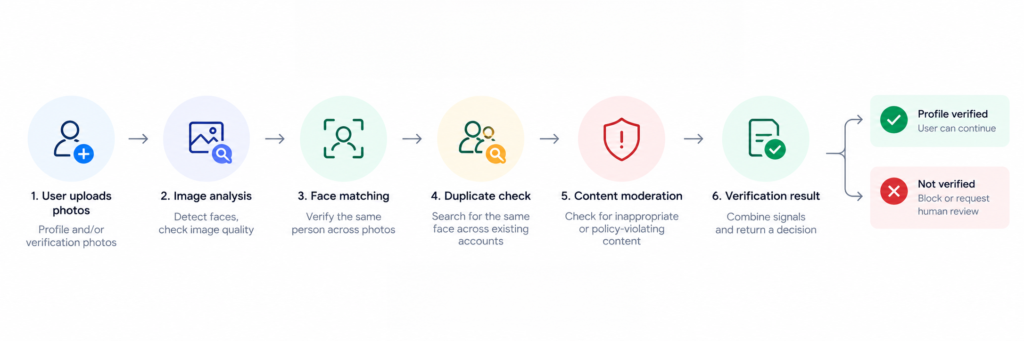
Face matching
One-to-one face comparison checks the similarity between two detected faces.
For example, a platform could compare a verification image with an existing profile image.
The result is generally a similarity or confidence score rather than an absolute declaration that two people are identical.
This type of face comparison is probabilistic. AWS, for example, explicitly recommends treating face-comparison results as confidence-based outputs and applying thresholds appropriate to the use case.
Face search and duplicate-profile detection
A different problem occurs when the platform wants to know whether one face already appears elsewhere.
Instead of comparing one image with another image, a 1 search compares the detected face against a larger indexed collection.
That enables use cases such as:
- “Does this person already have another profile?”
- “Has a previously banned account returned?”
- “Is the same face being used under several identities?”
- “Could an account network be reusing the same people or images?”
Face collections and face-search functionality are supported by computer-vision systems designed for recognition at scale. AWS, for example, allows a supplied face to be searched against all faces stored in a collection.
For platforms dealing with repeat fraud or account duplication, this capability may be more useful than basic 1:1 face matching alone.
Profile image moderation
Authenticity is only part of profile quality.
Platforms also need to determine whether profile images comply with their policies.
AI-powered visual moderation can identify or flag categories such as explicit imagery, violence, harmful content, offensive symbols and other unwanted material.
Automating this analysis helps platforms review high volumes of user-generated images before publishing them or route uncertain cases to human moderators.
Imagga provides AI-powered moderation for images, video and live streaming and positions the technology for social media, dating apps, marketplaces, gaming platforms and Trust & Safety workflows. Its moderation offering can be deployed through cloud and on-premise options.
Liveness detection
Liveness addresses another question:
Is a real person physically present during the verification attempt?
A liveness system can help detect attempts involving printed photographs, images displayed on screens, replayed videos or other spoofing techniques.
For example, Amazon Rekognition Face Liveness uses a short video selfie and returns a probabilistic liveness confidence score. It can then provide a reference image that can be used for subsequent face matching or search.
Liveness can strengthen a verification workflow considerably, but it should not be confused with face matching itself.
A platform can use facial recognition without offering liveness, and liveness alone does not prove someone's legal identity.
Test Imagga’s Profile Verification demo and explore how face matching and visual profile checks can work in a real verification workflow.
Where Imagga fits
Imagga should be viewed primarily as a visual profile authenticity and Trust & Safety technology provider, rather than a traditional KYC or document-identity-verification provider.
The relevant Imagga capabilities include facial recognition, visual content moderation and technologies for analysing user-generated imagery. Imagga specifically describes applications including fake-account identification, marketplace profile verification and dating-profile checks.
A platform could therefore use visual AI as part of a workflow that checks:
Profile consistency: Do profile photographs represent the same person?
Account duplication: Does the same face appear in other accounts?
Impersonation risk: Is visual content associated with another known profile?
Profile safety: Do uploaded images comply with platform rules?
Visual Trust & Safety: Do the images contain content that should be blocked, flagged or sent for human review?
Imagga does not currently provide a dedicated biometric liveness solution, selfie-capture SDK or dedicated deepfake/synthetic-face detector.
It also should not be positioned as a replacement for complete KYC platforms when government-document verification, AML processes or legal identity assurance are required.
Instead, it can provide the visual verification layer within a wider account-trust architecture.
Which industries benefit most from profile verification?
The distinction between profile verification and identity verification becomes particularly useful in industries where people interact with strangers but where full KYC may not always be necessary.
Dating platforms
Dating applications face a combination of impersonation, catfishing, stolen photographs, explicit imagery, duplicate accounts and romance scams.
Profile verification can therefore combine face consistency, duplicate-profile detection and image moderation.
The problem has meaningful real-world consequences. FTC data show that nearly 60% of people who reported losing money to a romance scam in 2025 said that the interaction began on social media.
Online marketplaces
Marketplaces need to establish trust between buyers and sellers while also moderating large volumes of visual content.
Potential checks can include seller-profile verification, repeated account detection and moderation of uploaded profile and listing images.
The same visual AI infrastructure can therefore contribute to both user trust and listing quality.
Social and community platforms
For social networks, forums and communities, requiring legal identification from every member may be unrealistic.
Profile verification provides an intermediate trust layer by helping identify duplicated or suspicious accounts while simultaneously screening user-generated imagery.
Gaming platforms
Gaming communities may face fake accounts, repeated abuse, inappropriate avatars and visual content, scams and account farming.
Here again, the goal is often not proving a user's government identity but preventing abuse and creating a safer community.
Profile verification and identity verification can work together
This does not have to be an either-or decision.
Platforms can combine different verification levels according to risk.
For example, a marketplace might allow most users to join with basic account and profile verification.
Additional identity checks could then be triggered when:
- transaction values become high,
- fraud signals are detected,
- a user requests access to sensitive capabilities,
- regulatory requirements apply,
- or an account's behaviour crosses a defined risk threshold.
This creates a layered model:
Basic account verification → profile authenticity checks → enhanced verification → full identity/KYC verification when necessary.
Such a risk-based approach can help platforms add stronger controls where they matter without forcing every legitimate user through the most demanding verification process.
Choosing the right verification approach
The starting point should not be:
“Which identity verification provider should we buy?”
It should be:
“What exactly are we trying to verify?”
If the requirement is:
We need to know this person's official legal identity, a KYC or identity-verification provider is likely appropriate.
If the requirement is:
We need to know whether this profile's photographs are consistent and trustworthy, face matching may be enough.
If the requirement is:
We need to know whether the same person is creating multiple accounts, a searchable facial-recognition index becomes especially important.
If the requirement is:
We need to prevent inappropriate profile images and unsafe user-generated visuals, content moderation belongs in the workflow.
And when the platform needs several of these capabilities together, profile verification becomes part of a wider Trust & Safety architecture rather than a single verification check.
Building trust without unnecessary friction
Online platforms increasingly face two competing pressures.
Users expect them to prevent fake profiles, fraud, impersonation and abusive content.
At the same time, legitimate users expect fast onboarding, privacy and a frictionless experience.
The answer is not necessarily to identify every user as aggressively as possible.
It is to apply the right level of verification for the risk being addressed.
Identity verification is critical when legal identity or regulatory compliance matters.
Profile verification addresses a different but equally important question: whether the account and the visual identity presented to other users can reasonably be trusted.
For dating platforms, marketplaces, gaming communities and social applications, technologies such as face matching, duplicate-account detection and visual content moderation can provide a valuable middle layer between basic email verification and full KYC.
And as fake profiles and AI-assisted scams become easier to create, that middle layer is becoming increasingly important.
Want to explore how visual AI can support profile verification on your platform? Explore Imagga's Facial Recognition and Content Moderation technologies or contact our team to discuss your use case.

Keep Your WordPress Clean: Imagga’s Plugin for Image Content Moderation
Managing a content-heavy website in WordPress comes with its risks - especially when multiple editors or contributors upload visual media.
Even unintentionally, inappropriate or explicit content can make its way into published posts, harming your brand and violating community guidelines.
The Imagga Content Moderation Plugin for WordPress, demonstrating an automated way using image recognition to detect and block explicit content at the point of upload - before it’s ever published.
Use Case: Content Moderation for WordPress Editors & Admins
This plugin is built for WordPress websites with multi-author workflows - such as news portals, community blogs, educational platforms, and corporate sites.
Whenever an editor or administrator uploads images as part of a post or article, the plugin checks those files in real time.
If any image is detected to contain nudity or explicit content, the upload is automatically blocked, and the user receives a clear error message.
This helps you enforce content standards without adding manual review steps.
But it also adds a layer of protection against bad actors.
Unfortunately, WordPress sites are sometimes compromised, and hackers may attempt to upload pornographic or inappropriate content as part of their attack. This can lead to:
- Hidden adult content embedded in fake posts
- Links to shady websites
- Damage to your brand and SEO rankings
By scanning every uploaded image, even by administrators, the plugin can intercept suspicious or explicit uploads immediately, giving you another tool to prevent reputational harm — even in edge cases like security breaches.
How It Works
The plugin integrates directly into the WordPress media upload flow using a system hook. Here’s what happens behind the scenes:
- An editor or admin uploads an image via the WordPress post editor.
- Before the image is saved, the plugin intercepts the upload and sends the image to Imagga’s adult content detection API.
- If the image is flagged as inappropriate:
- The upload is blocked.
- A custom error message is shown (e.g., “Upload blocked: Image contains inappropriate content.”)
- If the image is clean:
- The upload proceeds as normal.
Everything happens in real time, without slowing down the editing experience.
How to Install and Activate the Plugin
Since the plugin is distributed outside the official WordPress plugin marketplace, you’ll need to install it manually.
Manual Installation Steps
- Download the plugin ZIP file from our website.
👉 Download Plugin - In your WordPress admin panel, go to: Plugins → Add New → Upload Plugin
- Upload the ZIP file and click “Install Now.”
- Once installed, click “Activate Plugin.”
- Go to the plugin settings in the sidebar navigation under AI Mode and enter your API key and Secret to connect with Imagga’s content moderation API. You can get free API credentials by creating an account here. Additionally, you can manage some recognition features, such as the Confidence threshold.
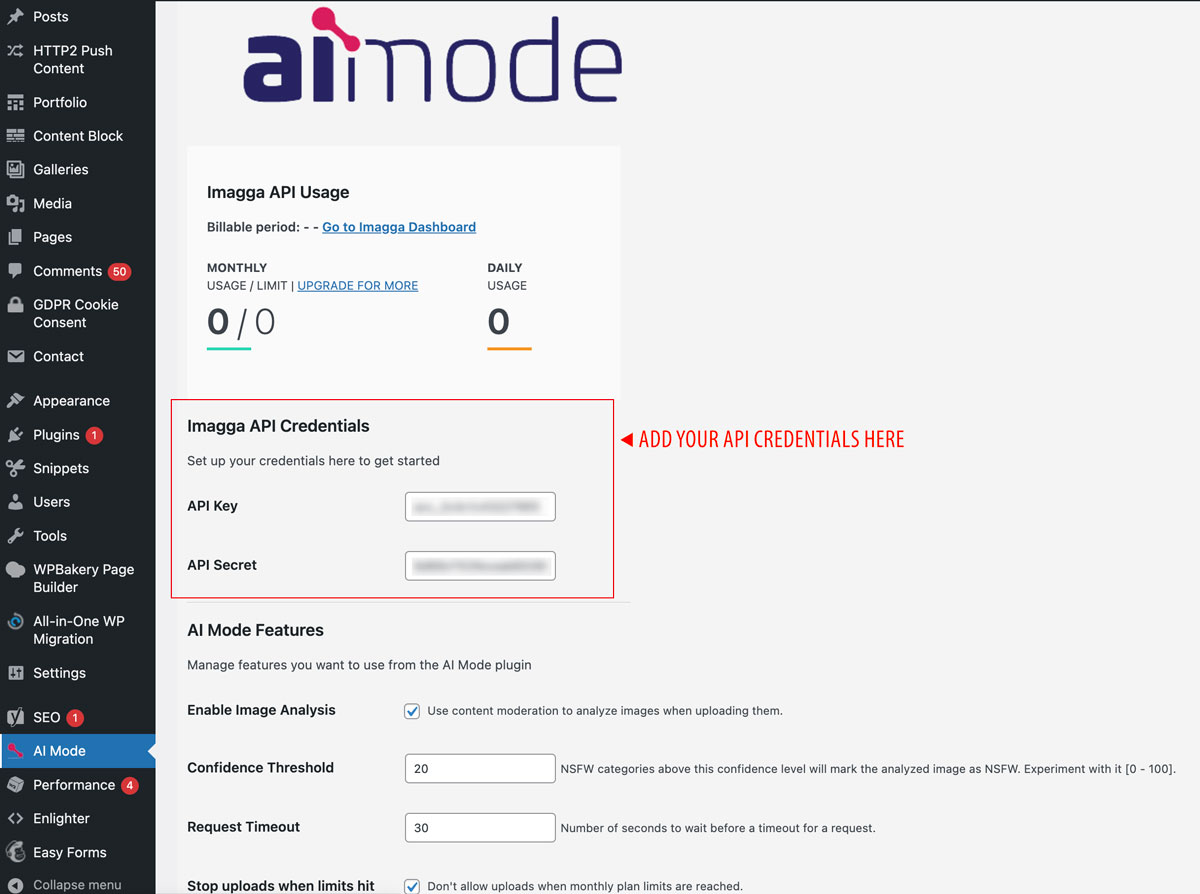
- That’s it! The plugin is now live and will monitor every new image uploaded by your content team.
Why This Matters
This plugin gives you a first line of defense against unwanted content making its way onto your platform.
With minimal setup, you get access to Imagga’s industry-leading AI moderation models, helping you:
- Protect your brand image
- Enforce publishing standards
- Stay compliant with content policies
Prevent moderation overhead or retroactive takedowns
This publication was created with the financial support of the European Union – NextGenerationEU. All responsibility for the document’s content rests with Imagga Technologies OOD. Under no circumstances can it be assumed that this document reflects the official opinion of the European Union and the Bulgarian Ministry of Innovation and Growth.

Обява за поръчка за „Събиране на снимки за трениране на специализирани невронни мрежи за персонални снимки“


Услуга по събиране и сортиране на данни
Във връзка с изпълнението на дейности по проект BG16RFOP002-1.005-0163-C02/16.11.2018 г., Имагга Технолъджис ООД обявява поръчка за „Събиране на снимки за трениране на специализирани невронни мрежи за персонални снимки“
Допълнителна информация от всички потенциални доставчици може да бъде намерена на страниците на Единния информационен портал на Структурните фондове на ЕС (www.eufunds.bg), Имагга Технолъджис ООД (https://imagga.com/).
Краен срок за получаване на оферти: 30.01.2020 г.
Проект: BG16RFOP002-1.005-0163-C02, „Иновативна услуга за автоматично търсене и организиране на огромни масиви с персонални снимки“
Главна цел: Разработване на облачно-базирана технология като услуга за автоматично търсене и организиране на огромни масиви с персонални снимки
Бенефициент: Имагга Технолъджис ООД
Обща стойност: 542 093.65 лв., от които 424 945.82 лв. безвъзмездна финансова помощ, както следва 361 203.94 лв. европейско и 63 741.88 лв. национално съфинансиране.
Начало: 16.11.2018 г.
Край: 16.11.2020 г.
Документите може да свалите от линковете по-долу:
What if Pinterest used Imagga's multicolor API?
At Imagga we really like to come up with fun ideas of different use cases for our technologies. This is how "What if" blog posts seriese have been born.
I'll start with one of the biggest players in the market of social image sharing - Pinterest. Great UI, really! I'm creative guy and after Pinterest came on the web stage, everyone else started to follow their model for visual presentation of large sets of images. But there is something that's missing - a good color search. Imagine that we have ability to filter all that images by color types. That would be awesome! Imagga's color extraction and multicolor search technology gives you that kind of fun and useful solution. Here are some examples that pop up in my mind:
- Filtering by selected colors will bring more specific results for example in design, architectural, crafts, fashion, food and etc. pinboards. We all love stylish clothes. Pinterest has a lot of fashion pinboards and companies use that to sell their products. This is how Pinterest itself generates most of it's incomes. Wouldn't it be cool if you can use color filters to find the most suitable clothes that meet your style requirements? Think about it ladies and gentelmen! This will result in better visibility for all retailers trying to sell clothes on Pinterest and of course more profitable business model for Pinterest.
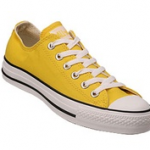 Creating pinboards by color type. Imagine that you like a yellow sneakers and want to search and collect images of that color in one pinboard. How you can do it - of course with some smart color search. Just typing sneakers and selecting yellow from color palette and the magic happens! I know, you can type yellow sneakers and get similar results, but not every time the results are relevant enough. Here an example of that kind of search - http://pinterest.com/search/pins/?q=%22yellow+sneakers%22 - a lot of irrelevant results.
- Lots of pinboards are created for visual inspiration - weddings lets say. It will be really great if Pinterest automatically detects the predominant colors in sertain set so you know it fits your color preferences. This gives another dimention in organizing images not just by styles, topic but also color plate. Handy for interior designers, color lovers, event organizers, etc. We, that can easily be done with Imagga's Color API.
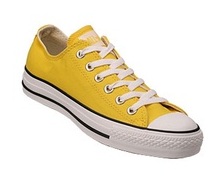
I really think that some smart multicolor search technology will be great asset for Pinterest. This may significantly increase the user experience of that great image service. Well, this are just ideas of how to implement our technologies. Probably Pinterest have all that in mind and pipeline.
We also have some other smart technologies that are still in development mode - auto-tagging and visual similarity search to mention few. The combination of these APIs can bring even more context and make pinterest-like projects way more intuitive to navigate.
If you have some cool ideas for image intensive projects, have a look at our APIs, request FREE trial account and start hacking! We will be more than delighted to help you out!